Help AI Understand Your Business Data, Starting With Your Backups
From Recovering Data to Rediscovering Its Value
We’ve spent years on data protection, and the core question has always been the same: how do you keep data safe, and get it back fast when something breaks?
But as companies keep piling up more and more data, a new question has crept in:
Once this data is safely backed up, can it do more than just sit there waiting for a disaster?
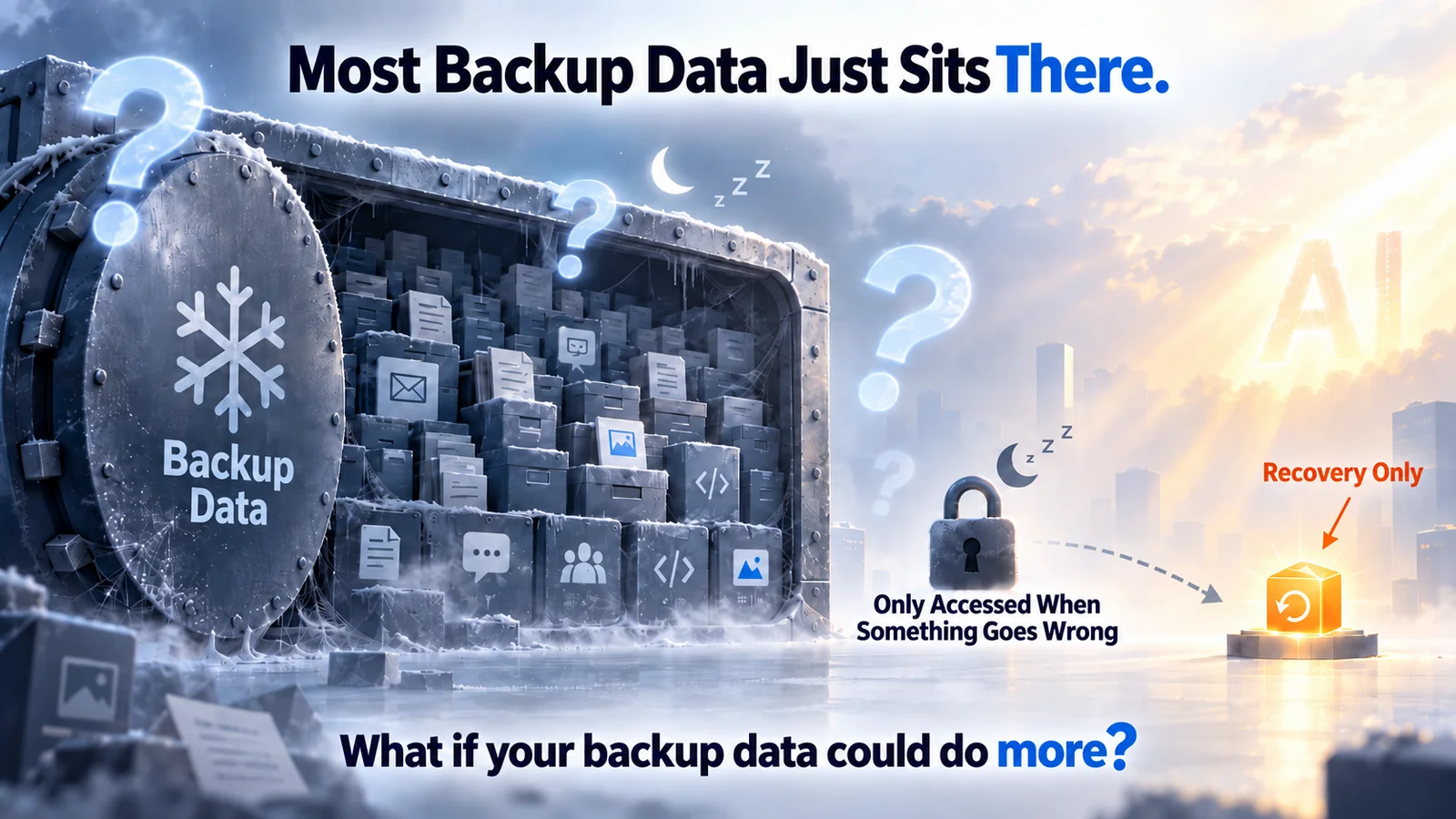
Most backup data spends its whole life asleep — is recovery really all it’s good for?
The industry has tried to answer this before. CDM (Copy Data Management) is one example — it lets backup data get reused for dev, testing, and analytics.
But CDM’s value mostly comes from structured data. Tables, fields, and relationships in a database are already well-defined, so they’re naturally easy to query and reuse.
The information that actually matters most to a business, though, tends to live in unstructured data — documents, emails, chat logs, meeting notes, code, images. That’s where the real context and history live, and it’s exactly the kind of information that doesn’t fit neatly into a fixed structure.
Traditional RAG pipelines typically require chunking, embedding, and indexing the data up front — a process that tends to lose some of the original context along the way.
Agents like Codex and Claude Code point to a different approach: they don’t need the whole codebase restructured ahead of time. They just search, understand context on the fly, and get complex work done.
That got us asking a question:
If an agent can understand code directly, why can’t the same approach work for mining value out of all that unstructured business data?
AI Doesn’t Get to Read Enterprise Files Whenever It Wants
For an individual, tools like Codex, Claude Code, and WorkBuddy can already read local files and analyze them directly.
But once you step into an enterprise setting, the hard part isn’t whether AI can understand a file — it’s this:
Which data is it allowed to see? Who gets access? How do you keep different business units from bleeding into each other?
Enterprise data is scattered across employee laptops, shared drives, Office 365, Feishu, DingTalk, WeCom, and code repositories.
You can’t just dump all of that into one place, and you definitely can’t leave it wide open to every agent that comes along.
What a business actually needs is a way to let AI understand this scattered information while still keeping data boundaries and access control intact.
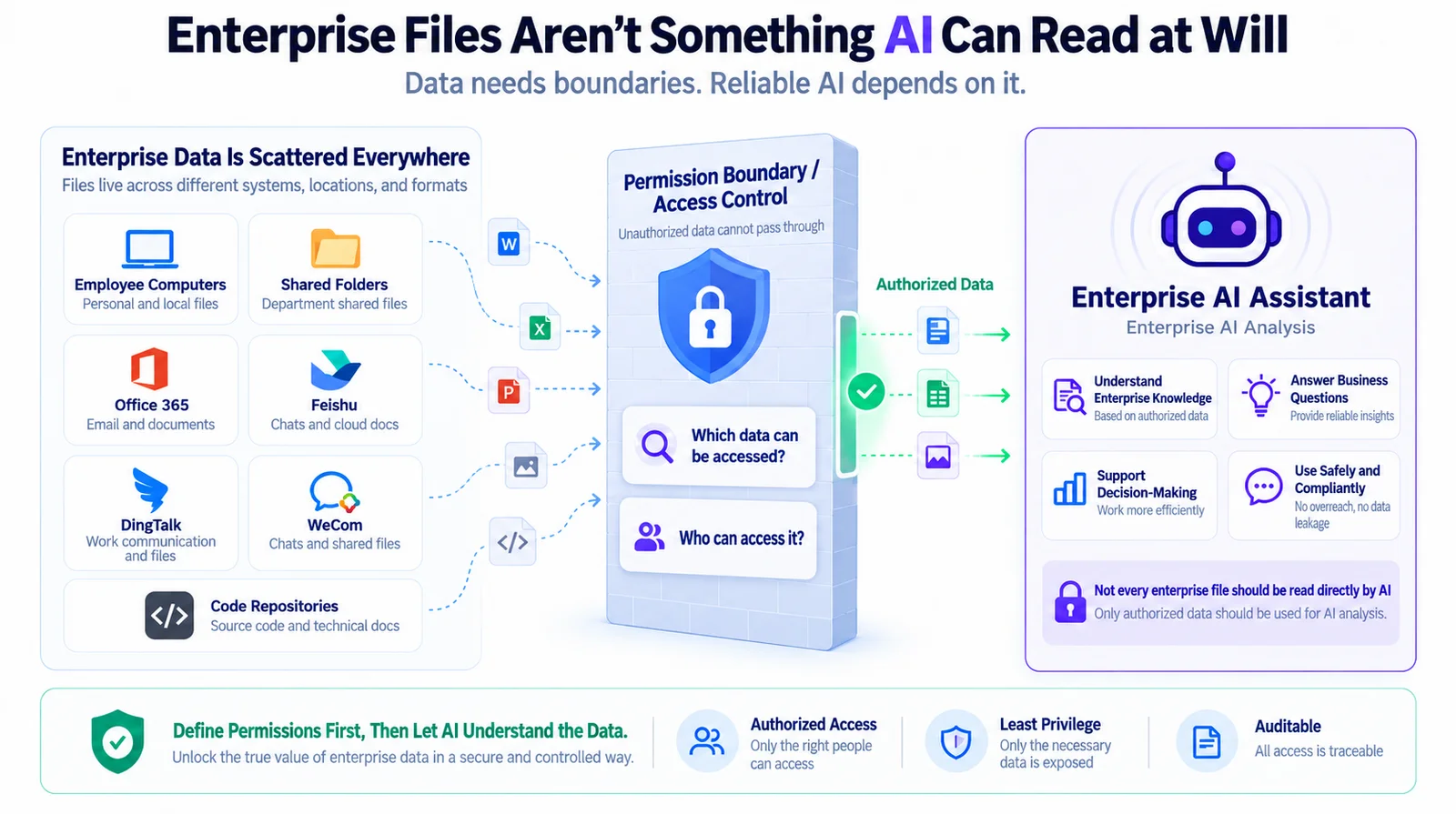
Define the permissions first, then let AI understand the data
Turning AI Into an Assistant People Can Actually Use
Today we’re launching HyperFileLens, a new open-source project from OneProLabs.
The goal is simple: connect AI to your company’s own data quickly, and hand it to end users as an assistant they can just use — no setup, no learning curve.
Two examples of what that looks like in practice:
- A customer support assistant: pull together product docs, slide decks, feature notes, meeting minutes, proposals, and sanitized project files, and let it answer questions about how features work, what changed between versions, why something was designed a certain way, or what happened in the past.
- A root-cause assistant: combine past incidents, screenshots, and code to help track down the source of a production issue.
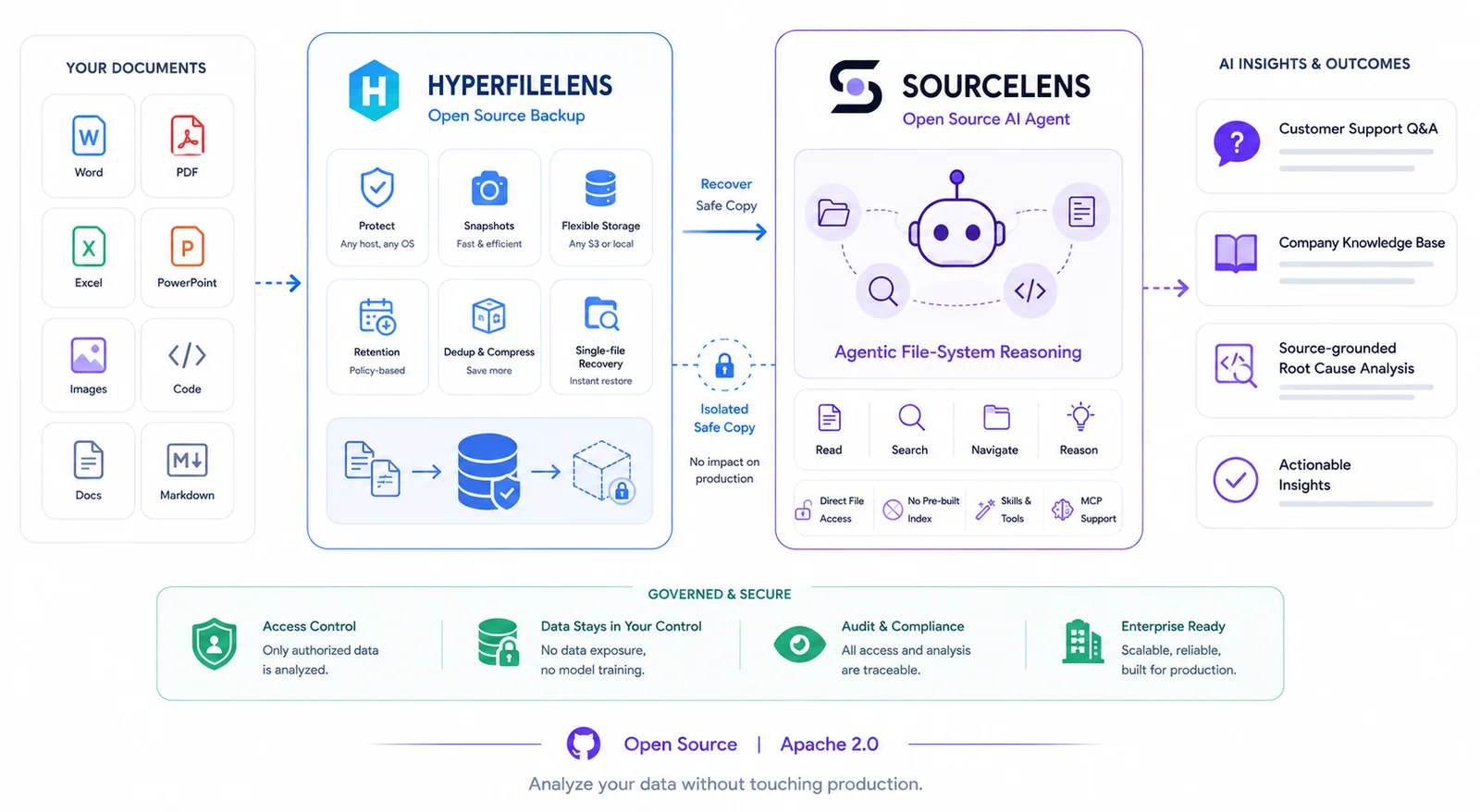
HyperFileLens + SourceLens: the full path from enterprise data to AI insight
For an everyday user, there’s nothing to learn — no prompt engineering, no need to understand what’s happening under the hood. Just open the assistant and ask, like you’re texting a coworker.
We built this “assistant” layer on purpose. The stronger general-purpose agents like Codex, Claude Code, and WorkBuddy get, the more everyday users actually need someone to define the data scope, task boundaries, and capabilities ahead of time.
The AI engine behind HyperFileLens is SourceLens. It’s a harness agent built specifically for querying unstructured data — no Embedding, no Vector DB, no pre-indexing required. It searches, reads, and reasons over the raw files directly. When it hits structured data — a database, a spreadsheet — SourceLens can also query it directly through Skills, and combine both kinds of results into a single answer.
We’ve built knowledge assistants before with Dify, FastGPT, Coze, and RAGFlow. What actually ate up our time was never building the assistant itself — it was everything upstream: chunking, indexing, getting the data ready. In our case, SourceLens has replaced that entire pipeline.
And this isn’t a proof of concept — it’s already running in production. SourceLens currently powers global sales support, product support, and engineering analysis for HyperBDR and AGIOne.
Information that used to be scattered across product docs, project files, technical documentation, and code repos is now something sales, support, and engineering teams can pull up directly through an AI assistant.
Between June 18 and September 7, 2026, SourceLens processed 7.9GB of documents and code across 14 data sources, answering 1,100+ questions across 477 sessions, and working through more than 660 million tokens in total.
That’s real usage, and it shows enterprise AI assistants are ready for actual workflows, not just demos. By turning product knowledge, project experience, and technical materials into something an assistant can access, a team can support global sales, customer support, and engineering troubleshooting more efficiently — without having to scale up headcount to match.
In practice, SourceLens grounds every answer in the company’s own data and traceable evidence. For questions where the underlying data is solid, internal usage shows about 95% accuracy.
SourceLens also isn’t locked into one model — it picks the right one for the task. Right now that mostly means:
- DeepSeek-V4-Flash for text understanding and reasoning
- Qwen3.6-Plus for images, screenshots, and other multimodal content
Based on real usage, model calls over these 81 days have cost roughly $140 in total — proof that a company can run its own AI data assistant continuously without the cost spiraling.
Try HyperFileLens Yourself
HyperFileLens is open source on GitHub (https://github.com/oneprolabs/hyperfilelens), and there are two ways to use it:
- SaaS: the fastest way to try it — no server to set up.
- Community edition: Apache 2.0 licensed, fully self-hosted.
Either way, you stay in control of your own data — where it’s stored, what environment it runs in, and which model it uses.
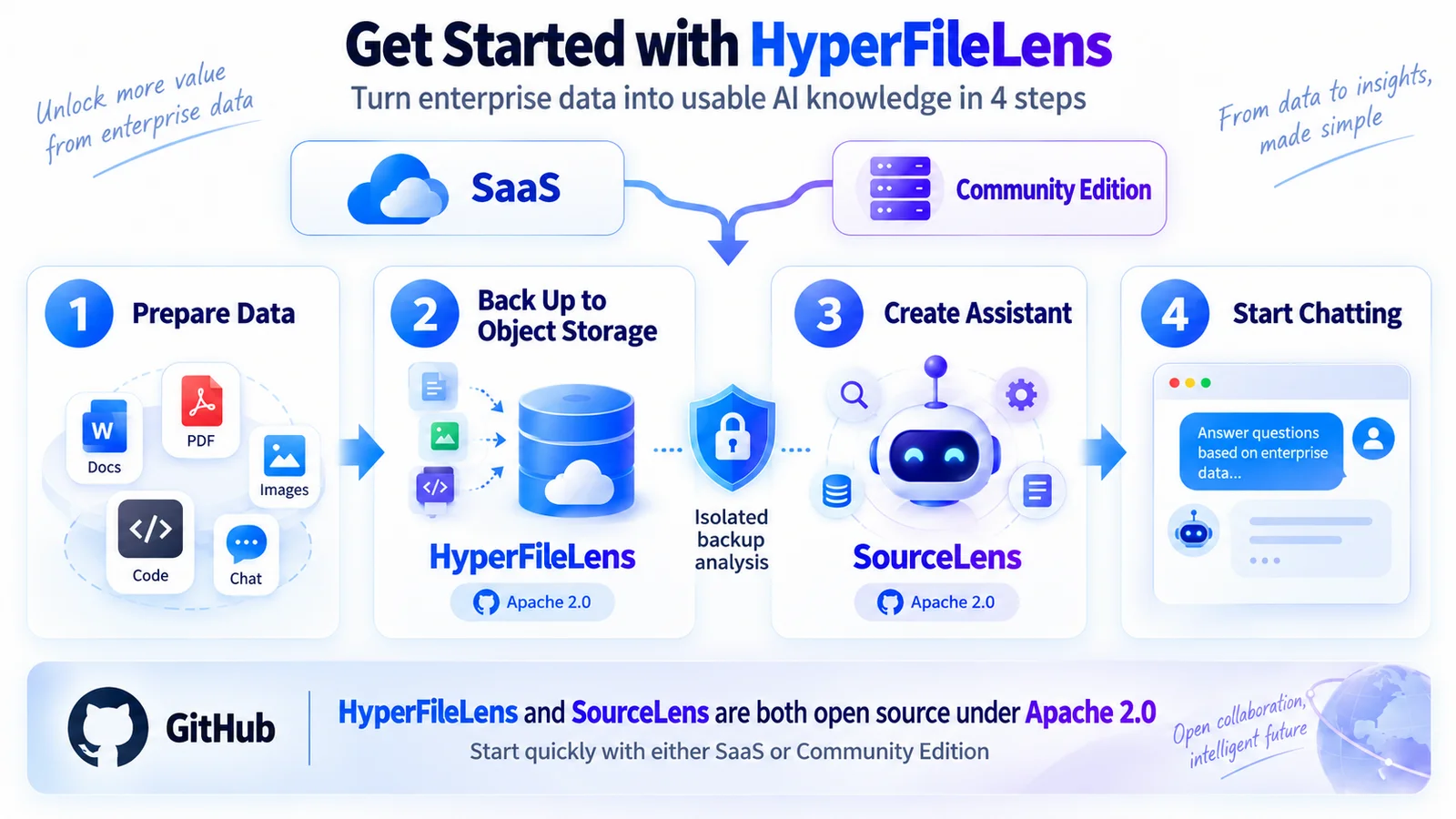
Four steps from enterprise data to usable AI knowledge
1. SaaS
If you just want to try HyperFileLens quickly, open https://hyperfilelens.com and use the free SaaS version.
There’s no server to deploy and no model to configure. Once you’ve signed up, all you need is:
- A computer, server, or shared storage with the data you want to protect
- Your own object storage
Check the docs on the site for the full walkthrough.
2. Community Edition
If you want your data, system, and model to run entirely in your own environment, deploy the community edition instead.
It’s Apache 2.0 licensed, and you can configure:
- Your own object storage
- Your own model or API
- Your own runtime environment
Recommended setup:
- Ubuntu 24.04
- CPU / RAM: 4 cores / 8GB for small-scale use; 8 cores / 16GB recommended for larger teams
Mainland China:
curl -fsSL https://gitee.com/oneprolabs/hyperfilelens/raw/main/deploy/online/install.sh \
  | sudo bash -s -- --mirror cn
Everywhere else:
curl -fsSL https://raw.githubusercontent.com/oneprolabs/hyperfilelens/main/deploy/online/install.sh \
  | sudo bash -s -- --mirror global
The whole flow, from install to daily use, comes down to this:
Prepare your data → back it up to object storage → create an assistant → start talking to your data.
AI Is Changing How We Work With Data
In the past, a company usually had to define a structure before it could analyze anything.
But so much of what’s valuable lives in unstructured data — documents, code, emails, chat logs. What AI changes is that machines can now understand this content directly, and surface the relationships and knowledge hidden inside it.
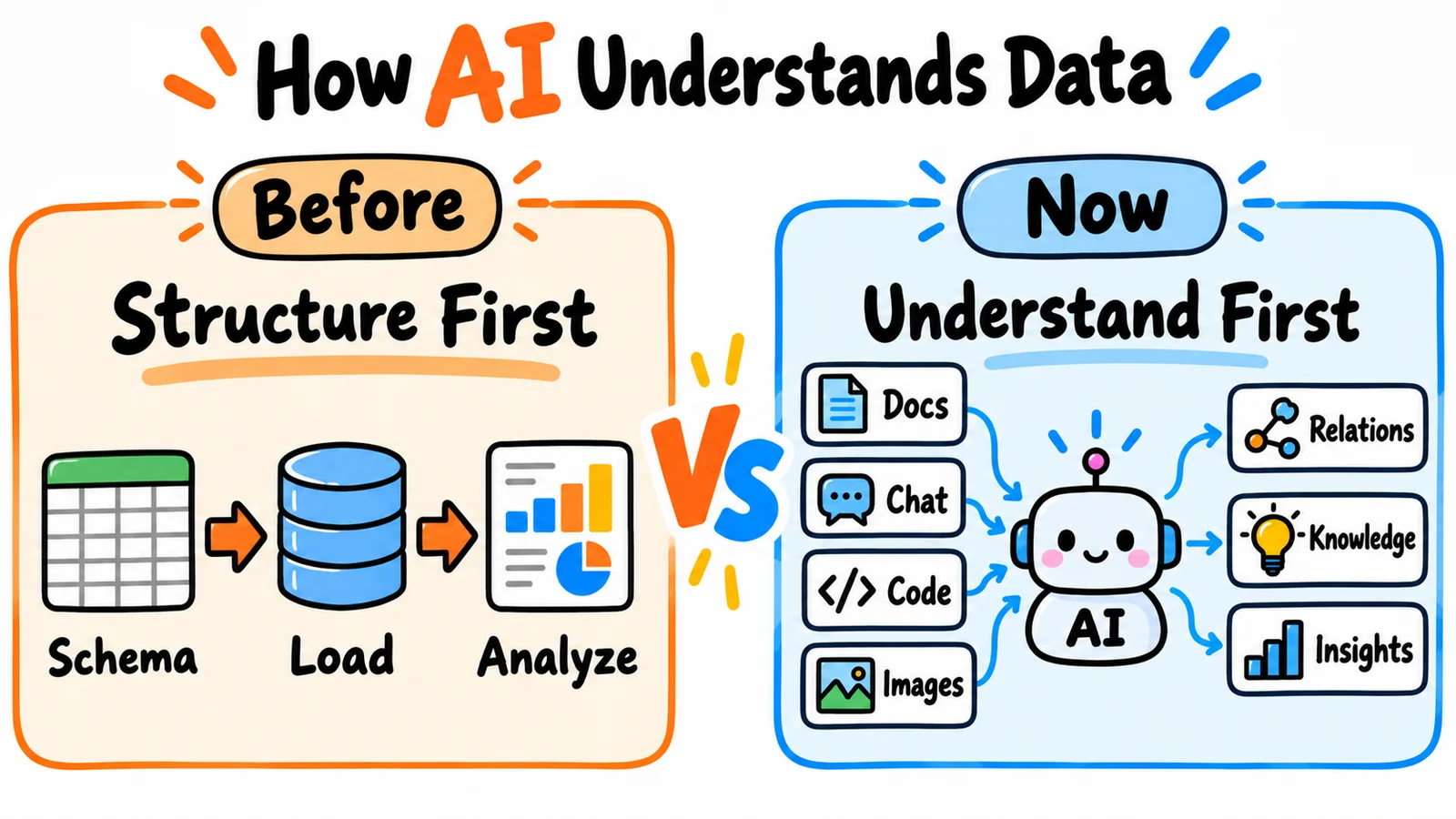
Used to be structure first. Now it’s understanding first.
That’s also why we’re paying close attention to ontology: the idea that a company’s knowledge might not need to be defined by hand from the start anymore — it could instead be discovered and built up by AI as data keeps accumulating.
HyperFileLens isn’t a full ontology platform yet, but it’s testing out a direction we think matters:
Once AI can understand a company’s unstructured data, can the data assets it’s been sitting on all along finally get rediscovered and put to use?
Backups used to exist for one reason: getting data back after something went wrong.
In the age of AI, the data inside those backups might carry a second kind of value:
Helping a company rediscover the knowledge and insight that’s been hiding in its own data all along.
Join the OneProLabs Open-Source Community
If you run into issues while trying it out, want to contribute, or just want to talk shop about the project, find us here:
- GitHub: https://github.com/oneprolabs/hyperfilelens
- Twitter/X: @oneprolabs