Why 80% of a Company's Most Valuable Information Ends Up Lost in Chat Logs
The Enterprise Knowledge Everyone Overlooks
After years of building products and delivering projects, we noticed a problem that shows up in almost every company.
A company’s most valuable information usually isn’t sitting in documents or knowledge bases — it’s scattered across various chat tools.
In China, most cross-team and cross-company communication still happens on WeChat; even with tools like Feishu and DingTalk around, they can’t fully replace it. On overseas projects, the mix often expands to WhatsApp, Slack, Teams, and other IM apps.
Whatever the tool, customer feedback, engineering discussions, bug investigations, ad-hoc decisions, shared experience — the genuinely valuable information is almost always born in the middle of a conversation.
But once the conversation ends, that information scatters into a trail of chat messages.
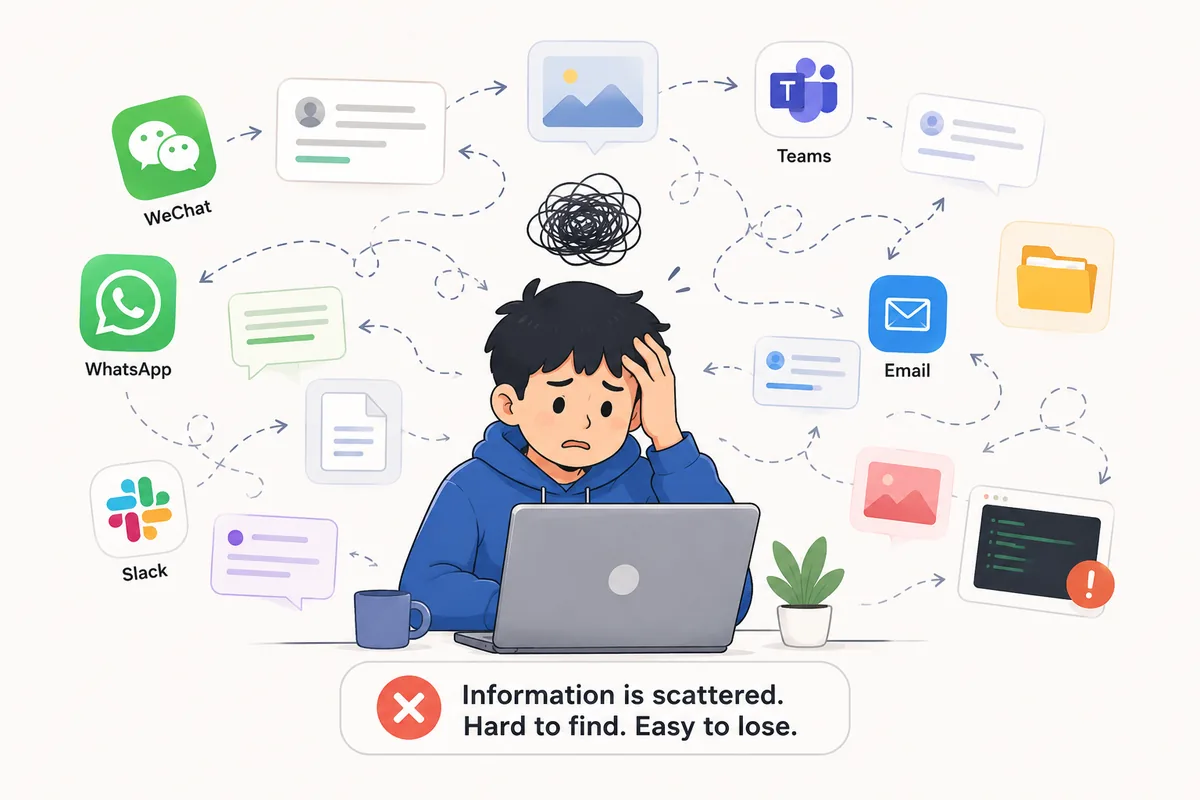
Information comes from all directions, yet ends up scattered — nobody knows where to look, and none of it sticks
Every Engineering Team Has Lived Through This
Most engineering teams have had an afternoon like this.
A problem suddenly hits production. Someone on the team takes a look and says:
“We’ve solved this one before.”
So everyone starts digging through chat logs, searching for keywords, hunting for screenshots — even chasing down a document someone once shared.
After ten-odd minutes, someone finally finds the relevant chat.
But the one screenshot that mattered has expired and won’t open.
“Does anyone still have that screenshot?”
“Is that chat still in your history?”
Nobody’s sure.
In the end, everyone just re-analyzes, re-investigates, and re-discusses it — as if the problem had never happened before.
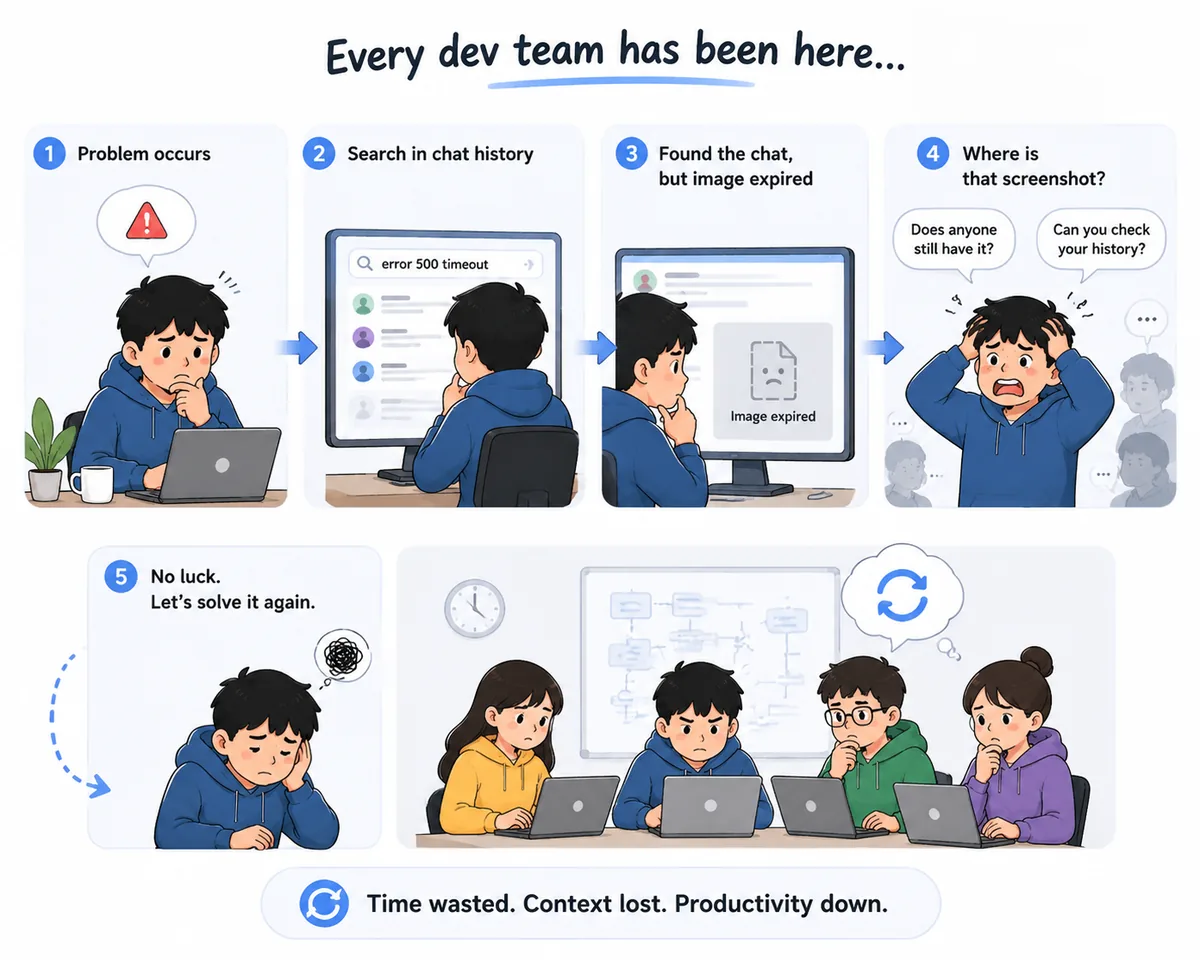
The broken screenshot is just the surface — the real cost is that the team lost its context and has to start over
What’s Really Lost Is More Than a Chat Log
We eventually realized this isn’t one team’s problem — it’s a problem almost every company has.
The truly valuable information isn’t produced while writing documents. It emerges naturally in the process of discussing, analyzing, and solving problems.
A line of customer feedback, an engineering discussion, a screenshot, a bug investigation — these scattered fragments are exactly what make up a company’s most precious knowledge.
But as the conversation ends, they stay behind in the chat logs, slowly buried under new messages, never getting a real chance to be captured.
We Broke the Problem Back Down
Later, we re-examined the whole thing and realized the real problem to solve isn’t the chat logs themselves — it’s the entire flow of how information moves.
First, how to collect it.
Different teams use different chat tools — WeChat, WhatsApp, Slack, Teams — so information enters through all kinds of doors. We needed a single, unified entry point rather than maintaining a completely different integration for each platform.
Second, how to understand it.
In engineering, a large share of the key information isn’t text at all — it’s screenshots. Error messages, logs, pages, configs… very often an image carries far more than several paragraphs of text. So AI needs to understand not just words but images too, so these fragments can form complete context.
Third, how to standardize it.
For the same problem, everyone expresses it differently — different summarizing skill, different completeness. Some send a single line, some dump a pile of screenshots, some leave out the critical background. In the end, the engineering team still has to spend a lot of time reorganizing, filling in, and confirming.
We wanted AI to handle this step — turning scattered fragments into a unified, complete, and accurate problem description, so that every submitted issue reaches a relatively consistent level of quality instead of depending on any one person’s ability to articulate.
Finally, how to enter the company’s workflow.
For a company, the goal isn’t to generate a summary — it’s for the information to keep flowing through the existing engineering-management process. Whether it’s a bug, a feature request, or a task, it should automatically enter the company’s existing management system to be tracked and iterated on, so that information once scattered across chat logs truly becomes part of what the company continuously accumulates and improves.
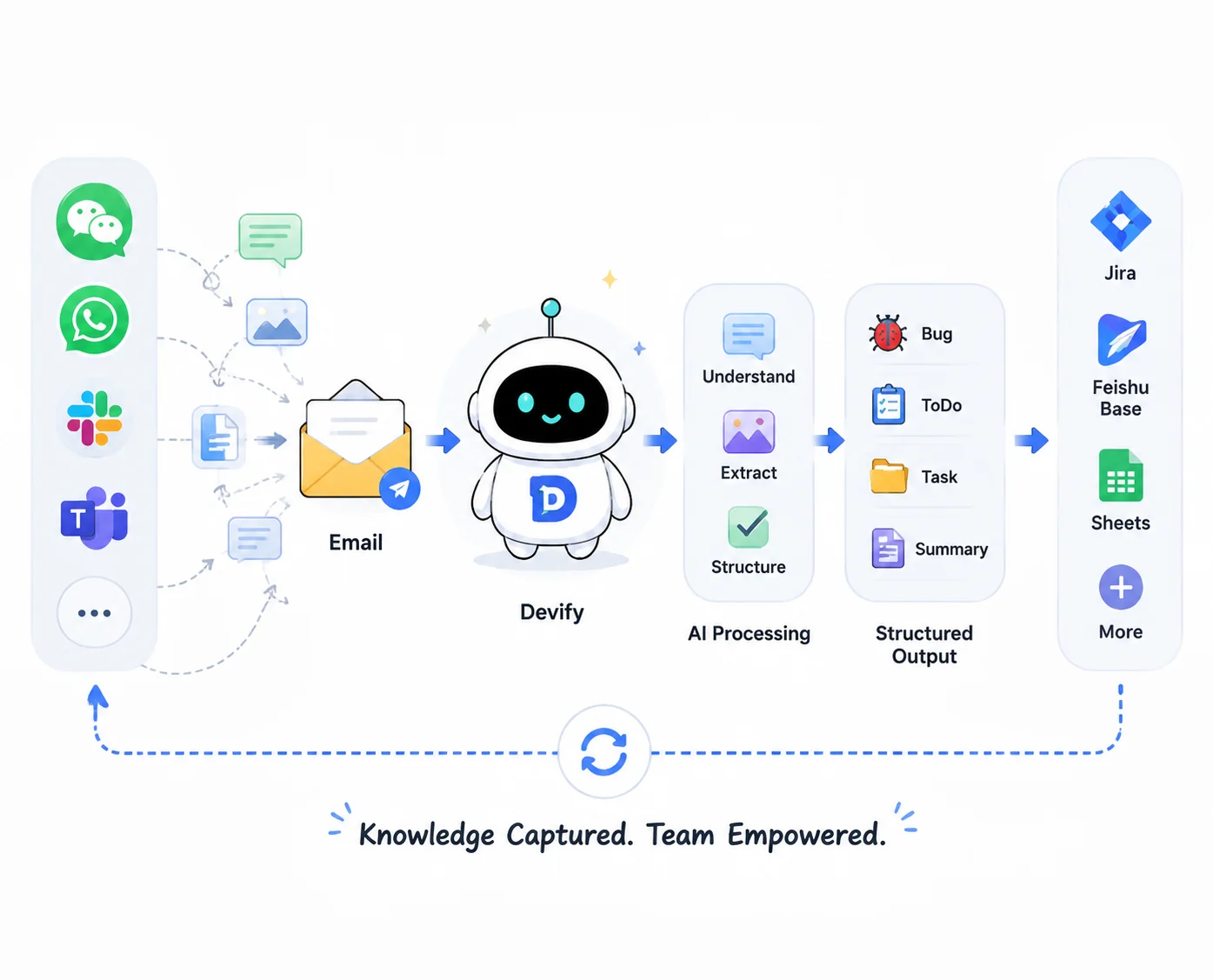
How information travels from a chat log, step by step, into data a company can use and move through its workflow
Why We Ended Up Choosing Email
Once we broke the problem apart, the path became clearer.
We tried many collection methods and studied the APIs of different chat platforms, but every platform has its own ecosystem, security mechanisms, and restrictions — hard to turn into a stable, long-term solution.
So we turned our attention back to one overlooked capability: email.
People usually reach for email only in non-urgent situations, yet almost every chat tool supports “forward to email.” It doesn’t depend on platform APIs and isn’t affected by policy changes — which makes it the most stable universal entry point.
So we made email the unified point of entry.
It’s not that we didn’t want to collect all chat logs automatically — it’s that under current conditions that’s hard to achieve. By comparison, manual forwarding is more realistic and more controllable.
Because the information genuinely worth capturing is only a small fraction to begin with.
When you decide a conversation is worth keeping, you just spend a few seconds forwarding an email — and the rest, from organizing the information to understanding the content, recognizing images, distilling the problem, and moving it forward, is all handled automatically by AI.
This approach filters out huge amounts of noise while preserving the team’s existing habits as much as possible — capturing genuinely valuable information at the lowest possible cost.
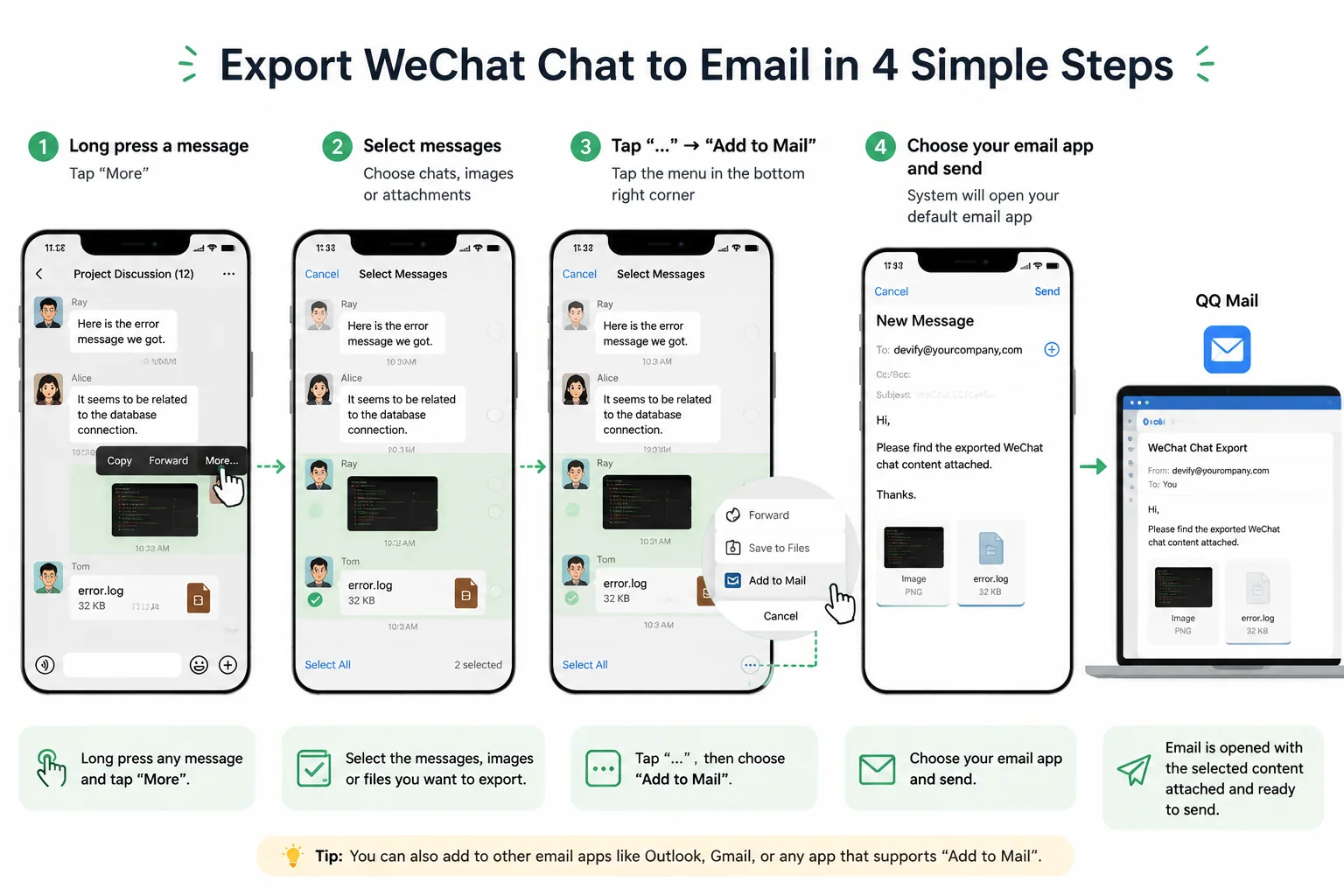
Using WeChat as an example: forwarding a chat to email takes just four steps — Slack, WhatsApp, and Teams work the same way
A Few Thoughts on Enterprise Agents
After actually building the whole system, our biggest shift wasn’t technical — it was in how we understand enterprise AI.
We used to treat these chat logs as data, hoping simply to preserve them.
Only later did we realize that merely having data doesn’t directly create value.
The real value lies in that data continuously entering the company’s workflow and becoming a foundation an enterprise agent can understand, execute on, and keep iterating.
Today, more and more companies are building their own AI agents.
But when many agents actually go into production, they hit the same problem: the models keep getting stronger and the workflows richer, yet they consistently lack a continuous, real, high-quality source of data.
Without data, even the best agent stays stuck at the demo stage.
And when the chat logs, problems, discussions, and experience a company produces every day can be continuously captured, standardized, and fed into the company’s existing engineering process, that data becomes more than historical records — it becomes the foundation on which an enterprise agent keeps learning, collaborating, and creating value.
That’s the reason we ultimately open-sourced Devify.
We hope it’s more than a chat-log organizer — we want it to become the data entry point for the age of enterprise agents, continuously turning the real information a company produces every day into capabilities that can genuinely drive AI.
How to Try Devify
Devify is open source on GitHub (https://github.com/cloud2ai/devify). If you’d like a quick try, we offer two options.
Option 1: The SaaS — Try It Directly
Open https://aimychats.com and register to use it right away, no deployment needed — ideal for individual developers or small teams validating the whole flow. The end-to-end path: chat tools (WeChat / WhatsApp / Slack) → forward to email → Devify processes automatically → structured results (Bug / ToDo / Task / Summary) → sync to Jira, Feishu Bitable, and similar systems.
Option 2: Local / Self-Hosted Deployment (Recommended)
Best for teams with data-security and system-integration requirements. Devify supports fully local deployment, and the simplest way is Docker:
git clone https://github.com/cloud2ai/devify.git
cd devify
cp env.sample .env   # copy the template, adjust as needed
docker compose up -d
⚠️ The repo ships a template,
env.sample, while Docker Compose reads.envby default. Before starting, be sure to runcp env.sample .envand fill in your config, otherwise the service won’t start.
After it starts, open the Devify UI in a browser and register the admin account. Everything else is configured in the web UI — no more touching the command line. Just two steps to get it running:
Step 1 · Connect an AI model: Go to “Admin Console → Model Config,” add a model (provider API key, endpoint, model name), and set it as the default in app settings. It supports mainstream providers like OpenAI, Tongyi Qianwen, and OpenRouter, as well as local models. Devify needs at least one multimodal model to recognize images and understand intent; early on, using a single aggregator-platform account for unified access is the easiest route.
Step 2 · Set up email intake (IMAP): Go to “Settings → Email,” choose IMAP pull, and fill in your company mailbox’s server address, account, password, SSL port, and inbox folder. Devify then pulls email on a schedule and processes it automatically.
Once both steps are done, the full path is live: chat tools → forward to the company mailbox → Devify pulls via IMAP → AI processing → structured results. From there you can extend it as needed — connecting notification channels, adjusting processing rules, or configuring team members.
Who Is It For?
Devify doesn’t chat — it’s just an intelligent manager of chat logs — so it fits people surrounded by heaps of fragmented communication every day.
This need isn’t limited to engineering teams. Almost any role that relies on chat runs into it:
- Lawyers: organizing case information, evidence leads, and key conclusions from conversations
- Doctors: recording consultations, patient feedback, and diagnostic essentials
- Students: organizing discussions, study notes, and task lists
- And anyone who needs to extract and capture information from chat
Fundamentally, if your work depends on chat and that chat content has “reusable value,” you run into the same problem:
The information was created, but it was never captured.
We open-sourced Devify not to build yet another tool.
We did it to solve a more fundamental problem:
The most valuable information a company produces every day shouldn’t disappear the moment a conversation ends.
If Devify can help you reconnect that part, then its value already holds.