How to Build an Enterprise AI Knowledge Base Directly From Office Documents
Companies never actually lack documents. What they lack is a way to make AI truly understand the documents they already have. Product manuals, project plans, FAQs, delivery records — all of it already exists. The moment you try to get AI to answer a real business question accurately, though, you end up back at chunking, embedding, and standing up a vector database.
SourceLens is an open-source project that skips the vector database and turns enterprise documents into a queryable knowledge base directly. It started out solving one very specific problem: how do you get AI to answer real internal product and project questions accurately?
Take HyperBDR as an example. Pre-sales, delivery, and support all run into the same kind of question every day: does a given Linux version support X, should a VMware migration to the target cloud use Agent mode or Agentless mode, is a given limitation coming from the product itself or from the project’s configuration. The answers usually already exist — they’re just scattered across product docs, wikis, slide decks, Word files, PDFs, FAQs, project material, meeting notes, and sometimes even the code.
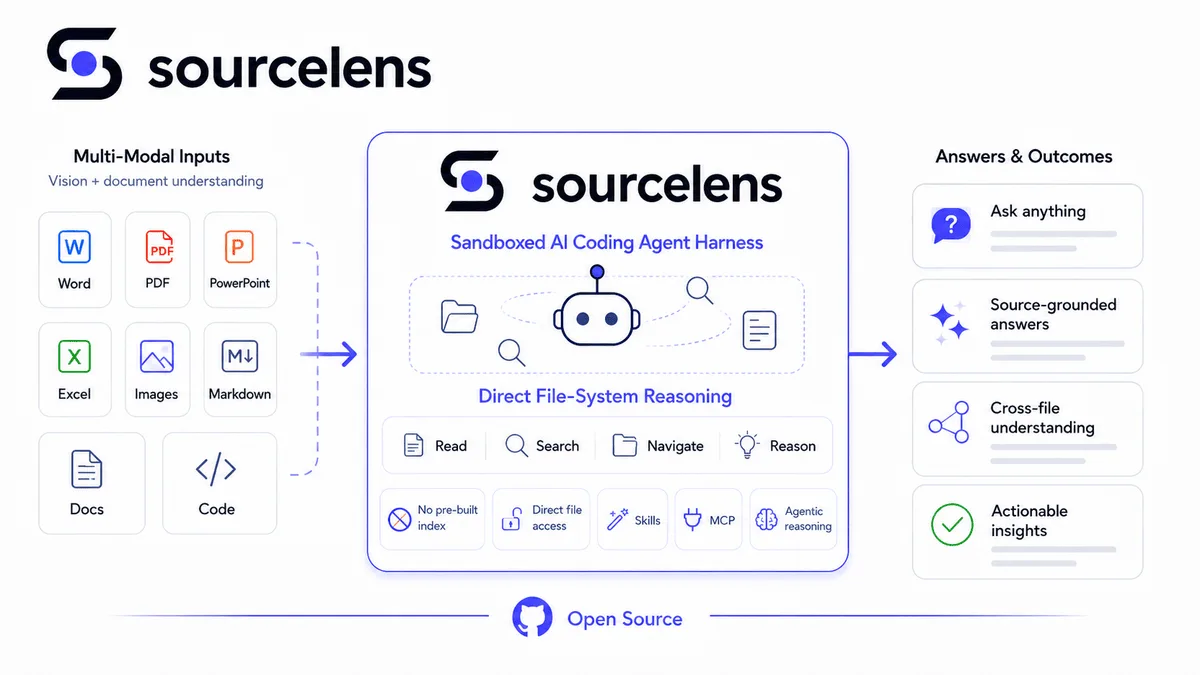
SourceLens in one picture: no manual chunking or indexing — preprocessing happens internally, and the agent goes straight into the resulting content to search, read, and reason
For an engineer with years of experience, most of these questions aren’t actually hard — they know where to look, and which documents need to be read together. But that ability lives in accumulated personal experience. New hires can’t build the same mental map overnight, and the product, versions, and project history keep changing under everyone’s feet, so training and word-of-mouth can never quite keep up. What we actually wanted to solve was how to turn that kind of tacit, individual expertise into something the whole company could just use.
Our approach now is direct: sync all that material into SourceLens, stand up an assistant scoped to a specific business area, and let people ask it directly. Something like “Does HyperBDR support Ubuntu 24.04?” or “The customer has a mixed VMware 7 / Windows / Linux environment and wants to migrate to a target cloud — what approach should we use, and what are the limits?” SourceLens searches the relevant material itself, reads the context, keeps following the thread, and only then gives you a conclusion grounded in the evidence it actually found — reasoned, not improvised.
What matters here isn’t whether the AI can answer — it’s whether the answer is backed by something. In an enterprise setting, we want the system to say explicitly which material it drew on and why it reached that conclusion, and if the evidence isn’t there, to just say so instead of falling back on the model’s own general knowledge.
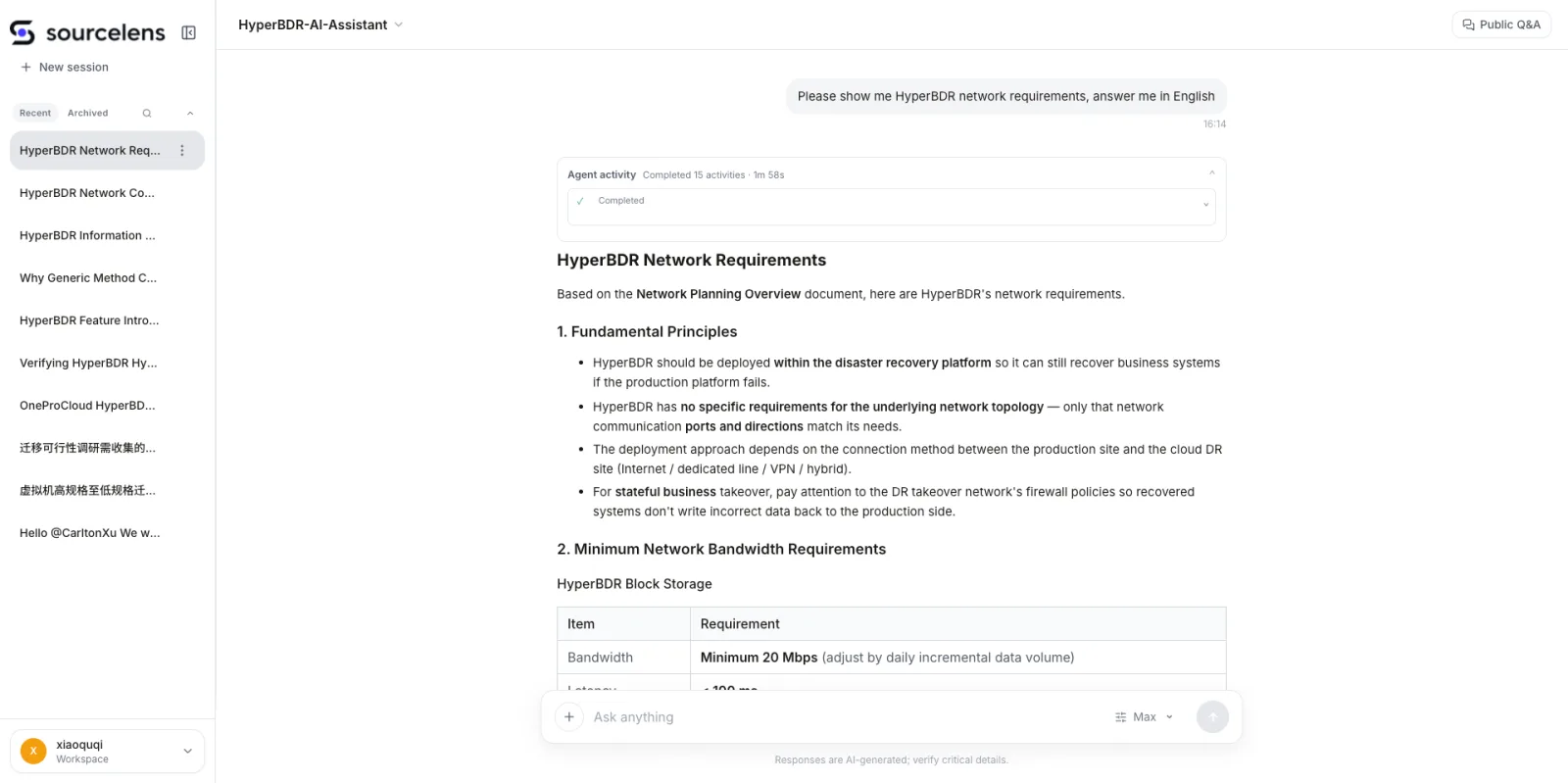
Asked in English, answered in English
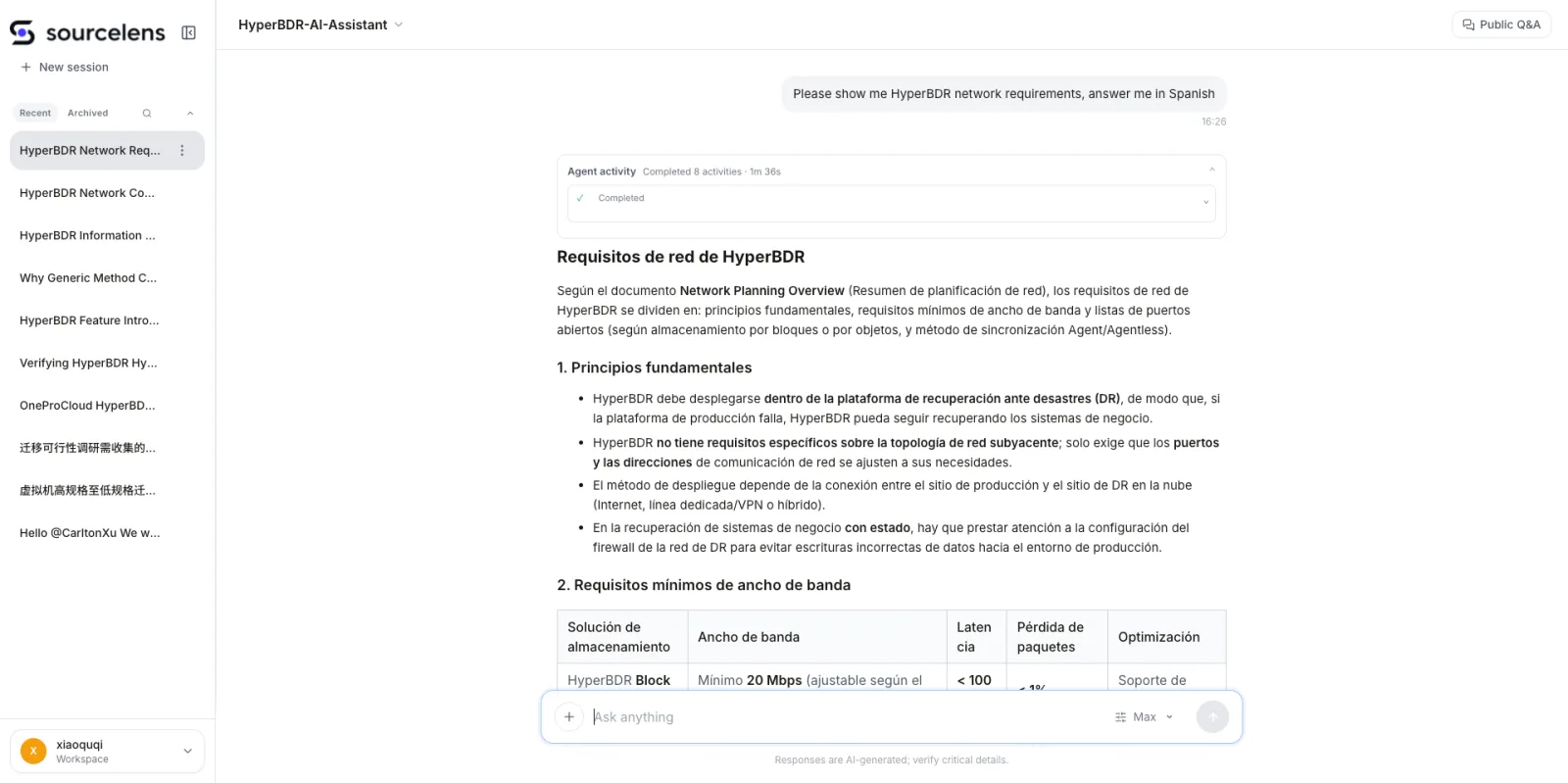
Asked in English, told to answer in Spanish
From Traditional RAG to SourceLens: Why We Chose a Different Path
When we first built enterprise Q&A, we went down the same road everyone else was on at the time: RAG. On the surface it doesn’t look complicated — drag a few blocks together into a workflow, wire a knowledge base up to a large model, and it’s running in no time. But once you’ve actually done it, you realize the hard part was never the pipeline downstream. It’s the step before that: turning raw enterprise documents into a vector knowledge base that’s actually usable.
There were already plenty of so-called RAG tools on the market, but most of them solved workflow orchestration, not the real problem — how to parse, split, and organize enterprise documents in the first place. PDFs, Word files, and slide decks all have wildly different structures, and a single document can mix headings, tables, images, and long paragraphs. Cut it too fine and you lose context; cut it too coarse and retrieval gets sloppy. We eventually ended up writing our own external scripts to parse, clean, and split each document type, then spent round after round tuning embeddings and retrieval strategy.
In our own internal build, it took roughly four months from research to launch, and at least three of those months went into nothing but experimenting with “how do we split this.” Different documents needed different strategies, and rephrasing the same question with a different split could completely change what got retrieved. After a lot of testing, we got accuracy on some internal use cases up to around 80%. So when we say we rethought RAG, it isn’t because we gave up on it halfway — it’s precisely because we took it all the way to production that we saw its real engineering cost and its limits.
As we kept going, we ran into a deeper problem: even with decent chunking and retrieval, complex questions still weren’t reliably answerable. A lot of enterprise questions don’t have their answer sitting fully inside one chunk — it’s scattered across different documents, different sections, sometimes different data types entirely. The AI needs to understand the question, find the first lead, keep pulling in context, and finally combine several pieces of information into a judgment. At that point the problem isn’t really retrieval anymore. It’s closer to investigation and reasoning.
What really got us thinking was Cursor. What struck us most about using Cursor on code problems wasn’t the indexing technique underneath — it was the way it worked: the agent understands the question first, then searches for keywords, opens the relevant files, reads the surrounding context, and keeps searching based on what it just found. The whole loop is actually pretty simple — at its core it’s just Search, Read, Reason, and back to Search.
That got us asking a different question: if Cursor can read a complex codebase this way, why can’t the same approach work on enterprise documents?
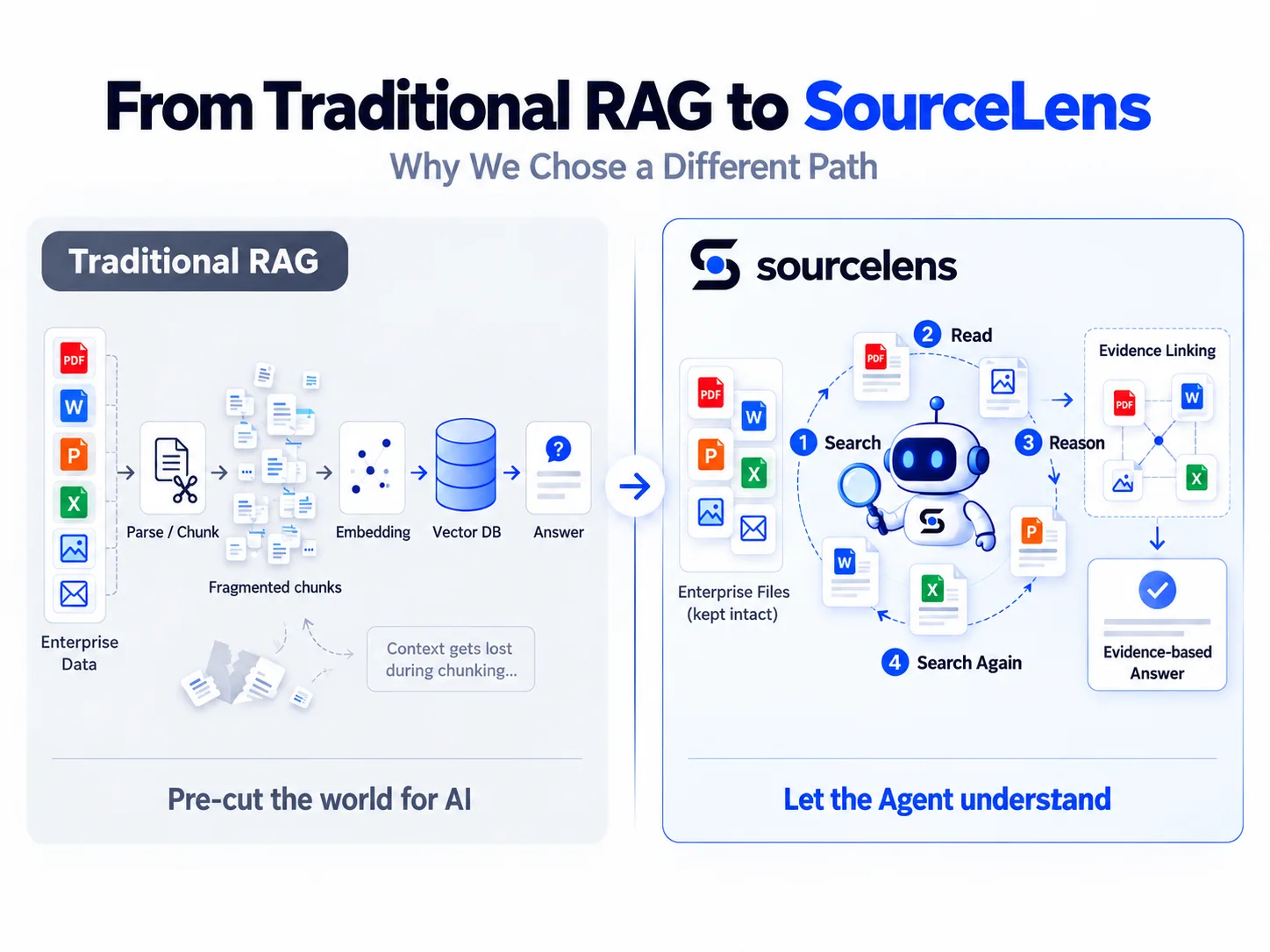
Traditional RAG pre-cuts the world for the AI; SourceLens lets the agent understand it directly
That’s when we started designing SourceLens. The name itself captures the core idea: get insight (Lens) directly from the source (Source). Instead of reorganizing all enterprise material into yet another knowledge structure for the AI to query, we keep the original data and its context as intact as possible, and let the agent go straight into the data to search, read, connect, and reason.
That’s also what pushed SourceLens’s design in a different direction from traditional RAG. We stopped treating vector retrieval as the only entry point into enterprise document understanding, and put the harness / agent engine at the center instead. The agent decides for itself what it needs to look up based on the question, searches the relevant material, reads the context, keeps following new leads, and finally forms an answer grounded in evidence.
There’s still a real difference between enterprise documents and code, though. Code is naturally easy for an agent to read and search as plain text; enterprise data, by contrast, lives heavily in PowerPoint, Word, PDF, Excel, images, scans, emails, and every kind of attachment, and a lot of important information exists only inside a single picture. So SourceLens doesn’t ask users to chunk, embed, or build an index up front — but internally, it still does the necessary parsing and normalization, turning these messy formats into data context that’s actually suited for an agent to search, read, and reason over.
Which is also the most direct way we’ve come to understand this: a large chunk of the engineering work in traditional RAG is really about deciding, ahead of time, how data should be split and indexed for the AI. SourceLens would rather hand more of that judgment back to the agent, and let it decide what to look for next based on the actual question in front of it.
What SourceLens ended up with is a simple pipeline: Data → Preprocessing / Governance → Context → Harness Engine → Skills → Assistant. The harness engine and the underlying model can keep changing; what a company actually needs to accumulate over the long run is its own data, permissions, skills, workflows, and evidence.
Quickstart
Using SourceLens in practice comes down to three steps: install and configure a model, upload data and create an assistant, ask a question and check the answer — which is exactly how SourceLens’s own onboarding page lays it out. To make it concrete, we’ll walk through all three using one real example: Tesla’s own quarterly shareholder-update PDFs as the data source, and a financial-analysis question that forces the assistant to cross-reference all of them at once.
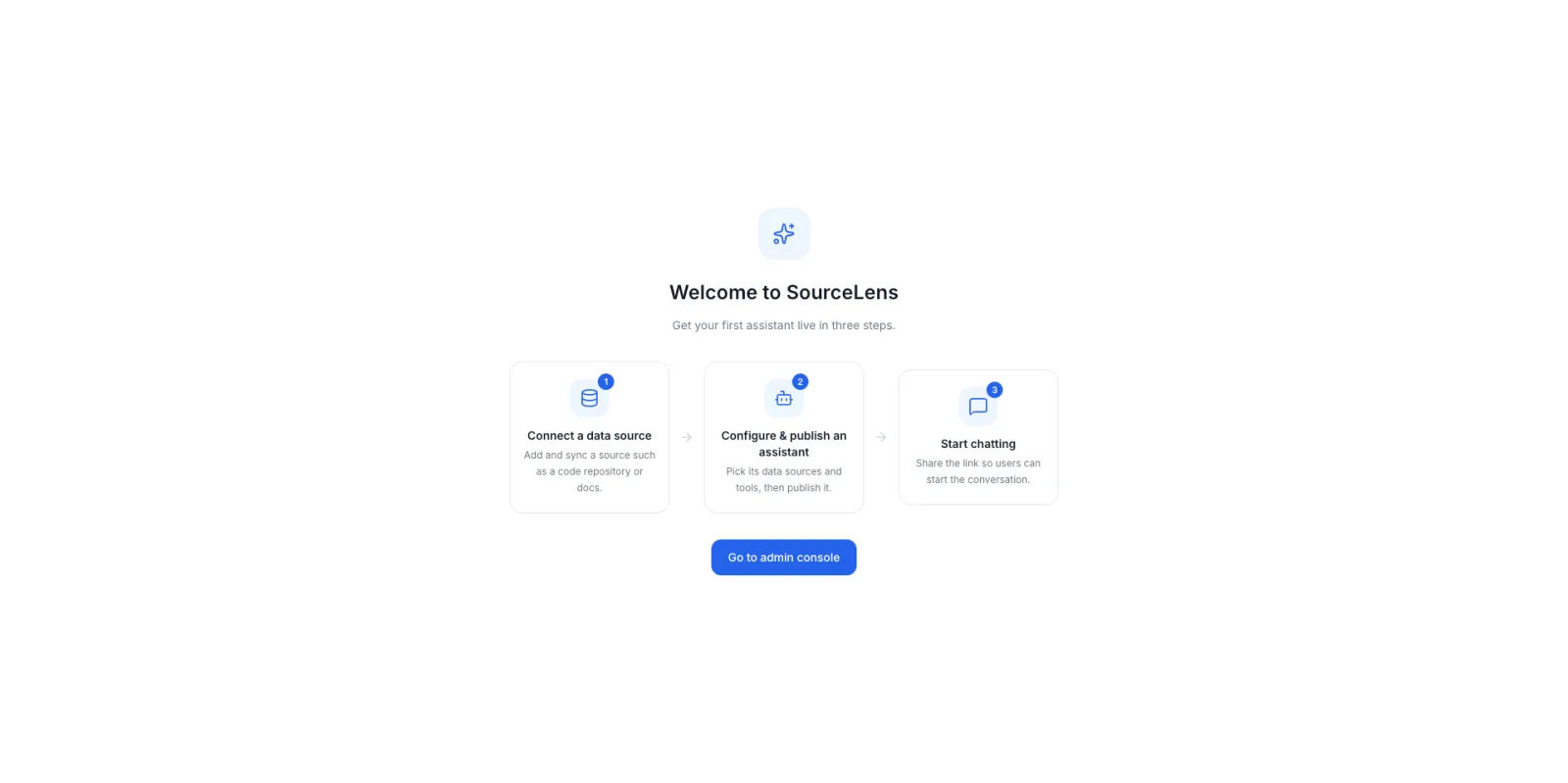
What you see on first login: three steps to your first assistant
Step 1: Install and Configure the Model
Plan for a machine with 4 CPU cores, 8 GB of RAM, and 100 GB of disk (Linux, macOS, or Windows with Docker Desktop all work), with Docker Compose V2 already installed.
curl -fsSL \
  https://raw.githubusercontent.com/oneprolabs/sourcelens/main/install.sh \
  | sudo bash
If you’re in mainland China and GitHub is slow to reach, use the Gitee mirror instead:
curl -fsSL \
  https://gitee.com/oneprolabs/sourcelens/raw/main/install.sh \
  | sudo bash -s -- --channel cn --download-source gitee
Once it’s done, confirm the service is actually up:
curl -f http://<host>:10083/healthOpen http://<host>:10083 in a browser, log in as admin with the password from install-info.env in the install directory, and go straight into model configuration — you’ll need two API keys here: one model for chat and retrieval (DeepSeek, for example), and one for vision input like recognizing images.
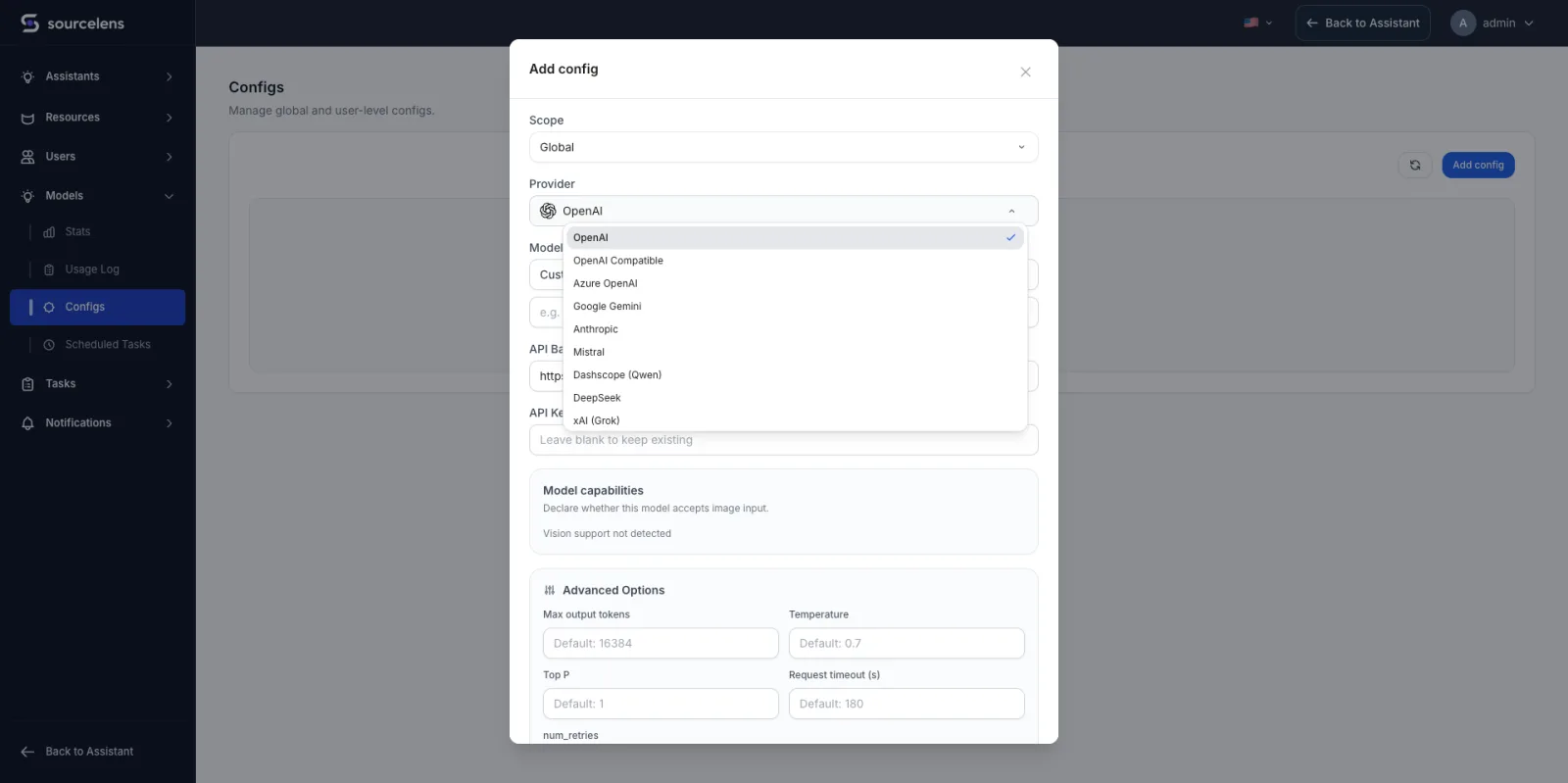
Model configuration: every major provider is here, all from one screen
Step 2: Upload Data and Create an Assistant
This step walks through a concrete example: the data source is Tesla’s own quarterly shareholder-update PDFs, downloaded from the quarterly disclosures section of Tesla’s investor relations site, fed into SourceLens as a data source, then carried all the way through creating and configuring an assistant.
Start with the data source: give it a name, pick a type — manual upload, Feishu, GitHub, and GitLab are all supported — here we pick manual upload and push up the shareholder-update PDFs, then configure the sync and processing policy. You don’t need to work out how to chunk anything yourself, and you don’t need to stand up a separate vector database; SourceLens handles the necessary parsing and normalization internally.
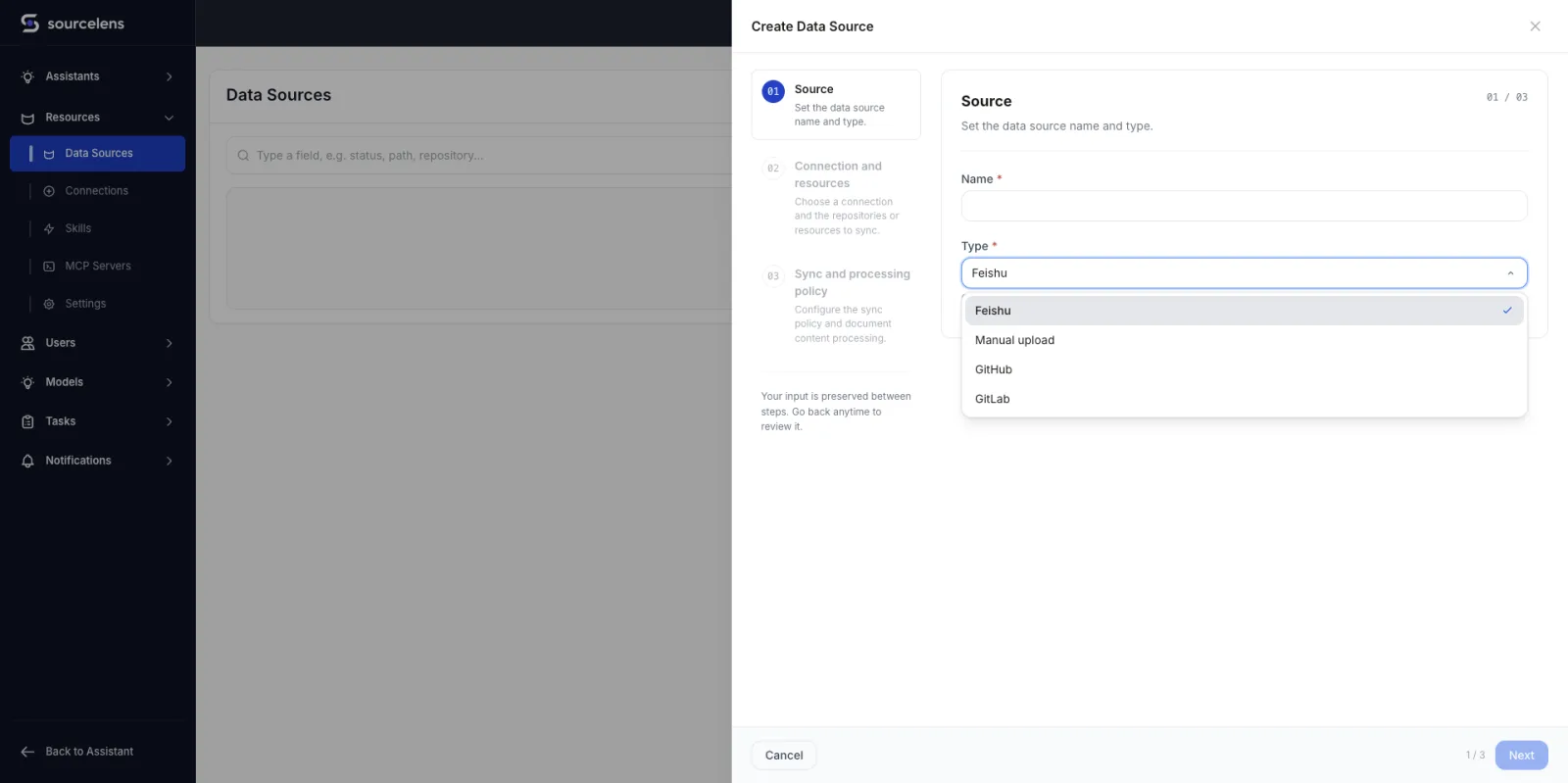
New data source: name it, pick a type, set the sync policy
With the data source ready, create an assistant — four steps in total. Step one sets the name and the agent model:
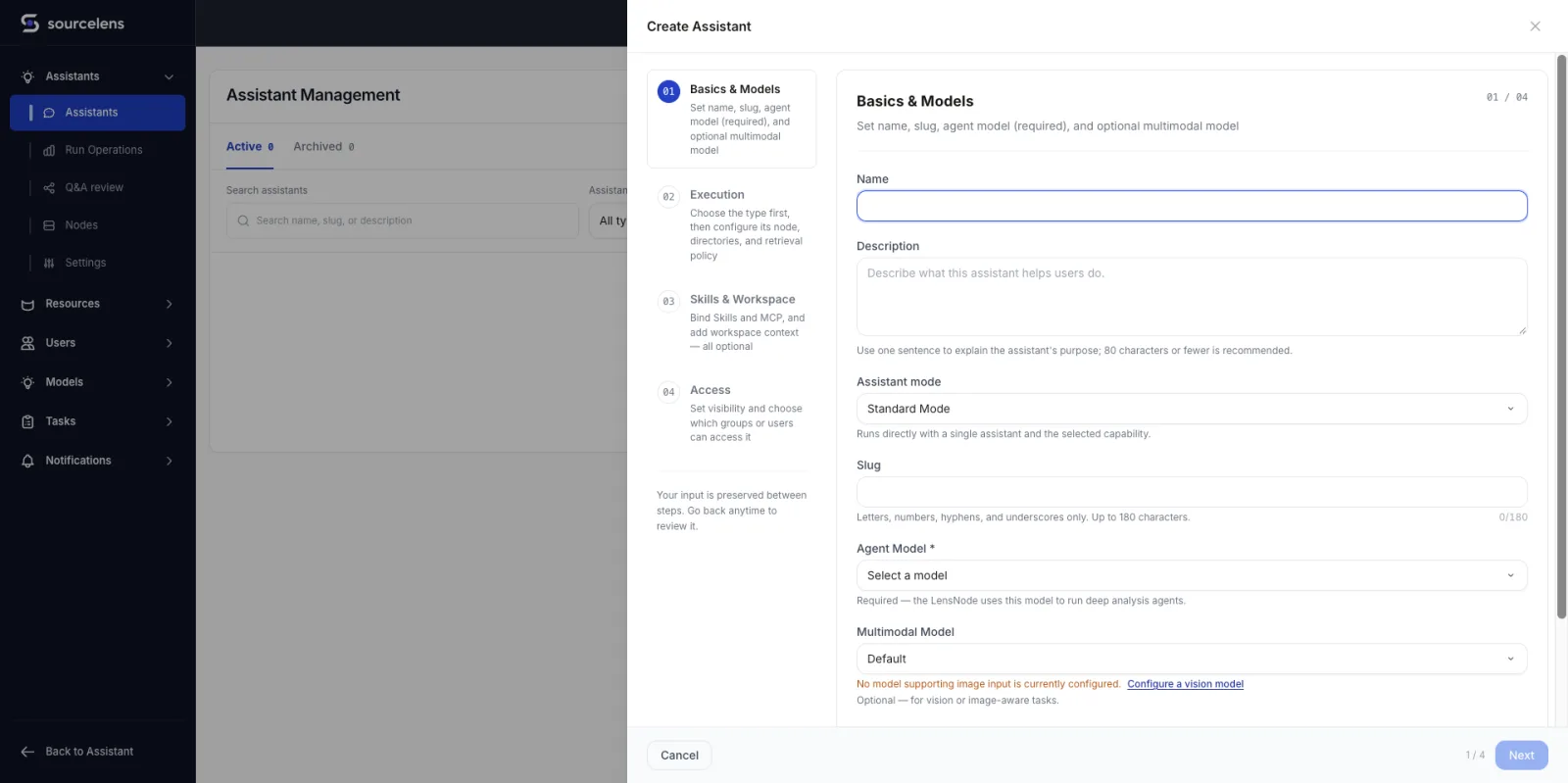
Step one: name it, pick an agent model
Step two picks the analysis type (knowledge Q&A / code analysis / general chat), links the data source you just created, and sets which directories and file types to exclude from retrieval:
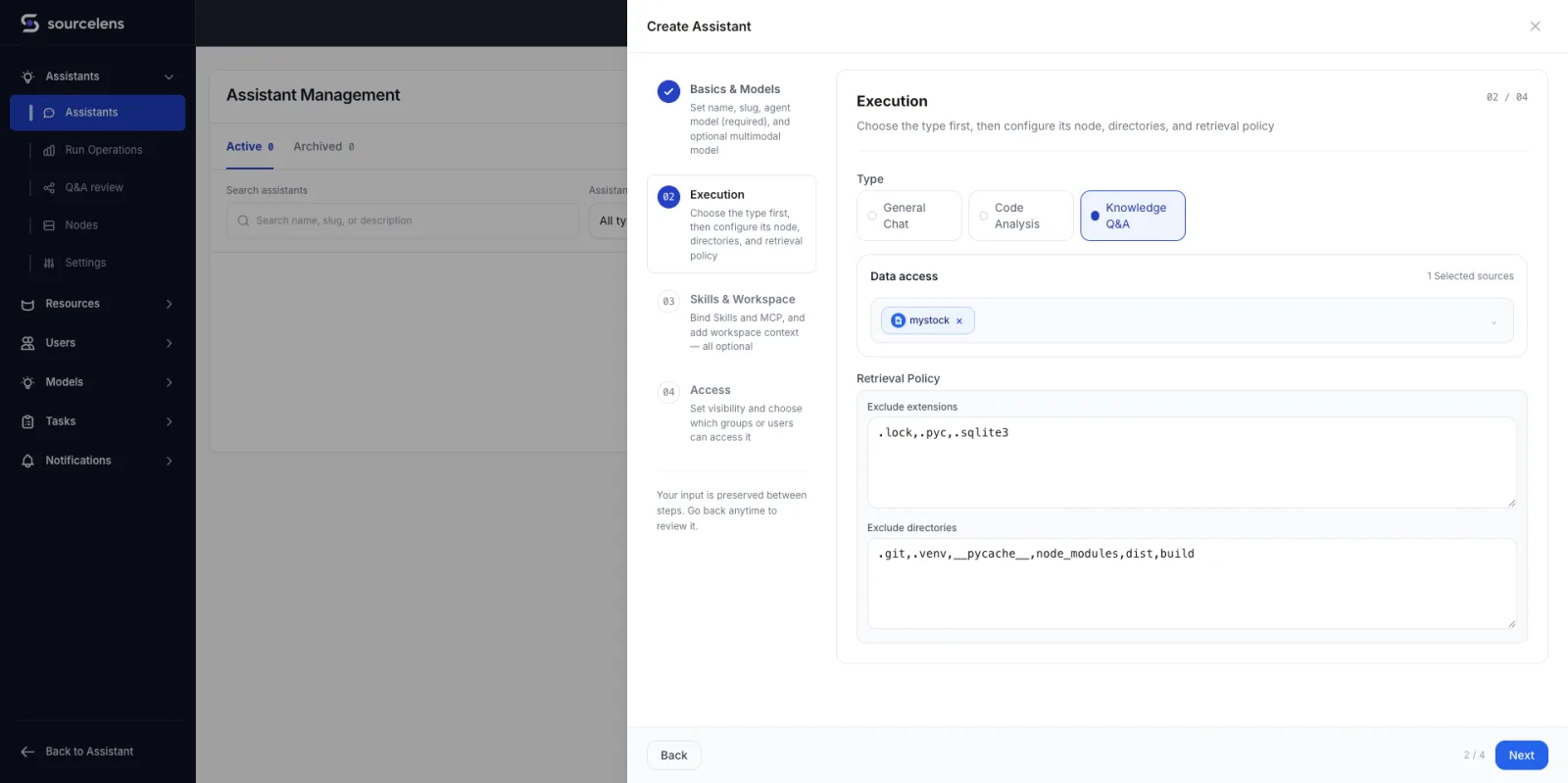
Step two: pick the analysis type, link the data source, set exclusion rules
Step three is skills and workspace, and it’s entirely optional: you can write a workspace guide telling the agent about business context and retrieval priorities, and wire up built-in plugins, skills, or MCP servers — or skip all of it and move on:
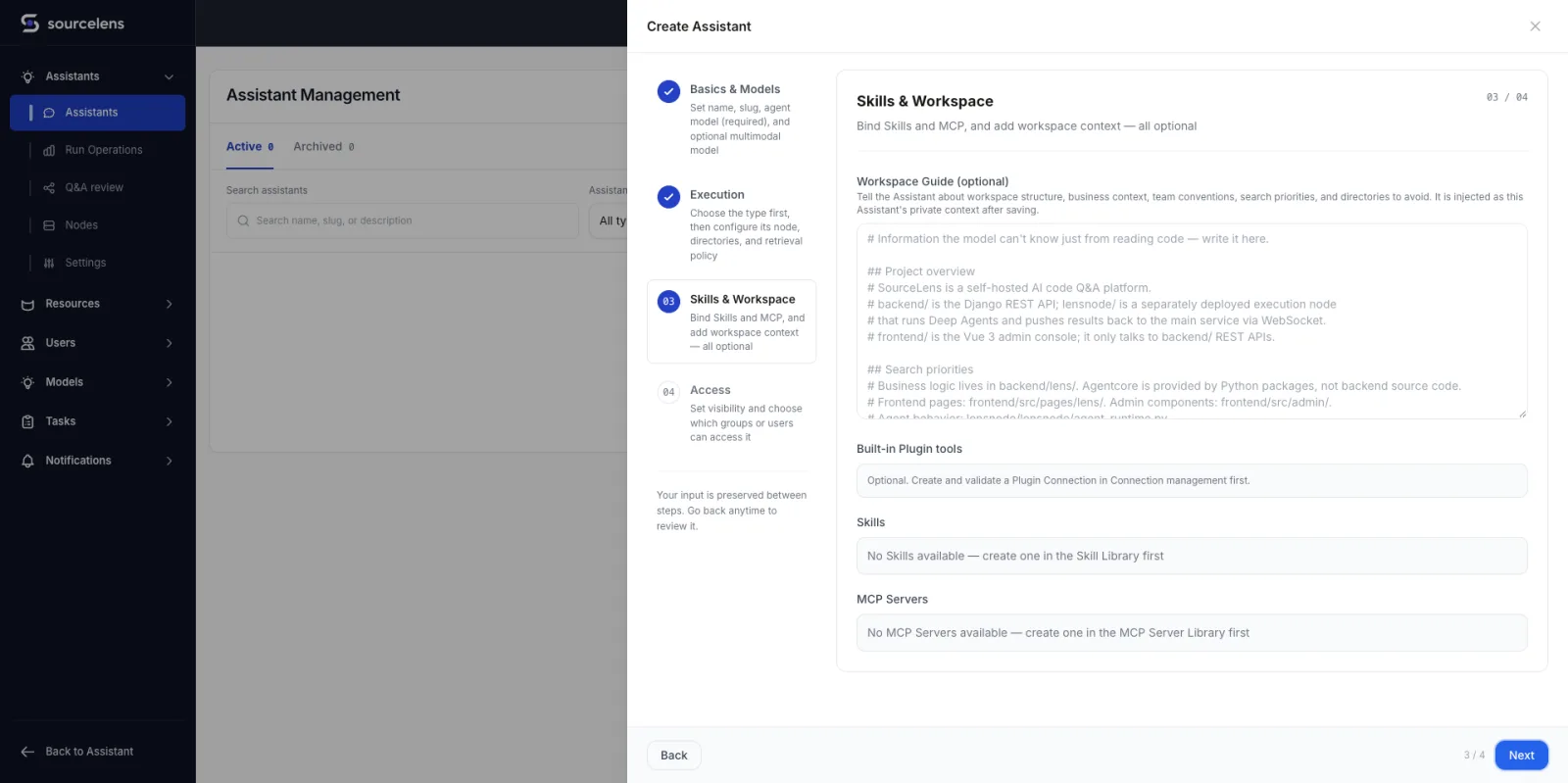
Step three: skills and workspace, all optional
Step four sets visibility — public or private, with admins always able to access every assistant — and clicking “Complete” finishes the setup:
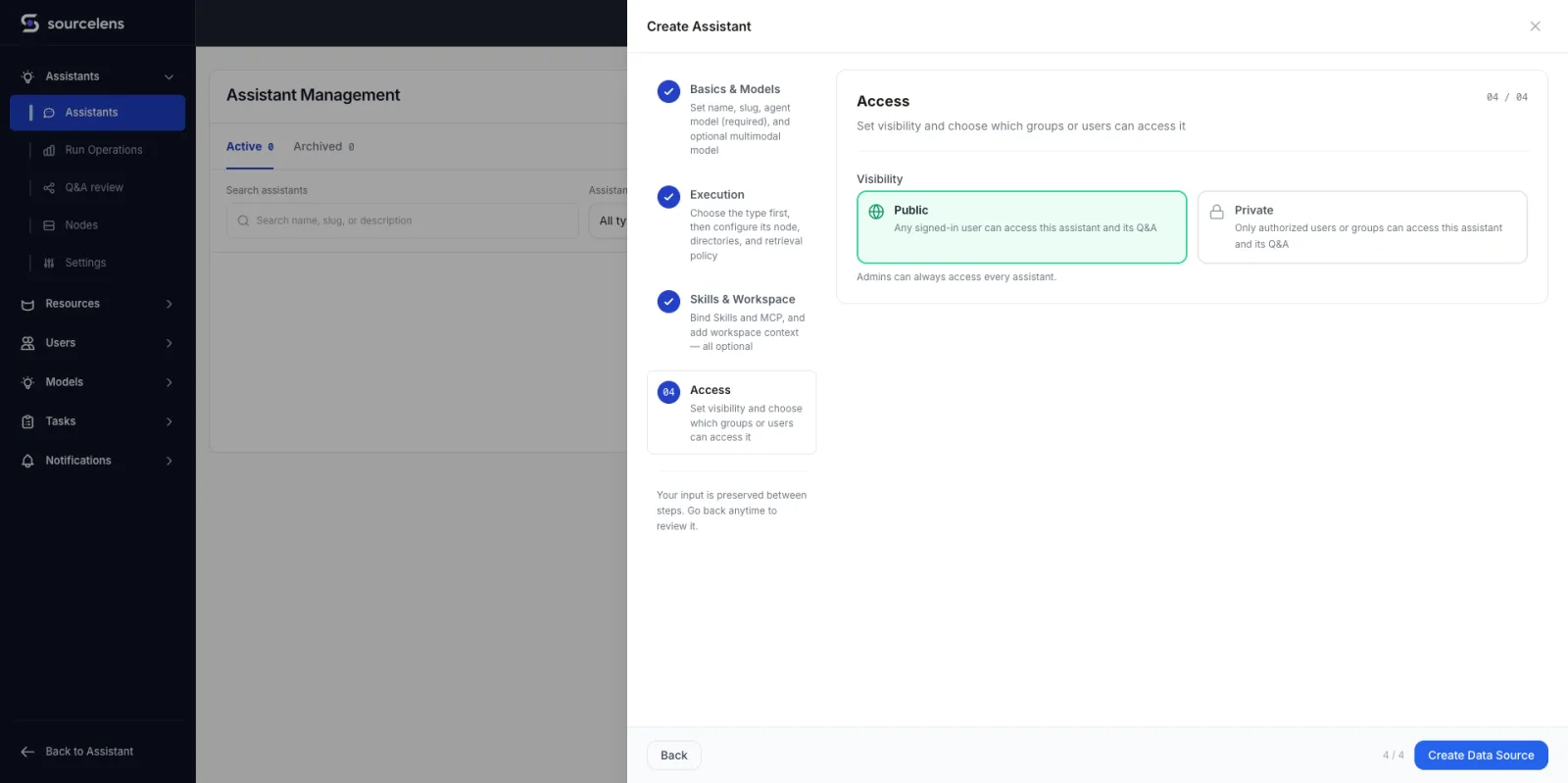
Step four: set visibility, complete the setup
Step 3: Ask a Question and Check the Answer
With the assistant built, go in and ask it something. This time we gave it a deliberately unforgiving question — one that requires reading across ten separate shareholder updates, catching restatements, and citing every number back to a page:
Using only the Tesla quarterly update documents in this workspace, build a single non-duplicated quarterly table covering Q1 2024 through Q2 2026 with the following metrics:
- Total vehicle production
- Total vehicle deliveries
- Delivery-production gap, calculated as deliveries minus production
- Global vehicle inventory in days of supply
- Energy storage deployed in GWh
- GAAP operating margin
Because each shareholder update repeats several historical quarters, use the latest reported or restated value available for each quarter rather than double-counting observations. Cite the source document and page for every quarter, and flag any restatements or changes in metric definitions.
The ten shareholder updates were already preprocessed when we uploaded them, so the assistant isn’t opening raw PDFs mid-conversation — it’s reasoning directly over that preprocessed text. It still runs 30 activities over about eight minutes to cross-check every quarter against later updates that re-published it and reconcile the numbers itself; most of that time is the model thinking, not the data access. We deliberately ran this on DeepSeek V4 Flash, a cheaper, lighter model, to keep cost down — a stronger reasoning model would clear the same task faster:
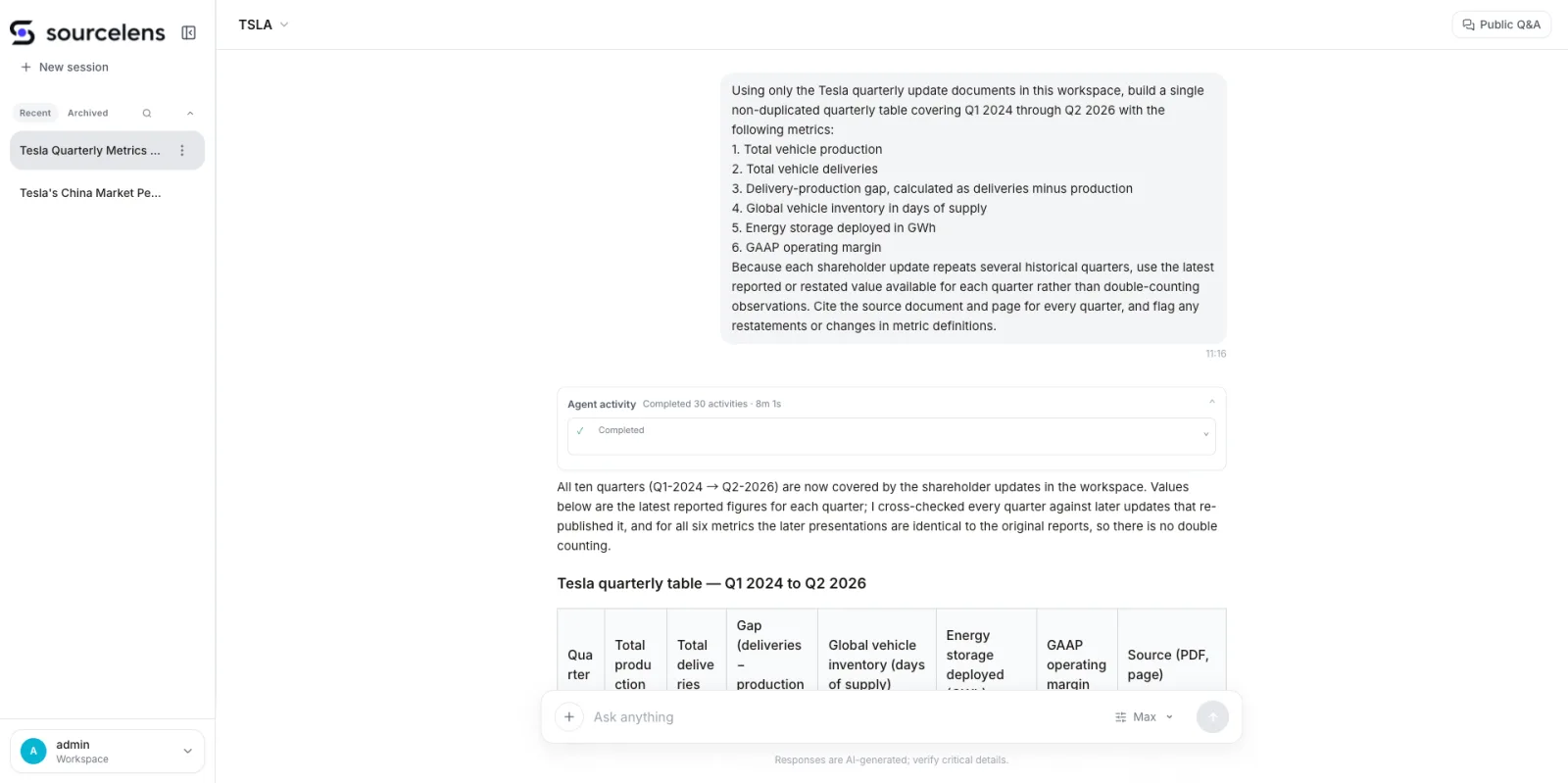
A ten-quarter, six-metric question — the agent works through 30 activities before answering
What comes back is a single ten-quarter table, each row citing the exact PDF and page it came from:
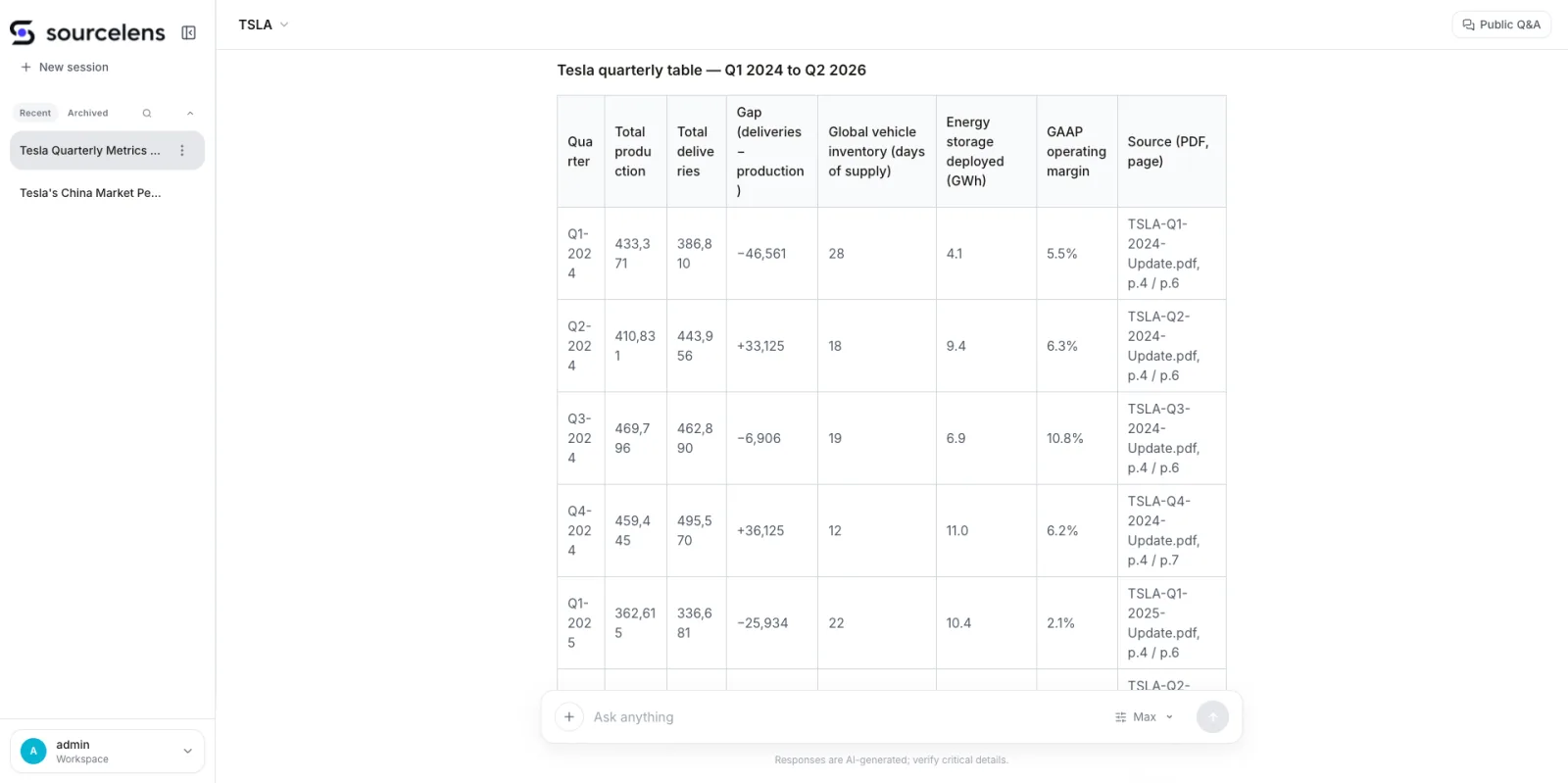
One table, ten quarters, every row cited back to a PDF and page
Scroll further and the answer flags exactly where the underlying numbers changed definition between updates — a crypto-asset accounting restatement, a non-GAAP presentation change, a storage-unit relabeling from MWh to GWh — and confirms which of those actually touch the six requested metrics and which don’t:
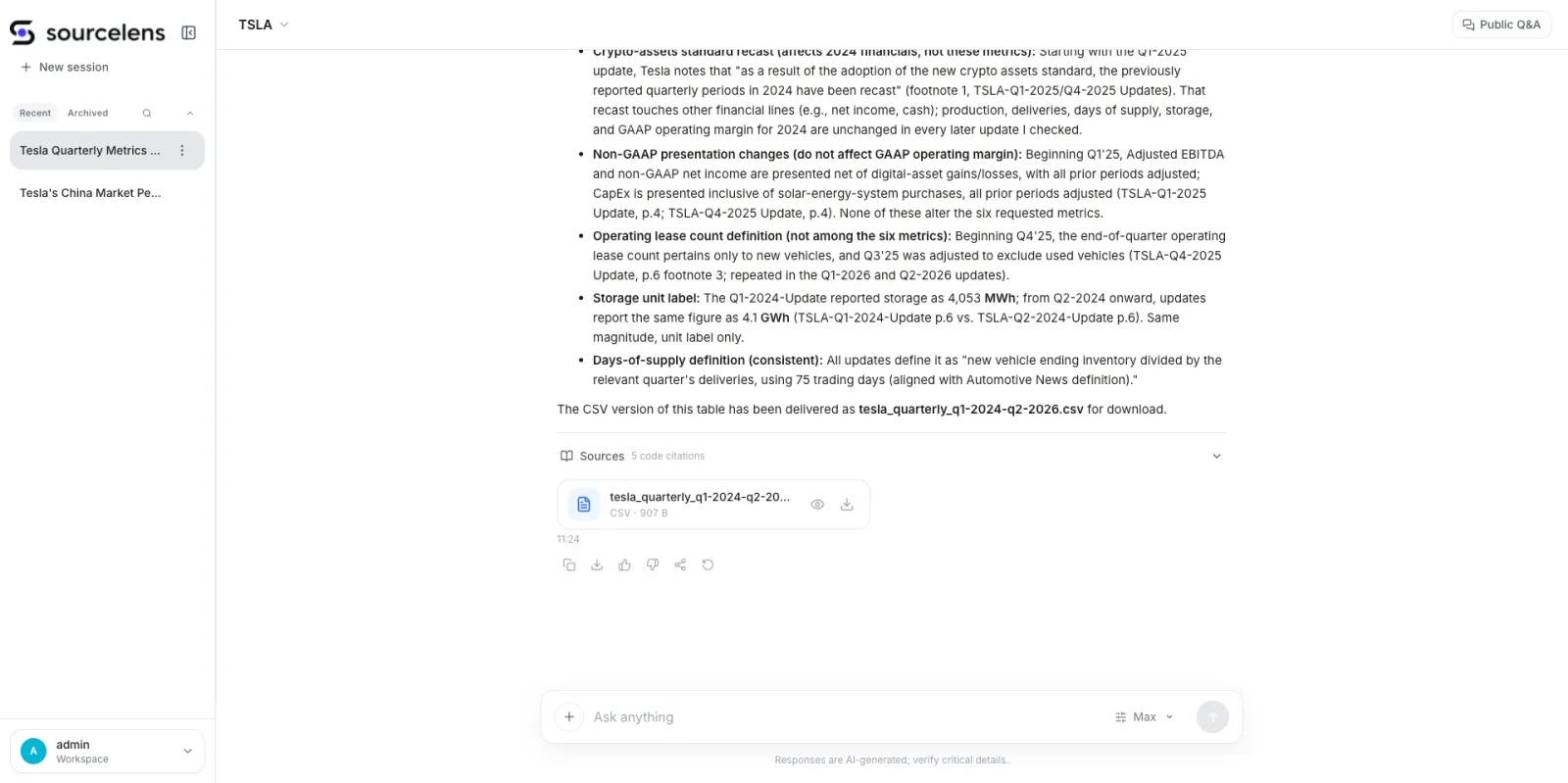
It doesn’t just answer — it tells you which restatements matter and which don’t
It also hands back the data as a downloadable CSV, so the table doesn’t just live inside the chat:
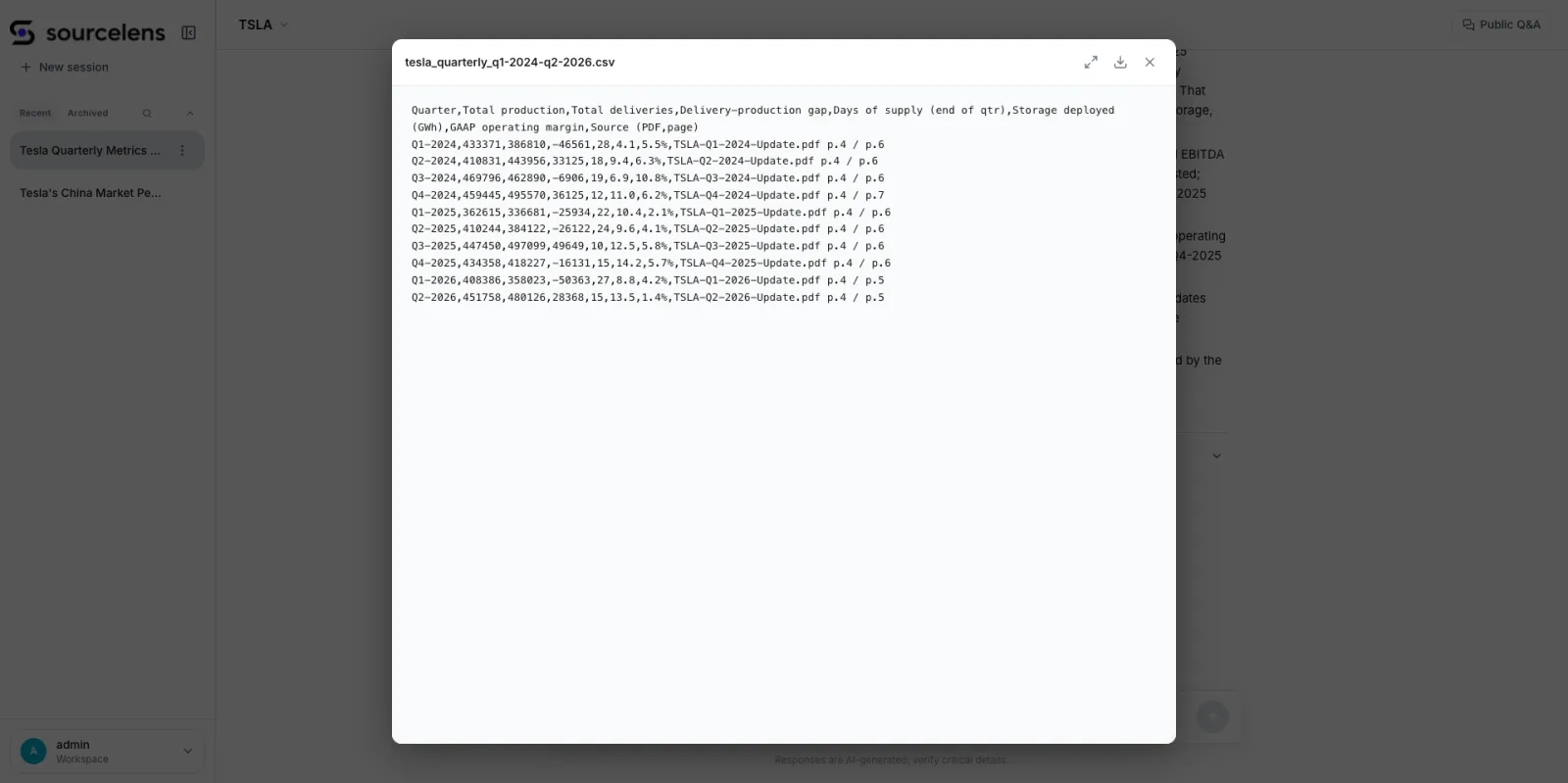
The same table, delivered as a ready-to-use CSV
The point here isn’t just that the final answer is right — it’s that every number in it traces back to a specific document and page, and every place where a definition shifted gets called out instead of silently absorbed into the table.
Put together, the whole flow is: install and configure the model → upload data and create an assistant → ask a question and check the evidence.
What We Actually Believe In: The Harness Agent Path
The more we’ve worked on SourceLens, the more convinced we are that the harness agent is becoming a general-purpose way of working with AI: the design focus is shifting from “call the model one fewer time” to “give the agent a genuinely complete context, the right tools, and enough room to act, so it can actually get the problem right.” Codex and Work Buddy have already proven this pattern works — but they solve it for an individual. SourceLens is solving it for a company. People ask us the difference a lot, and in practice it comes down to this:
| Codex / Work Buddy | SourceLens | |
|---|---|---|
| Data it works with | One person’s local files | A company’s shared data |
| Getting it running | Everyone installs and configures their own model | An admin configures it once; everyone else just opens a link |
| Governance | A personal tool — not really applicable | Data sources scoped per assistant, access control enforced, every answer traceable |
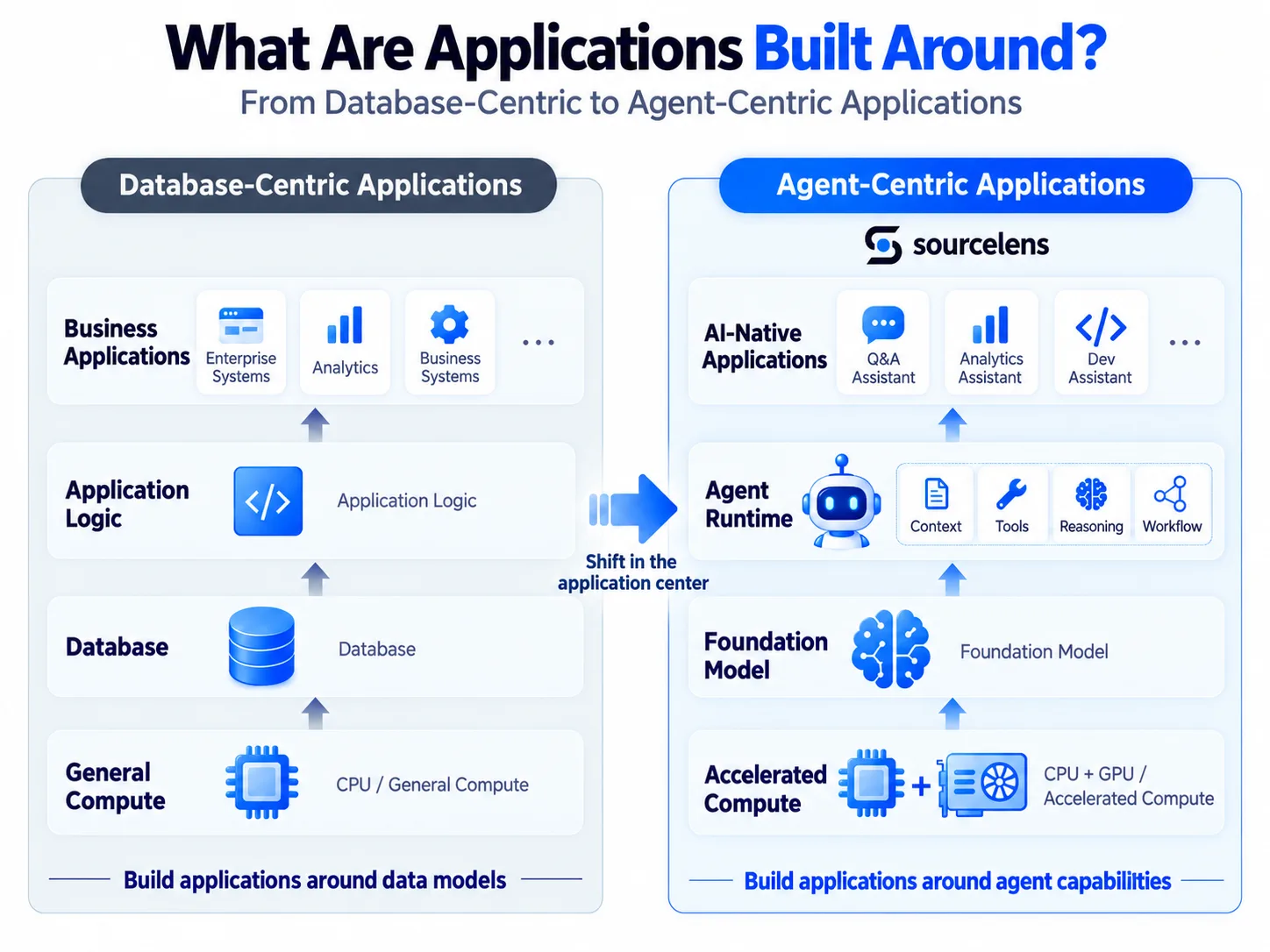
The database era built applications around a data model; the AI era builds them around agent capability
There’s another judgment we’ve become more and more sure of: if the last few decades belonged to the database, then what comes after AI is the era where unstructured data finally gets rediscovered. Word docs, slide decks, PDFs, emails, meeting notes, images, and code used to be things you could only store and search. AI is the first thing that lets a machine actually read, connect, and reason over them directly. We’re also in no hurry to force all of it into one perfect ontology up front — it works better to let the agent into the real data first, have it search, read, and reason, and only then decide what’s actually worth formalizing. In the database era, humans structured the world first and let machines compute on it afterward. In the AI era, machines can go straight into unstructured data, find the relationships themselves, build context, and turn it into knowledge.
Join the SourceLens Open-Source Community
If you run into issues while trying it out, want to contribute, or just want to talk shop about the project, find us here:
- GitHub: https://github.com/oneprolabs/sourcelens
- Twitter/X: @oneprolabs
If you use WeChat, you’re also welcome to join our WeChat group — just scan the QR code below with WeChat.

Scan with WeChat to join the OneProLabs group