$5 for a Week of Work: How We Use AI to Capture Fragmented Enterprise Knowledge
$5 buys back a week of work. From August last year to July this year, our cloud migration and disaster recovery product team used AI-My-Chats to process 100+ pieces of fragmented knowledge every month, at an average model cost of about $5. After switching to open-source models, that’s recently dropped to about $3.1. This post is about the practice and thinking behind those numbers.
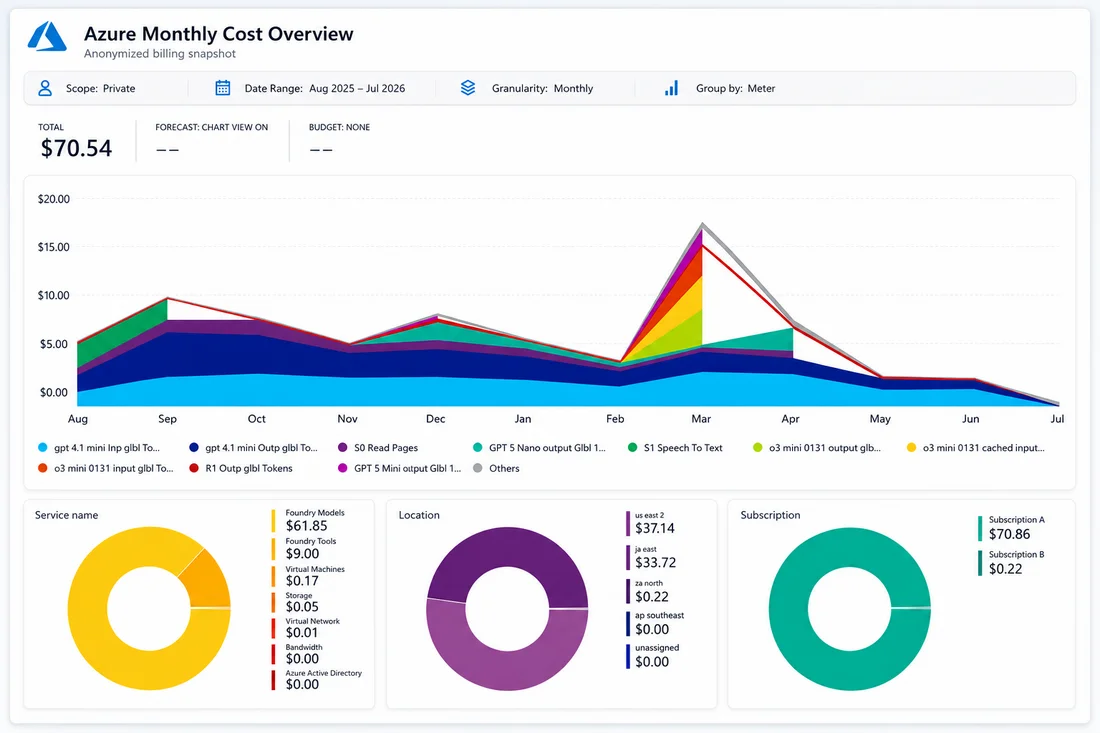
The real bill: broken down month by month over the past year, averaging about $5/month in model costs
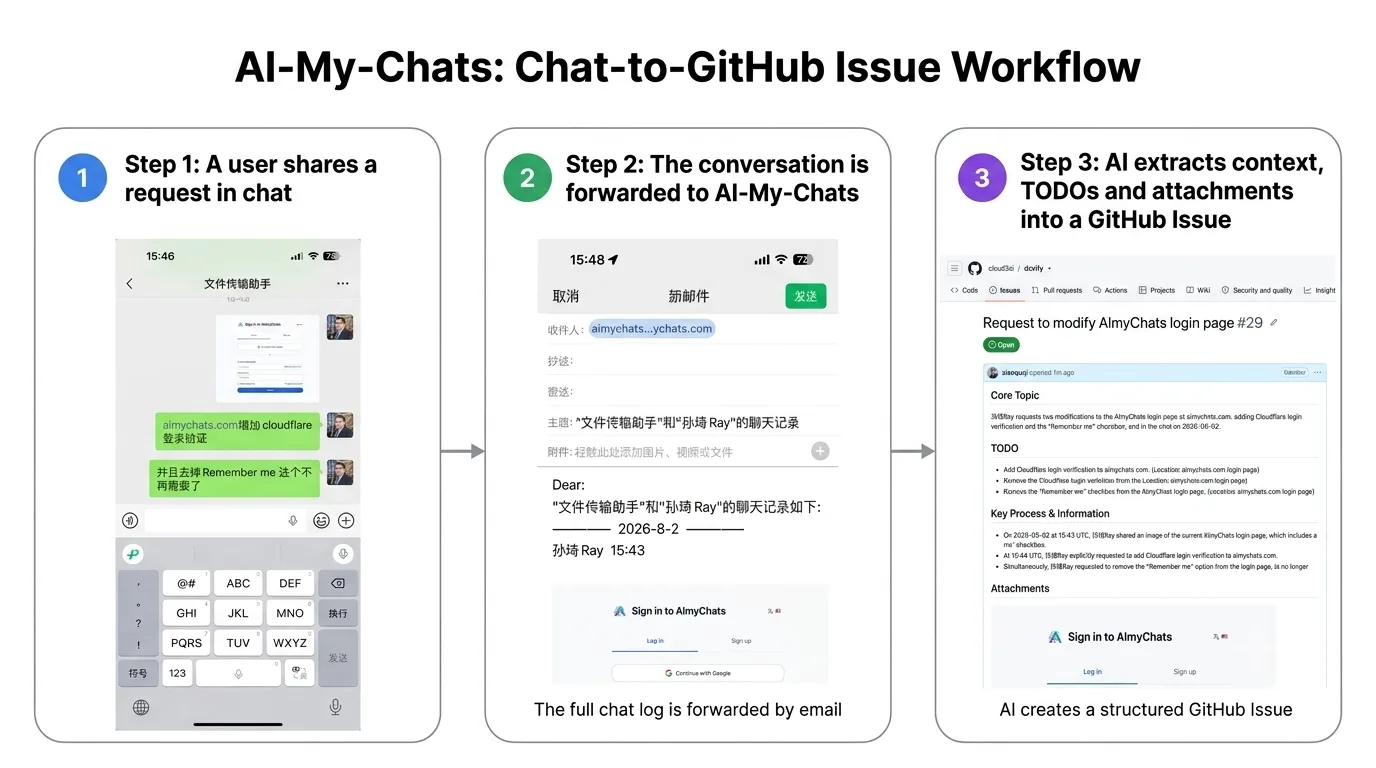
From a chat log to a structured GitHub Issue — just one forward away
I. Why We Built This
Thinking About Enterprise Knowledge Capture
I recently shared how we use AI-My-Chats on Reddit, and it struck a chord. Two questions came up again and again.
First: companies generate a huge amount of valuable information every day, in email, chat, meeting notes, and project discussions — text, screenshots, logs, attachments, off-the-cuff judgment calls. Very little of it ever makes it into a project management system or a knowledge base. It’s not that companies lack knowledge; it’s that turning information into knowledge is too much friction. Re-reading the context, pulling out the key points, formatting it, filing it in the right system — that all takes a steady stream of manual work. Most of this information isn’t worthless, it’s just too expensive to organize, so it ends up scattered across different tools and different people.
Second, data sensitivity: if the content touches internal projects, technical details, and business data, is it really okay to hand it to an external model service like OpenAI or Anthropic? That’s a completely fair concern, and it’s exactly what AI-My-Chats is built to address. It never reads your chats automatically — you decide what’s worth capturing, and the system organizes it using that context. It isn’t locked into a single model vendor either. Companies can choose commercial models, open-source models, or models running on-premises or in a private cloud, based on quality, cost, and data-security needs.
Right now we mainly use DeepSeek V4 Pro for text understanding and summarization, and Qwen 3.6 Plus for images and context — though that’s just our current combination, not a fixed limitation of the product. Devify, the open-source project behind AI-My-Chats, already has configurable model integration built in, so switching models doesn’t mean redesigning the whole workflow.
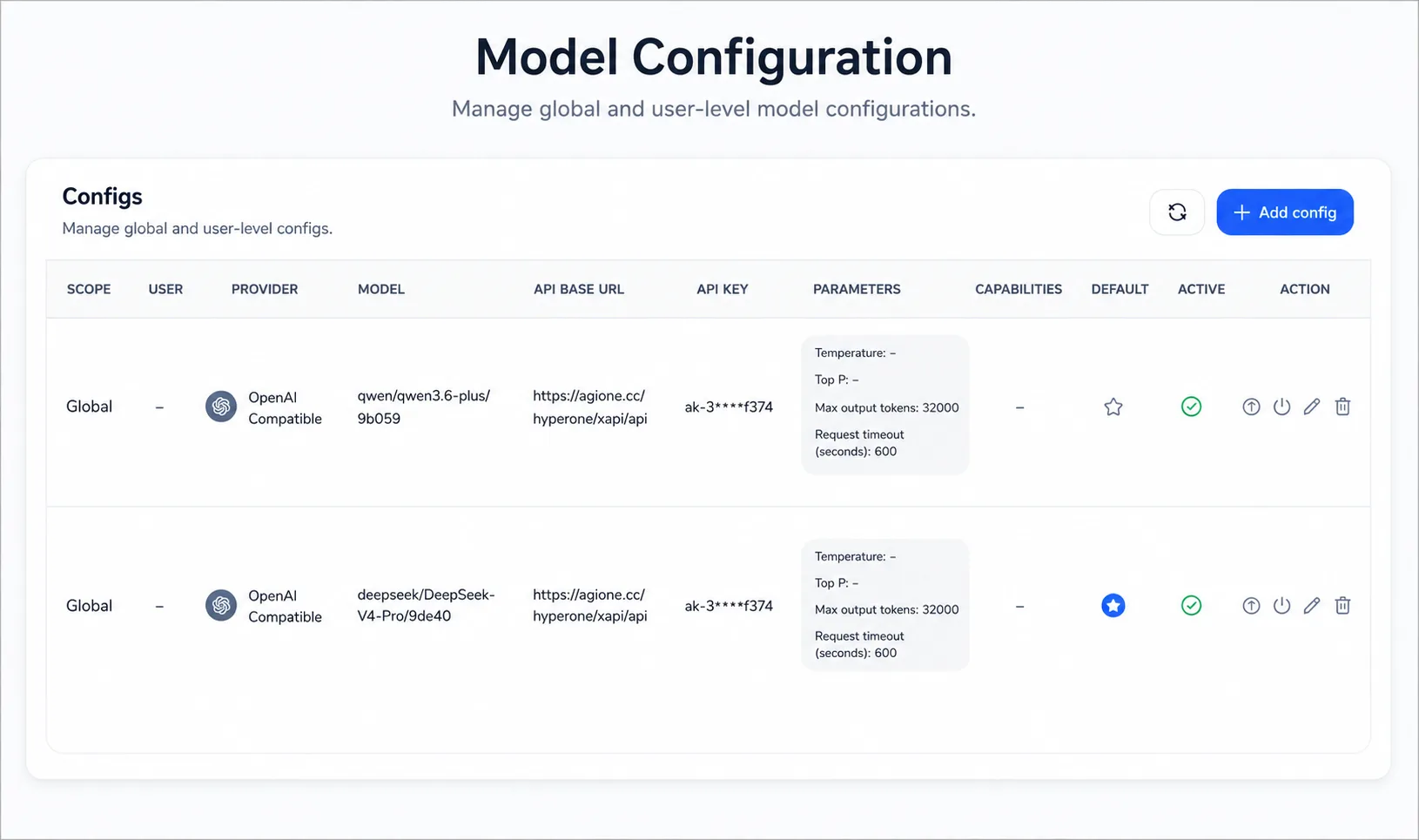
Models are pluggable: companies can mix and match based on quality, cost, and data-security needs
Gartner’s report Token Costs Escalate and AI Sovereignty Concerns (G00852160) put it well: “Where AI runs is becoming as important as what AI can do.” The same report cites a 2026 CEO survey in which 70% of CEOs named tech sovereignty a shared concern at the executive-committee level, and 90% said they’re increasing investment in geographic strategy to address it. As open-source models and private deployment mature, the freedom to choose your own models and control your own data is becoming a core part of enterprise AI infrastructure.
That’s the problem we set out to solve: while companies stay in full control of their data, models, and processing pipeline, lower the cost of turning information into knowledge, and convert scattered content into enterprise knowledge that’s traceable, actionable, and reusable.
From Fast Response to Knowledge Capture
OneProCloud builds cloud-native migration and disaster recovery products — HyperMotion for migration, HyperBDR for disaster recovery — serving mostly overseas customers, plus some domestic ones. Both products now support the mainstream public and private cloud platforms at home and abroad, covering pretty much any heterogeneous cloud environment a company is likely to run.
Both products are built around simplicity, efficiency, and heavy automation. For host migration and disaster recovery, users don’t need to manually pre-create VMs, disks, or other resources on the target cloud — the system reads the source configuration and provisions the target automatically, enabling one-click migration, DR drills, and failover.
That said, a full migration or DR run typically touches the source environment, networking, storage, the OS, and the target cloud platform, and problems customers hit don’t always trace back to HyperMotion or HyperBDR itself — they can just as easily come from dependencies on the source or target side. Strictly speaking, some of those issues fall outside our product’s scope. But customers care about whether the whole migration or DR goal gets accomplished, not where the boundary of our product happens to sit. So over the past few years of project support, as long as it helps get the job done, we’ve generally dug in and helped customers work through it together. A lot of customers stick with OneProCloud not just because the product is easy to use, but because we care about whether they actually get the job done.
As our user base grew, we started thinking about how to keep response times fast while also capturing the experience, requirements, and technical judgment calls that come out of support work — because once your user base multiplies, you can’t just throw more people at the problem and expect to hold the same service quality and response speed.
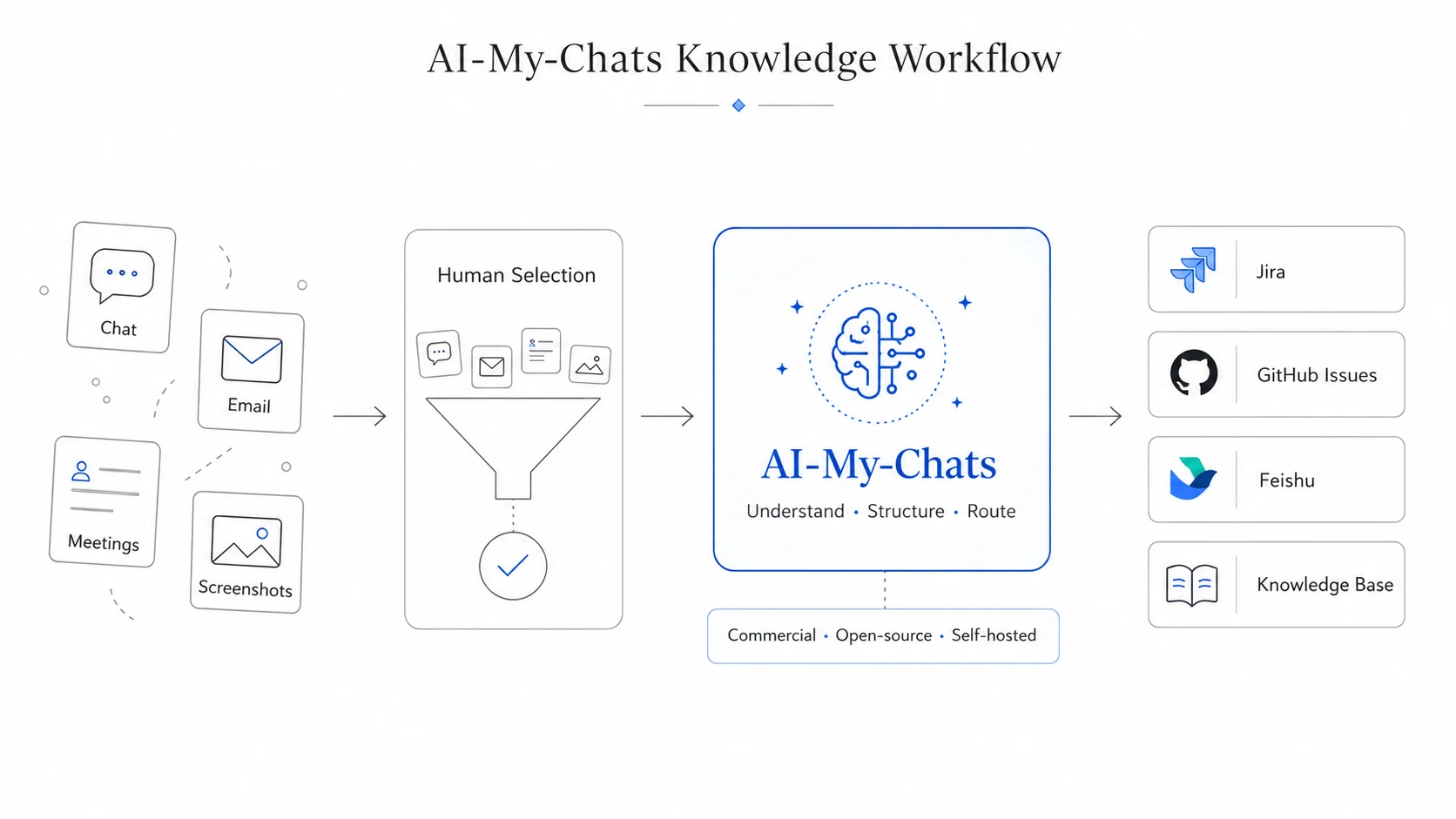
AI-My-Chats’ overall architecture: multi-source input, human curation, unified AI processing, multi-destination output
We wanted AI to turn this fragmented information into traceable, reusable enterprise knowledge without adding any extra process burden — and eventually, to let the system draw on that accumulated knowledge to directly help users analyze and solve problems.
II. How We Designed It
Why We Didn’t Integrate Directly with Chat Platforms
Early on, we looked at ways to hook directly into messaging platforms, including projects like WeChaty. Approaches like that pull messages through protocol emulation, hooks, or other unofficial methods, but they usually come with stability, compliance, and account-security risks — hard to rely on as long-term infrastructure for a company.
More importantly, we came to realize that automatically reading every conversation isn’t a good idea in the first place. A company’s day-to-day chatter is full of throwaway information; not every message is worth keeping. Feeding all of it into a system just creates noise and makes the data-sensitivity problem worse. So we leaned toward letting people inside the company make that call themselves — what’s worth keeping, what needs follow-up, what experience should go into the knowledge base.
Then we noticed that messaging apps already let you forward selected content to email. That gave us a simpler, more controllable path: don’t integrate with the chat platform at all, don’t auto-collect everything, just let users pick what’s valuable and submit it into the pipeline themselves. That one small action solves two problems at once — the act of submitting something is itself a filtering step, and the system only ever touches content the company explicitly chose to submit, which gives you a much cleaner data boundary.
But forwarding content to email alone isn’t enough. If nobody sorts out the background, the key points, and the next steps, that information still can’t flow into a downstream process, and it can’t be searched, tracked, or reused later. Our goal was never to move information from one tool to another — it’s to turn scattered, off-the-cuff notes into knowledge entries a team can pick up and keep using.
From Fragmented Information to Captured Knowledge
Once we’d settled on user-driven submission, the next question was how to turn that scattered information into enterprise knowledge that could actually be managed and reused. At the time, OneProCloud mainly used Jira for engineering and issue tracking, so version one of AI-My-Chats had a simple goal: take content people submitted, have AI organize it, and write the structured result straight into Jira.
That first version used GPT-4.1 mini for text and Microsoft’s OCR for screenshots. When an email came in, the system would pull out the body text, images, and attachments, then use the context to generate a title, background, requirement description, existing findings, and a to-do list. Once GPT-5 nano shipped, we gradually moved text processing over to it — same quality, lower per-item cost.
In the last few months we started rolling in open-source models like DeepSeek and Qwen. In real-world testing they held up fine for both our text-understanding and multimodal use cases, and once the quality gap stopped mattering, cost, control, and deployment flexibility started to matter a lot more. Today we mainly use DeepSeek V4 Pro for text understanding and summarization, and Qwen 3.6 Plus for images and context. After switching to this open-source combo, our average monthly cost dropped further, from about $5 to about $3.1 — same workload, one more model swap, one more notch down.
None of this was about chasing any particular model. A model is just a swappable component; what actually matters is keeping the whole knowledge pipeline stable, controllable, and able to run for the long haul. Information that used to be scattered across emails, screenshots, and everyday chat now turns into a single structured record that keeps the background, current judgment, and next steps together. Even after a problem is solved, the process and the experience behind it don’t vanish with the conversation — they stay searchable, traceable, and reusable.
Gartner makes a similar point in AI Inference’s Financial Reckoning (G00847756): enterprise AI value is shifting from the one-time, capex-based investment of model training to the continuous, opex-based consumption of inference, a shift that fundamentally changes how IT leaders have to do the math. The same report forecasts that by 2030, over 80% of AI-optimized IaaS spend will go toward supporting inference workloads. Once AI is actually running in your workflow, model capability alone isn’t enough to judge it by — you also have to weigh quality, per-item cost, and real-world value. For us, whether an AI workflow can run long-term comes down to two things: can it actually get the job done, and can it keep doing that job at a stable, controllable cost.
Back when we were running on OpenAI models, our roughly 20-person cloud migration and disaster recovery product team processed over 100 issues, requirements, and knowledge records a month through AI-My-Chats. The model cost: roughly $5, about 30 to 40 yuan.
Same bill, viewed differently: broken down by month, the cost curve is a lot more intuitive than a cumulative total
This kind of information used to require someone to re-read it, work out the context, and pull out the key points before it could move to the next step. AI-My-Chats basically eliminates that manual middle stage — and at 15 to 30 minutes saved per item, that adds up to roughly a full person-week freed up every month. Put another way: for about $5 a month, we can analyze and organize 100+ pieces of fragmented information, so they both flow into our current workflow and stick around as searchable, reusable enterprise knowledge.
The biggest thing this number proves isn’t that we saved some money — it’s that this kind of knowledge pipeline can run reliably at a very low unit cost, with plenty of room to scale further.
From Reading Images to Understanding Context
Version one relied mainly on OCR to read text out of screenshots, but we quickly found that recognizing the words in an image doesn’t actually solve most problems. When someone drops an image into a conversation, what matters is why they sent that particular image at that particular point — and plain OCR can’t grasp how an image relates to the surrounding discussion.
So we moved to multimodal models that understand both the image content and the full context at once. The payoff wasn’t just better image recognition; the system got much better at judging the background of a problem, what the user actually meant, and what should happen next. From that point on, AI-My-Chats wasn’t just processing text and images anymore — it was processing what that information actually meant in the full business context.
III. From a Single Product to an Extensible Knowledge Platform
From a Single Destination to Extensible Knowledge Routing
In version one, organized content went straight into Jira so the engineering team could follow up. But the deeper we got into using it, the more we noticed that the same piece of information often has more than one use. A product issue might need engineering to keep tracking it, or it might be worth turning into a public FAQ that helps customers solve the same problem themselves. A requirement might need to go into a Feishu Bitable for unified tracking, or sync to GitHub Issues to join the project workflow.
So we split the AI’s organizing step from where the resulting knowledge actually ends up. AI handles understanding the context, cleaning up the information, and producing structured content first; then, depending on how it’ll be used, the result gets written into whichever enterprise system fits. On top of that, we’ve added support for Feishu Bitable and GitHub Issues, and we can keep adding more destinations from here. The sources keep expanding too — beyond the chat snippets, emails, screenshots, and attachments people submit themselves, meeting notes, project discussions, and other fragmented information can all flow through the same pipeline.
That’s how we think about extensibility for AI-My-Chats: it’s not about hard-wiring one piece of information to one destination system. It’s about turning fragmented content into real knowledge first, then routing that knowledge to wherever the company actually needs it.
Letting a Company’s Own Skills Weigh In
Next, we want to bring a company’s own accumulated Skills into AI-My-Chats — and by Skills, we don’t just mean technical scripts. We also mean the judgment calls, working principles, and business experience a team builds up over long-running projects.
In the past, that kind of judgment usually lived in the heads of a few experienced people. Going forward, we want the system to draw on a company’s own knowledge and rules while it organizes information, so its analysis and categorization actually fit how that company works. As usage grows, what the system accumulates stops being a pile of scattered records and starts becoming knowledge that increasingly reflects how the company actually operates.
Turning a Proven Workflow into an App
As use cases piled up, we started asking ourselves a bigger question: what do companies actually need — a general-purpose agent orchestration tool, or an application that already solves a specific problem? People inside a company usually understand their own business best, but understanding the business isn’t the same as being able to turn that experience, those rules, and that way of working into a stable, effective AI workflow. More often than not, the hard part isn’t whether the model can understand a sentence — it’s how to break the process into steps, how to set the judgment criteria, and where the final result should land.
So we arrived at a pretty blunt conclusion:
The more general-purpose it is, the less useful it is.
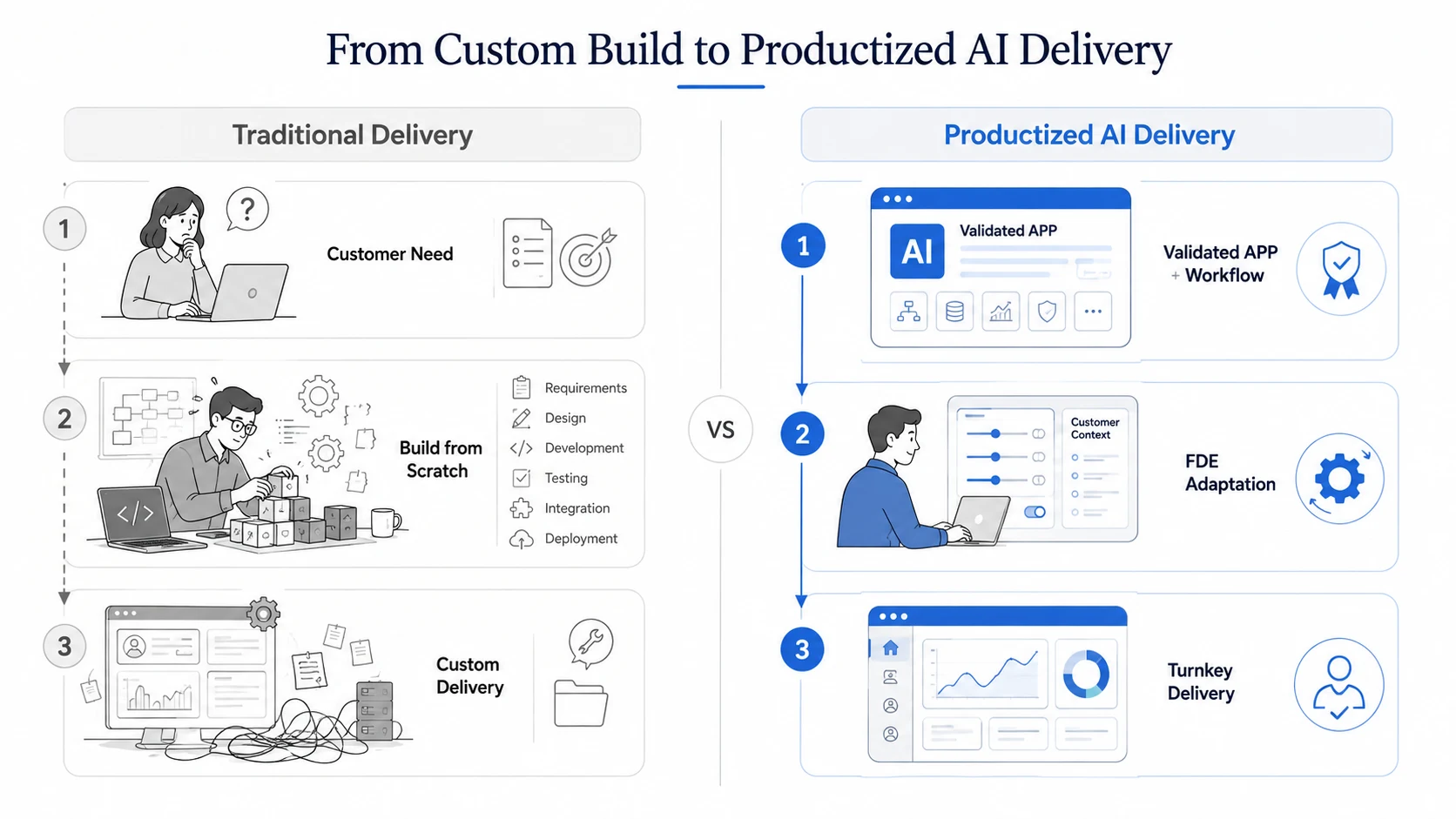
From ‘build everything from scratch every time’ to ‘a validated product plus on-site adaptation’
That’s not a knock on general-purpose capability at the platform level — it’s that companies don’t actually need endless configurability. They need a product that’s already validated against a specific problem and ready to use. So our choice was to package workflows we’ve validated over and over into concrete apps: models, knowledge bases, permissions, and base components stay flexible, but the business logic that actually determines the outcome is designed and validated by the product ahead of time. Users don’t have to design prompts and workflows from scratch — they just configure what they need for their own environment and get going.
This also got us rethinking the value of the FDE — the Forward-Deployed Engineer. Software delivery used to come in two flavors: start from scratch, understand the requirements, and build something custom, or take an off-the-shelf product and force-fit it to the customer’s process. The first is too expensive; the second rarely actually solves the customer’s problem.
AI has made building and adjusting software faster, and that’s opened up a third option: build a product and workflow that’s already validated and covers most scenarios, then send an FDE on-site to adapt it to the company’s own data, rules, and processes. It’s a bit like meal-kit-style delivery — the core capability and main workflow already work, and once it lands in the customer’s environment, what’s left is final configuration, fine-tuning, and integration, ending in a system that actually solves the problem.
This is exactly the model AI-My-Chats is exploring. Its core capabilities come from the open-source project Devify, so an FDE can do the on-site adaptation on top of a mature, open, adjustable product instead of building everything from zero every time. Seen this way, an FDE’s value isn’t just helping a company build a new AI app — it’s connecting a mature product to a company’s real needs, the last mile that makes it actually work.
How to Try AI-My-Chats
The core capabilities behind AI-My-Chats are open source on GitHub as the Devify project (https://github.com/cloud2ai/devify). If you want to try it quickly, we offer two options.
Option 1: Try the SaaS Directly
Open https://aimychats.com, sign up, and start using it right away — no deployment needed. Great for individual developers or small teams who want to validate the whole flow quickly. The end-to-end path: chat tools (WeChat / WhatsApp / Slack) → forward to email → AI-My-Chats processes automatically → structured results (Bug / ToDo / Task / Summary) → synced to Jira, GitHub Issues, Feishu Bitable, and similar systems.
Option 2: Local / Self-Hosted Deployment (Recommended)
Best for teams with data-security or system-integration requirements. Devify supports fully local deployment, and the simplest way to get started is Docker:
git clone https://github.com/cloud2ai/devify.git
cd devify
cp env.sample .env   # copy the template, adjust as needed
docker compose up -d
⚠️ The repo ships a template,
env.sample, while Docker Compose reads.envby default. Before starting, runcp env.sample .envand fill in your config — otherwise the service won’t start.
Once it’s up, open the Devify UI in your browser and register the admin account. Everything else is configured in the web UI, no more command line — just two steps to get it running.
Step 1 · Connect an AI model: Go to “Admin Console → Model Config,” add a model (provider API key, endpoint, model name), and set it as the default in app settings. It supports mainstream providers like OpenAI, Tongyi Qianwen, and OpenRouter, plus local models.
Step 2 · Set up email intake (IMAP): Go to “Settings → Email,” choose IMAP pull, and fill in your company mailbox’s server address, account, password, SSL port, and inbox folder. The system will then pull email on a schedule and process it automatically.
Once both steps are done, the whole path is live: chat tools → forward to your company mailbox → IMAP pull → AI processing → structured results, synced to Jira / GitHub Issues / Feishu Bitable.
If you run into any issues while trying it out, or want to contribute or swap notes on open source, open an issue or discussion on the GitHub repo.