Reflections on Migration and Disaster Recovery in the Cloud-Native Era
Trends
The Rise of Cloud Native
Cloud Native is one of the hottest topics in the IT industry in recent years. In July 2020, the China Academy of Information and Communications Technology (CAICT) released the Cloud Native Development White Paper (2020), explicitly stating that cloud computing has reached an inflection point and that cloud native has become a critical engine driving business growth. It is easy to see that cloud native is reshuffling the entire IT industry — from application development processes to the technical skills required of IT professionals — this is a disruptive revolution. On top of this, the Open Application Model (OAM) has emerged as a further abstraction built on cloud-native platforms, shifting focus from infrastructure to applications. At the same time, an increasing number of public clouds are embracing Serverless services, further underscoring the future direction: applications at the center, with a lightweight infrastructure layer playing a supporting role in system development. Regardless of how things evolve, the overall direction of IT will always move toward faster business iteration and better fulfillment of business requirements.
In September 2020, Snowflake IPO’d at $120 per share, marking the largest IPO of that year and the largest software IPO in history. Snowflake rebuilt the data warehouse using cloud-native principles, successfully disrupting the competitive landscape of that industry. This perfectly validates the market’s recognition of the cloud-native trend. So could the next domain to be disrupted by cloud native be the traditional disaster recovery (DR) space?
Why Cloud Needs Entirely New Migration and Disaster Recovery
1. Limitations of Traditional Approaches
Against this backdrop, traditional migration and DR remain stuck at the level of simply moving data, ignoring the need to rethink and rebuild around cloud characteristics and user business needs. The cloud computing vision is to make cloud resources as on-demand as utilities like water and electricity — so migration and DR on the cloud should naturally follow this trend. Snowflake succeeded by innovating on this business model, breaking the old competitive paradigm.
Why can’t traditional DR approaches meet cloud-native requirements? Simply put, the two focus on fundamentally different things. Traditional DR is storage-centric, relying on supreme control over storage. In the physical era, there were also no effective scheduling mechanisms for infrastructure layers such as compute, storage, and networking, making highly automated orchestration impossible. In cloud-native applications, the core has shifted to cloud-native services themselves. Once a user’s business systems are fully on the cloud, the user no longer has absolute control over the underlying storage — making traditional DR approaches obsolete.
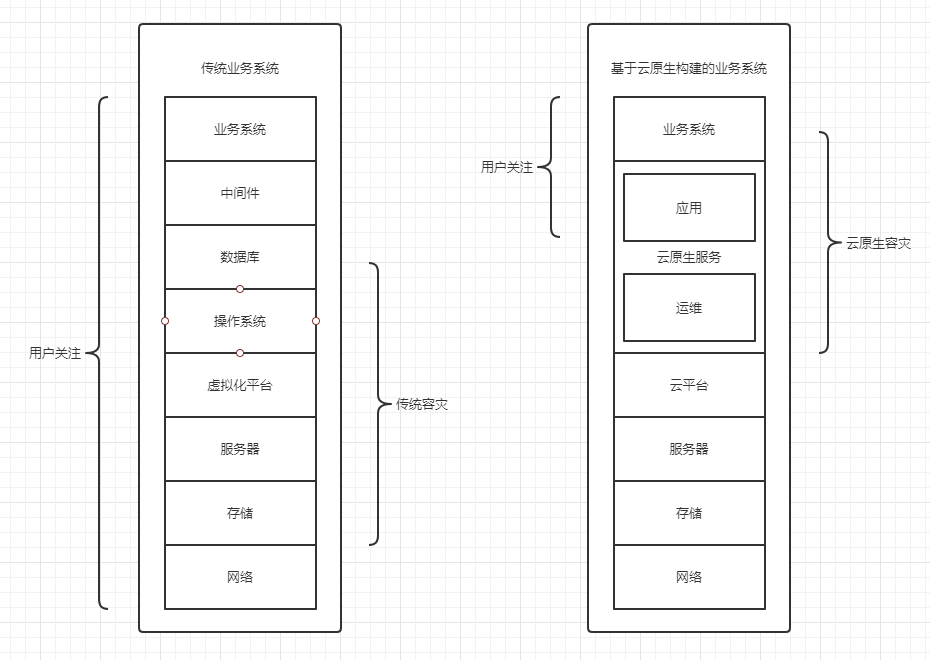
I believe that in building cloud-native DR solutions, the approach must be business-centric, leveraging the orchestration capabilities of cloud-native services to achieve business continuity.
2. Data Security
AWS CTO Werner Vogels once said: “Everything fails, all the time.” Through AWS’s shared responsibility model, it is clear that cloud providers are responsible for the underlying infrastructure, while users remain responsible for their own data security and business continuity.
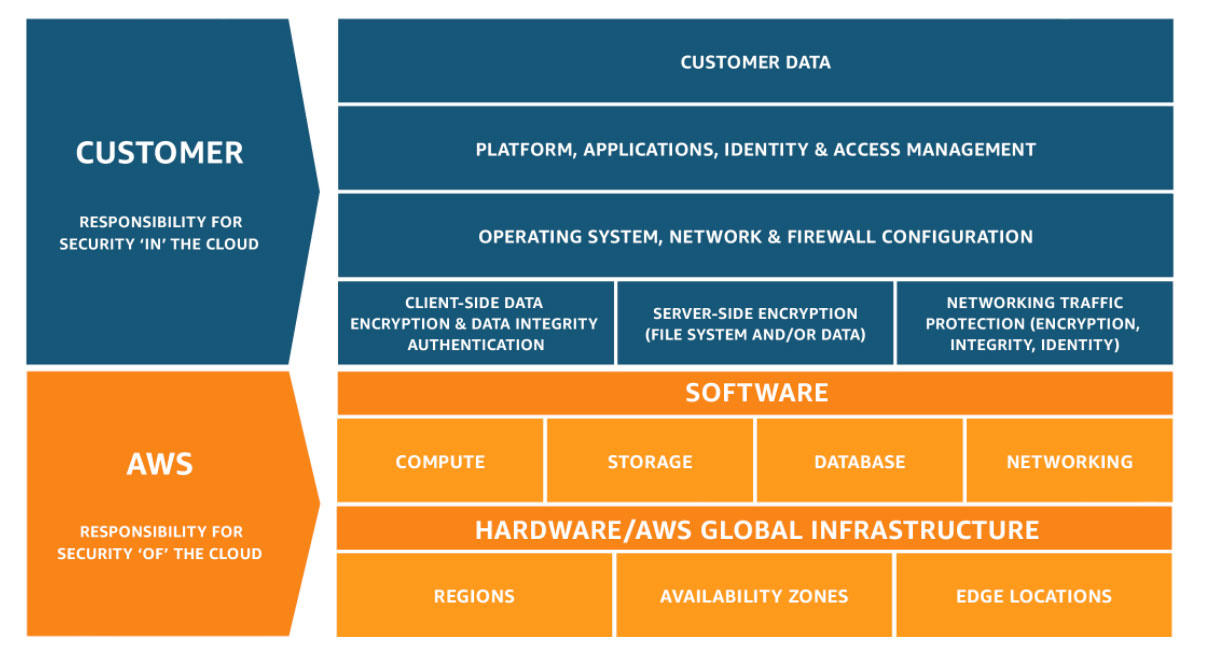
I believe that in the cloud-native era, the most immediate user need is data security — i.e., backup — while migration, recovery, and high availability are all business manifestations built on top of backup. The backup capability may be provided by cloud-native services or by third-party solutions, but the final business outcomes are produced through orchestration.
Going to the cloud does not mean peace of mind. On the contrary, users need to learn how to use the cloud correctly to maximize business continuity. Although the cloud is designed for high reliability at the infrastructure level, external forces can still cause disruptions — such as fiber cables being cut, power outages, or human errors causing a cloud availability zone to become unavailable. This is why there are jokes like “the stability of China’s cloud computing depends on the backhoe operators.” I believe that from the moment a user decides to migrate their business to the cloud, backup, migration, recovery, and high availability form a continuous process. The challenge is how to leverage cloud-native service characteristics to achieve business continuity while optimizing costs and reducing total cost of ownership (TCO).
3. Avoiding Vendor Lock-in
In a sense, the cloud-native direction represents a new wave of vendor lock-in — similar to the once-dominant IOE architecture — except now cloud vendors serve as the foundation for applications. In the IOE era, users had difficulty finding adequate replacements. In the cloud era, the differences are less pronounced. As a result, most customers choose hybrid cloud as their cloud strategy. To enable applications to move smoothly between clouds, migration using DR technology will inevitably become a normalized requirement. Gartner also lists migration and DR as a distinct capability in its multi-cloud management platform definition, further highlighting the normalized trend of migration and DR in multi-cloud environments.
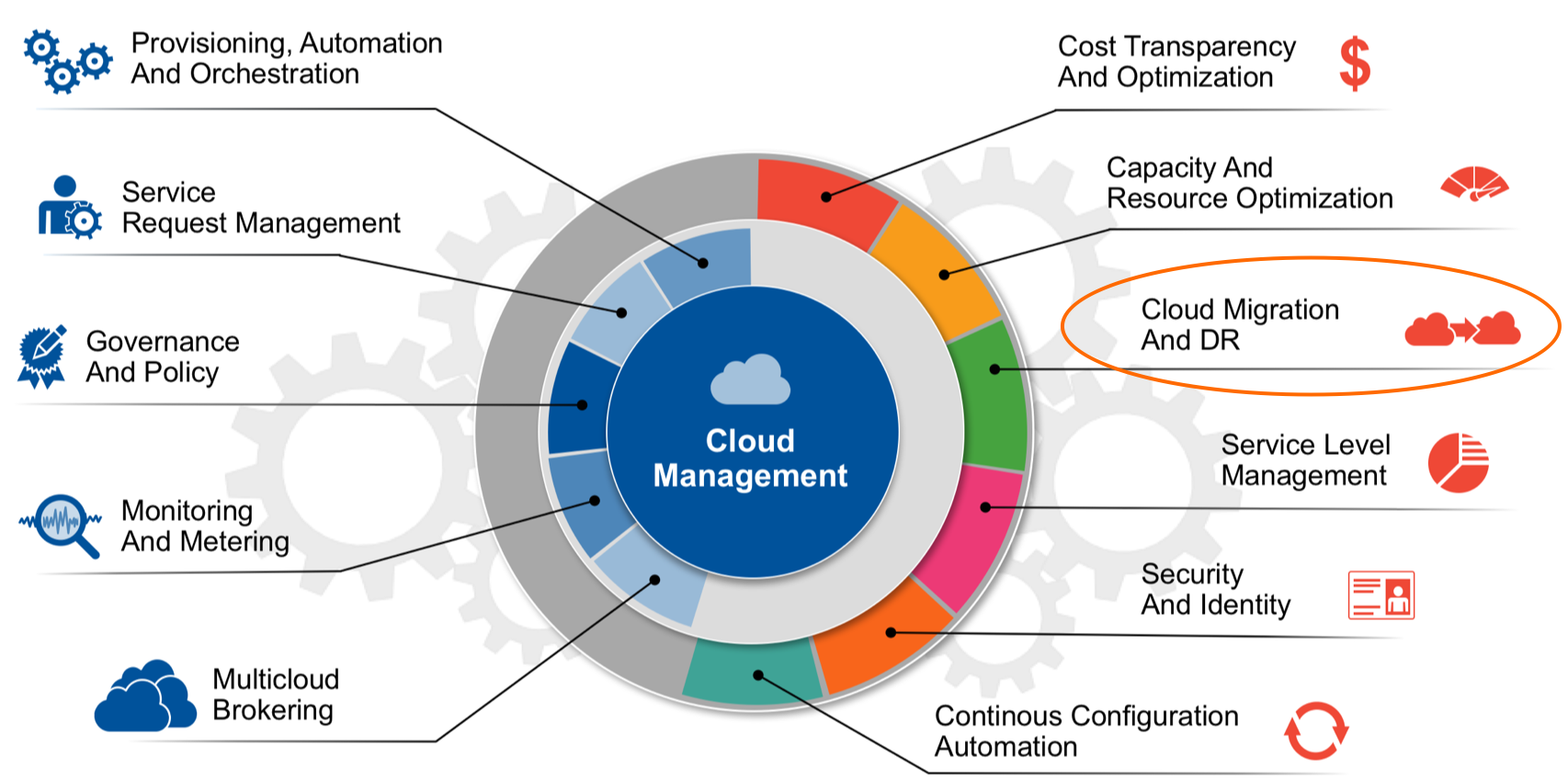
The Relationship Between Cloud Migration and Cloud Disaster Recovery
The Emergence of Cloud Migration Demand
In traditional environments, migration was not a frequent need — it only arose during data center relocations or hardware upgrades, and even then it was more like physically moving hardware. The need for automated migration tooling was not particularly evident. When VMware appeared, the demand for physical-to-virtual migration grew, but since it was a single virtualization platform, vendor-provided tools were largely sufficient. On virtualization platforms, what had once required manual physical effort suddenly became lightweight: traditional servers went from a pile of hardware to a file that could be moved and copied. Then came the cloud era, with cloud platforms booming and the Chinese cloud computing market becoming highly competitive. Moving to the cloud became a hard requirement. Over time, factors such as cost and vendor lock-in have made cross-cloud migration an increasingly normalized demand.
Shared Underlying Technology
The cloud migration and DR discussed here do not refer to migration services delivered by large teams of people — they emphasize highly automated approaches. The goal is to ensure business continuity during migration, minimizing or even eliminating downtime. This leverages storage-level synchronization technology from DR to achieve “live migration” across heterogeneous environments. Existing solutions range from traditional migration tools designed for the physical machine era to tools built on cloud-native principles. Regardless of the form, they all address users’ basic requirements for moving to the cloud to varying degrees. The biggest differentiator is human efficiency — which directly impacts your bottom line.
From another angle, migration is essentially a DR intermediate process up until the final cutover. Furthermore, once a business system is migrated to a cloud platform, disaster recovery becomes a continuous activity — encompassing not only traditional backup and DR, but also high-availability concepts native to the cloud. Only then can users’ business systems shed the burden of traditional infrastructure after going to the cloud, achieve “zero operations,” and truly benefit from what cloud has to offer. Therefore, I believe that in the cloud-native state, cloud migration, cloud DR, and cloud backup are fundamentally the same business form, and the underlying technical means can be completely identical.
Direction of Development
Against the backdrop of the pain points and trends described above, an entirely new platform will inevitably emerge to help customers address data security and business continuity challenges. Let’s analyze how to build migration and DR solutions for application systems in the cloud-native era from this perspective.
Cloud Migration Trends
Cloud Migration Approaches
Migration is a heavy consulting business. Cloud vendors and MSPs each have their own methodologies online, but they don’t differ much. Many people have shared related topics before, so this article will not repeat them. Instead, we focus on which tools and approaches are most effective in actual implementation. Cloud migration tools move workloads from the source to the target, ensuring that workloads run correctly at the destination. Common scenarios include: physical-to-virtual, virtual-to-virtual, physical-to-cloud, and virtual-to-cloud.
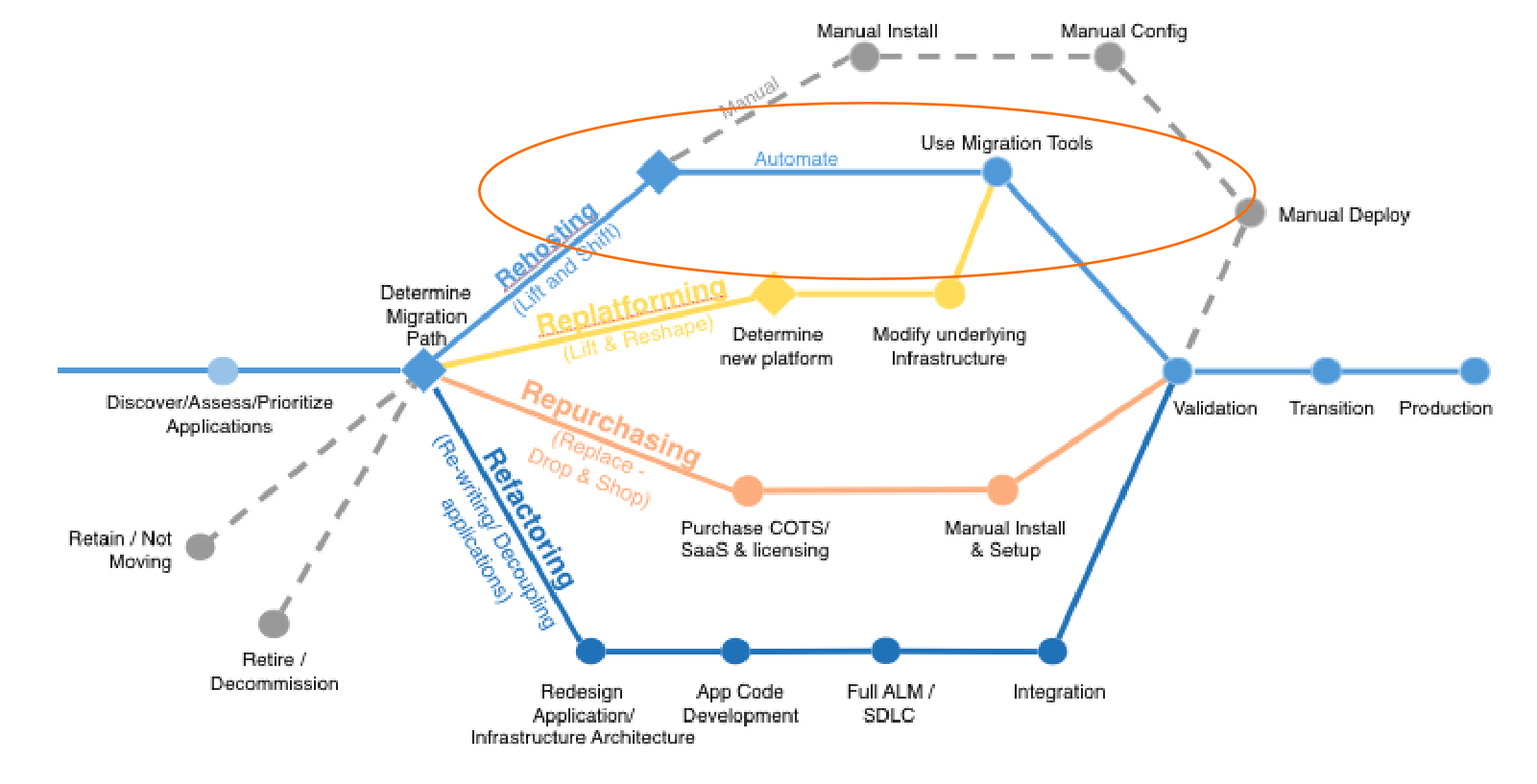
This is the classic 6R migration theory (now upgraded to 7R, with VMware added to the mix). In this diagram, only Rehosting, Replatforming, Repurchasing, and Refactoring are truly migration-related. Among these four, Refactoring is clearly a long-term iterative process requiring collaboration between users and software vendors. Repurchasing is essentially equivalent to manual redeployment. So what is realistically achievable by users or MSPs in the short term is only Rehosting and Replatforming.
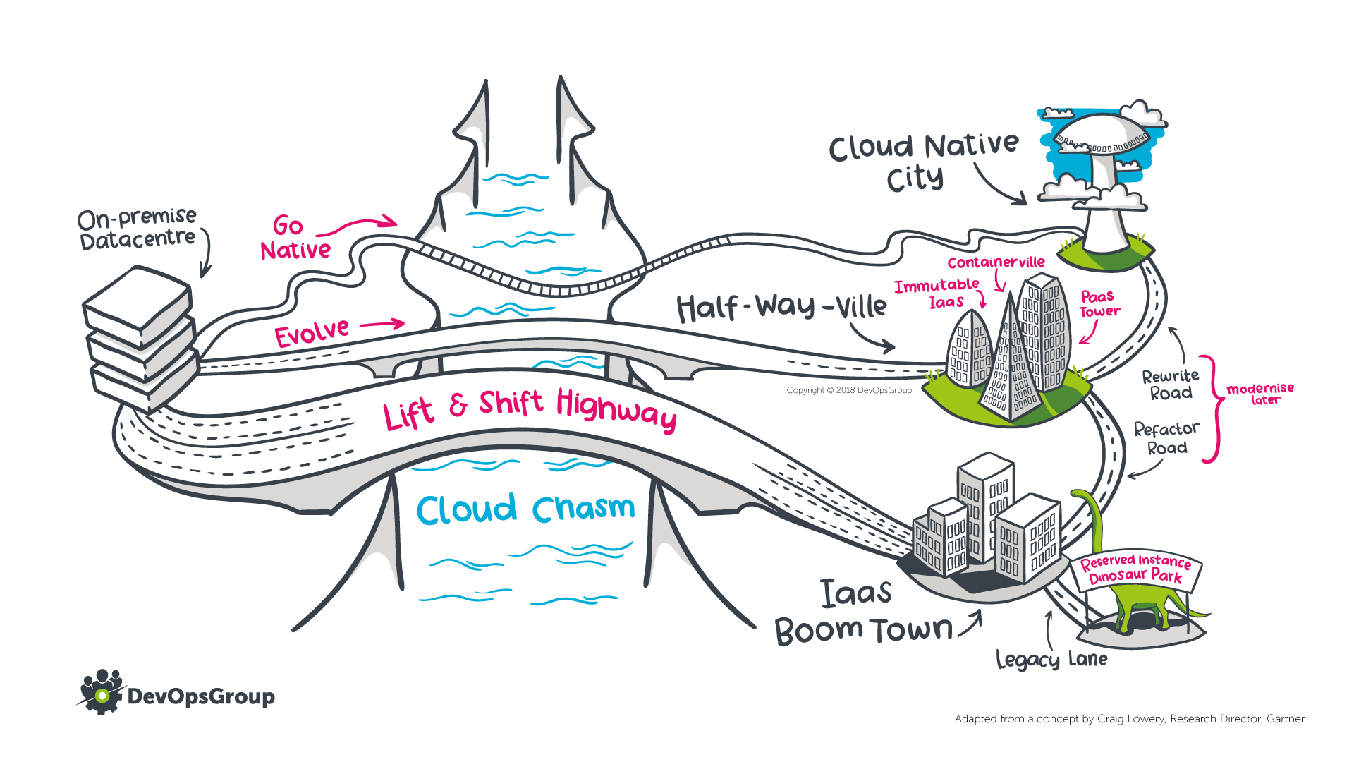
Compared to the classic migration theory chart above, I prefer the following diagram, which better reflects the full journey of a traditional application growing into a cloud-native application. Similar to the conclusion above, when truly embracing the cloud, the paths are essentially the following three:
- Lift & Shift is another name for the Rehost approach. This path is the widest, symbolizing the shortest path to the cloud — applications go to the cloud without any modification.
- Evolve and Go Native are both narrower paths, symbolizing that compared to Rehost, these paths take more time and are more challenging.
- On the right side of the diagram, the three states can convert into one another, ultimately evolving into fully cloud-native, symbolizing that migration is not a one-time event but a gradual process.
Rehosting Approach
Common rehosting methods include cold migration and live migration. Cold migration often involves complex steps, requires significant manual effort, is error-prone, has low efficiency, and significantly impacts business continuity — making it unsuitable for production system migration. Live migration solutions are generally commercial, and can be further divided into block-level and file-level, and then into traditional versus cloud-native approaches.
Cold Migration
Let’s first look at the manual cold migration approach, using VMware to OpenStack as an example. The simplest method is to convert VMware virtual machine files (VMDK) using the qemu-img tool into QCOW2 or RAW format, upload them to OpenStack Glance service, and then restart the instances on the cloud platform. This process requires injecting virtio drivers, otherwise the host cannot start normally on the cloud platform. The most time-consuming step is uploading the virtual machine files to OpenStack Glance. In our earliest practice, it took a full 24 hours from the start of migration to successful startup of a single host. Additionally, incremental data is generated during the migration period. Unless you shut down the source while waiting for migration to complete, you will need to repeat all the steps above. This approach is truly unsuitable for production systems with business continuity requirements.
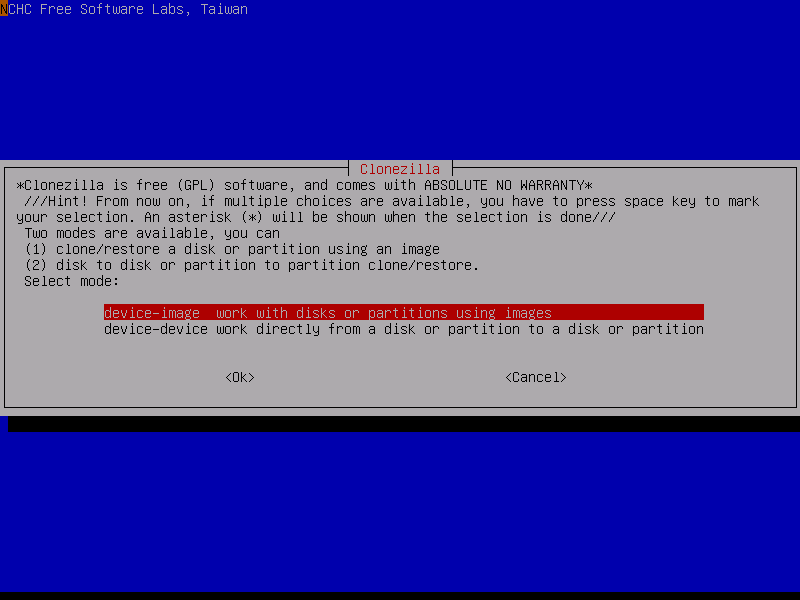
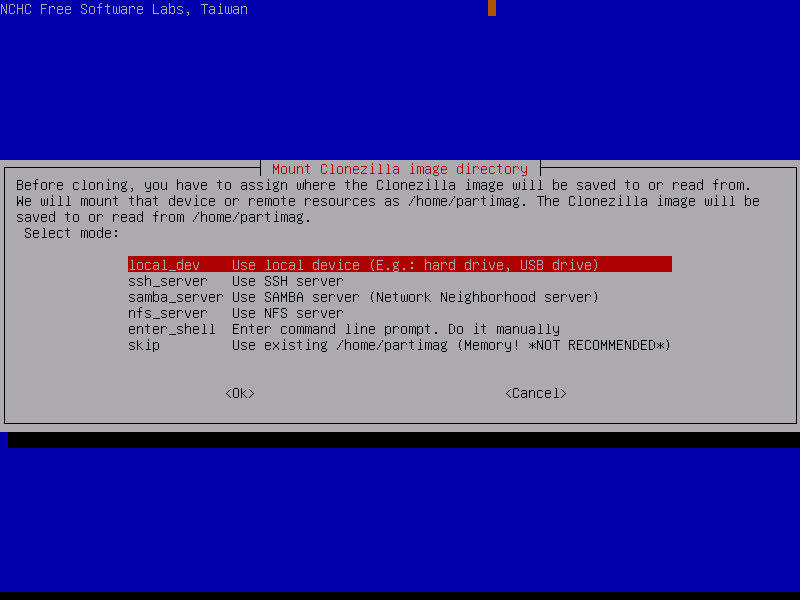
What about cold migration for physical machines? Based on our best practices, we recommend the veteran backup tool CloneZilla (known in Chinese as 再生龙). It is a classic backup software commonly used for full-system backup and recovery, very similar in principle to Norton Ghost. CloneZilla performs block-level copying from the bottom up, can back up entire disks, and supports multiple target formats — for example, saving a disk to an external drive in RAW format. You then simply repeat the steps described above to complete the migration. However, CloneZilla requires booting via a Live CD, which inevitably leads to long periods of business system downtime — which is why cold migration is not suitable for production environment migrations.
Traditional Live Migration Approaches
Traditional live migration solutions are generally divided into block-level and file-level, both leveraging delta synchronization technology — i.e., alternating full and incremental synchronization.
File-level live migration solutions tend to have significant limitations and cannot really be considered a true Rehost approach. They require preparing an operating system identical to the source in advance and cannot achieve full-system migration. Both the operational complexity and migration stability are lower. The commonly used Rsync on Linux can serve as a file-level live migration solution.
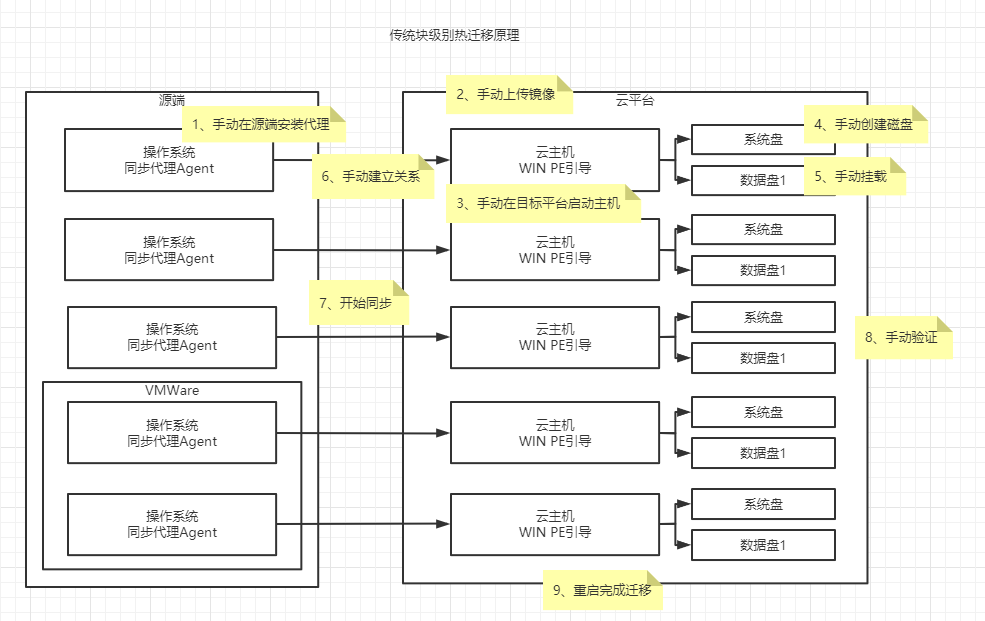
For a true live migration approach, block-level synchronization must be used to reduce dependency on the underlying operating system and achieve full-system migration. Traditional block-level live migration solutions are essentially variants of traditional DR solutions, implemented using in-memory operating systems like Win PE or other Live CDs. The basic principles and process are shown in the diagram below. Although this approach addresses migration goals to some extent, it still has the following shortcomings for future normalized hybrid cloud migration:
- Since traditional live migration solutions are built on physical environments, there is a lot of manual intervention throughout the process, requiring high technical skills from users.
- Cannot meet the multi-tenant, self-service requirements of the cloud-native era.
- Installing an agent is always a concern users have.
- One-to-one synchronization is not cost-effective.
- The best migration verification method is to fully restore the business system cluster on the cloud, but manual verification once again increases migration labor costs.
Cloud-Native Live Migration Approaches
It is precisely because of the drawbacks of traditional migration solutions that cloud-native live migration approaches have emerged. The leading vendor in this space is CloudEndure, an Israeli cloud-native DR and migration company that AWS acquired in 2019 for $250 million, beating out Google Cloud.
Cloud-native live migration refers to leveraging block-level delta synchronization technology combined with cloud-native APIs and resources to achieve highly automated migration, while also providing multi-tenancy and API interfaces to meet hybrid cloud tenant self-service requirements. Let’s analyze from a principle perspective why the cloud-native approach can meet the requirements for high automation and self-service user experience compared to traditional solutions. Comparing the two approaches, several advantages of the cloud-native approach stand out:
- Using cloud-native APIs and resources makes operations simple, completely replacing the large number of tedious manual steps in traditional solutions. Technical requirements for users are lowered, and the learning curve is significantly reduced.
- Due to simpler operations, migration efficiency improves, effectively increasing the human efficiency ratio of migration implementations.
- A one-to-many synchronization approach significantly reduces compute resource usage — compute resources are only used during verification and final cutover.
- Can meet multi-tenant and self-service requirements.
- Source-side agentless mode is also supported, alleviating user concerns and suitable for large-scale batch migration.
- Highly automated verification means that verification can be repeated multiple times before migration cutover is completed.
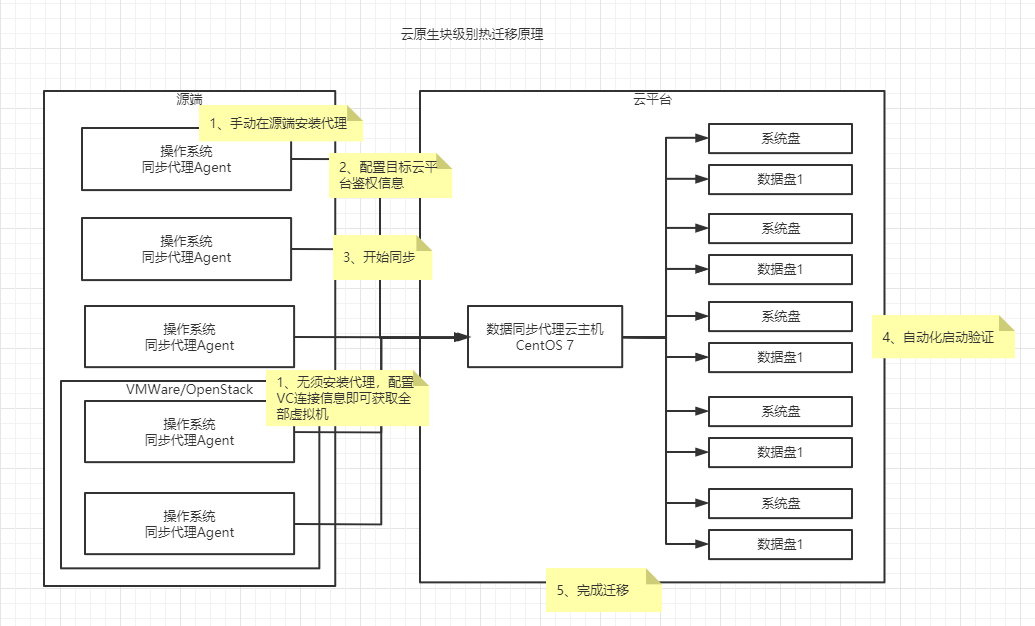
This is the CloudEndure architecture diagram. Of course, you can also use CloudEndure to implement cross-region DR.
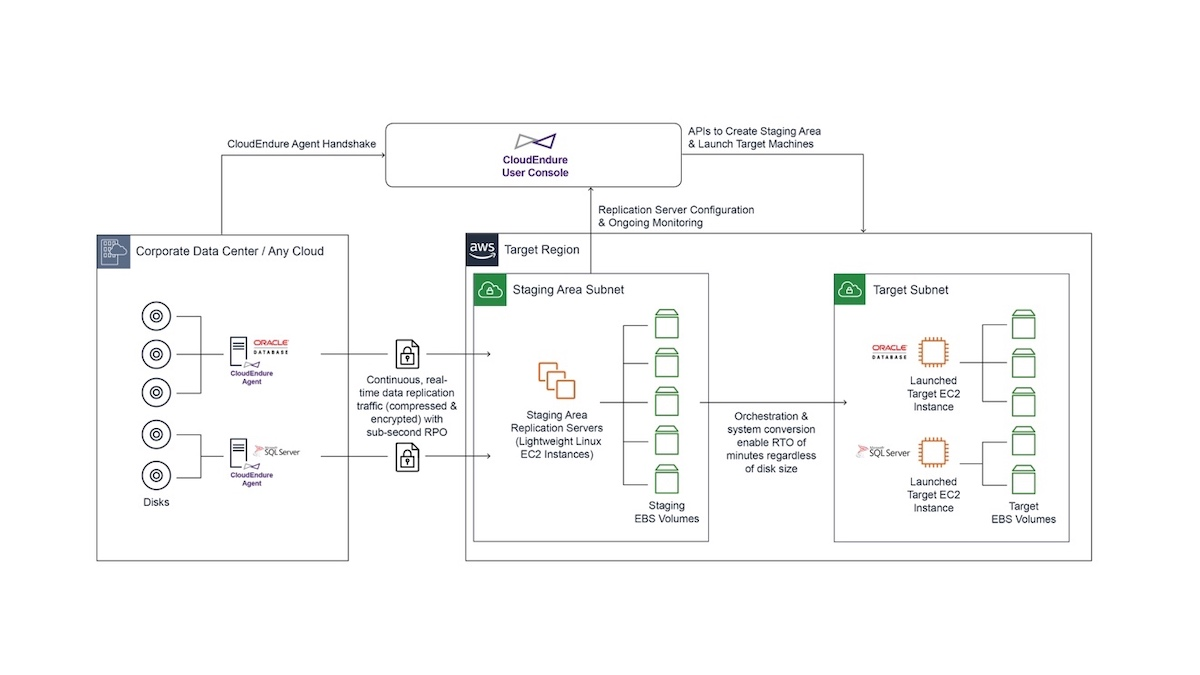
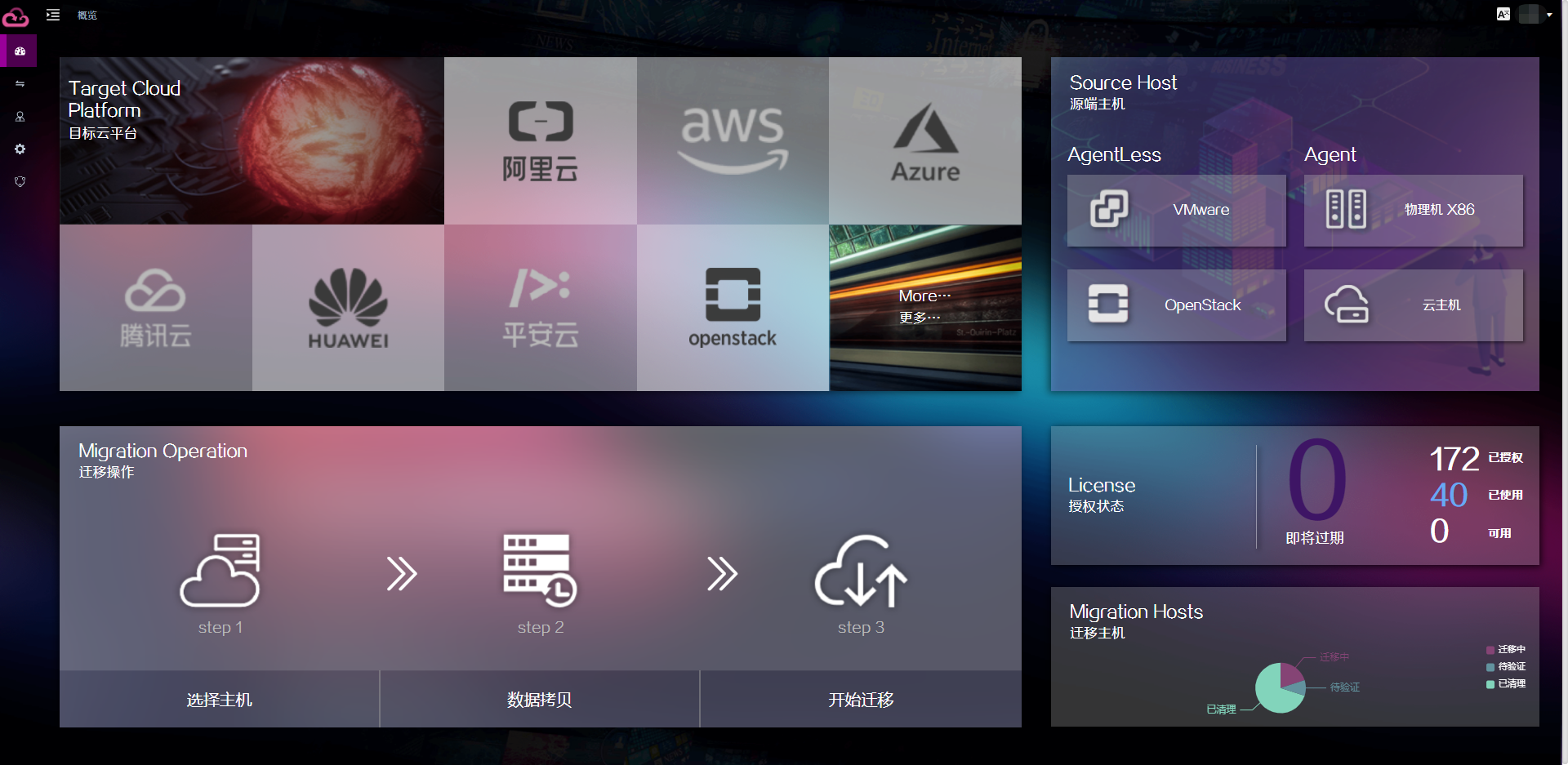
Unfortunately, since CloudEndure was acquired by AWS, it currently only supports migration to AWS and cannot meet the needs of various cloud migrations in China. Here we recommend a fully domestically developed migration platform — OneProCloud’s HyperMotion (https://hypermotion.oneprocloud.com/). In principle it is very similar to CloudEndure, while also supporting agentless migration for VMware and OpenStack. More importantly, it covers migration to all major public clouds, proprietary clouds, and private clouds in China.
Replatforming Approach
As cloud native provides more and more services, it reduces the complexity of application architecture, enabling enterprises to focus more on their core business development. However, the reduction of R&D workload means that this portion of cost is transferred to the deployment and operations side, making DevOps an indispensable component in cloud-native adoption — and enabling enterprises to respond to complex business changes more agilely.
As mentioned above, users can prioritize using some cloud-native services through minor modifications. This migration approach is called Replatforming. Currently, Replatforming migrations tend to focus on services related to user data. Common examples include: database service RDS, object storage service, message queue service, and container service. The introduction of these cloud-native services reduces users’ operations and maintenance costs. However, since cloud-native services are highly encapsulated and the underlying infrastructure layer is completely invisible to users, the Rehost approach above cannot be used for migration — alternative supplementary means must be employed.
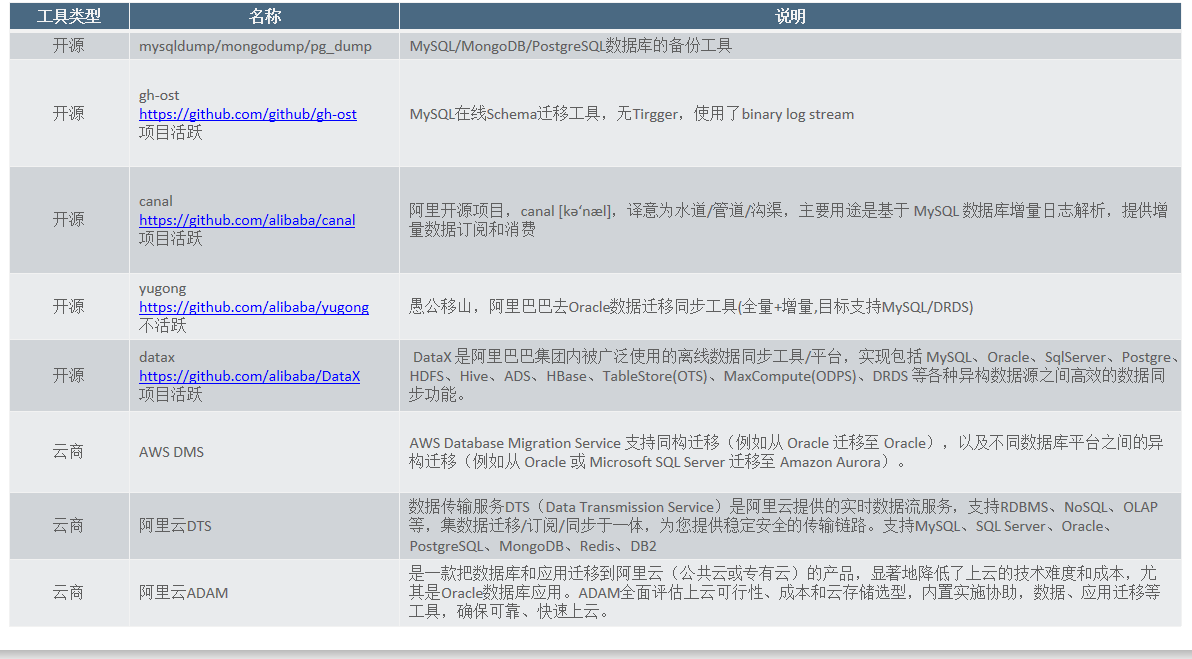
Taking relational databases as an example, almost every cloud provides migration tools — such as AWS DMS, Alibaba Cloud DTS, and Tencent Cloud Data Transfer Service DTS. These cloud-native tools support migration of multiple relational databases and NoSQL databases including MySQL, MariaDB, PostgreSQL, Redis, and MongoDB. Taking MySQL as an example, these services all cleverly leverage binlog replication to achieve online database migration.
Taking object storage as another example, almost every cloud provides its own migration tool — such as Alibaba Cloud’s ossimport and Tencent Cloud’s COS Migration tool — both capable of incremental migration from local storage to cloud object storage. However, cost must also be considered in actual migration: public cloud object storage is relatively inexpensive for storing data, but charges apply for data egress based on network traffic and number of requests. This requires careful cost consideration when designing migration solutions. For very large datasets, offline device options such as AWS Snowball or Alibaba Cloud’s Lightning Cube can also be considered. This topic won’t be expanded further here — there will be opportunities to introduce it separately in the future.
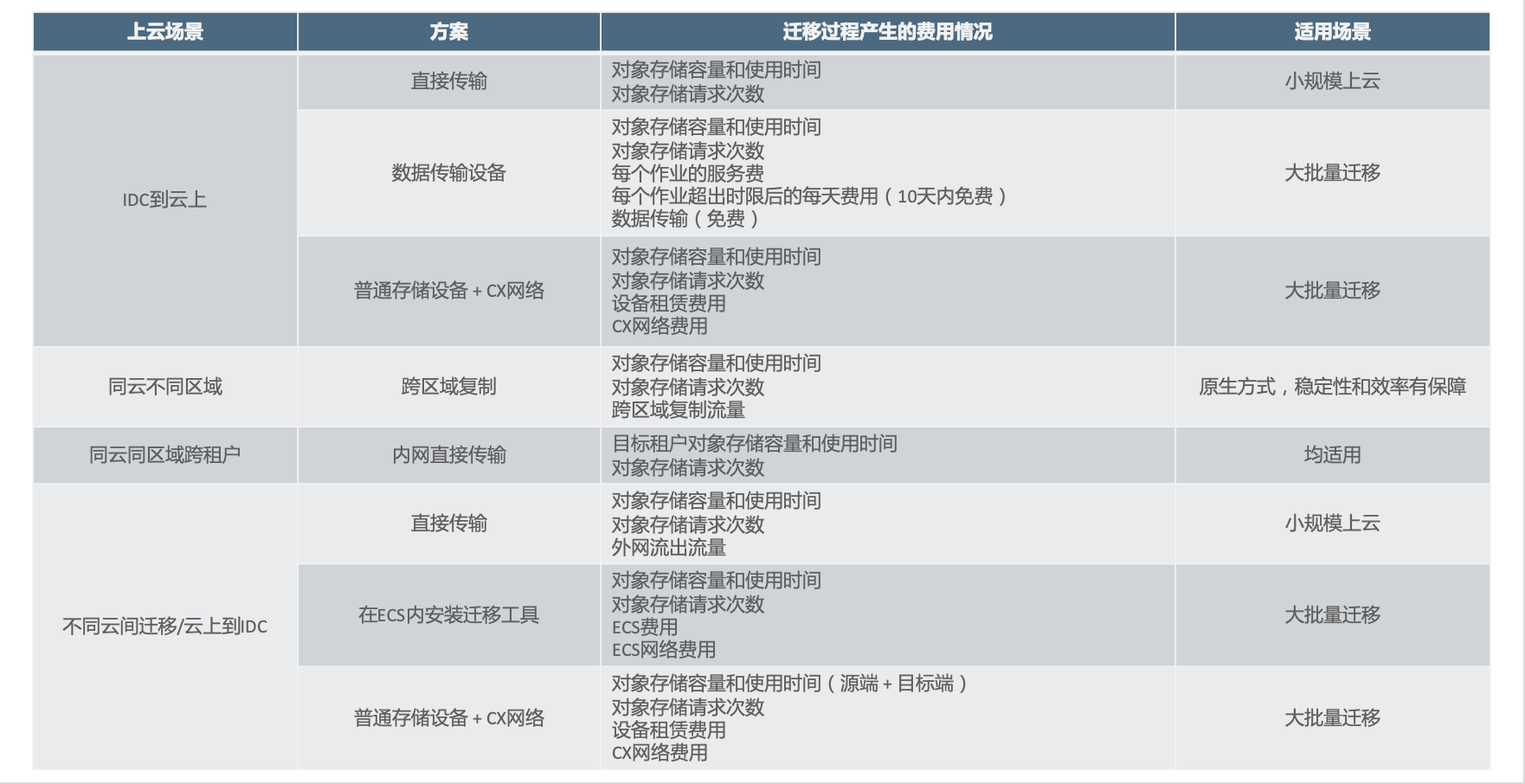
If you choose the Replatforming approach to move to the cloud, in addition to the necessary application modifications, you also need to select an appropriate migration tool to ensure smooth data migration to the cloud. Combined with the Rehost migration approach described above, you can achieve full migration of your business systems to the cloud. Given the many services involved, a migration tools reference table is provided below.
Disaster Recovery Trends in the Cloud-Native Era
To date, no single platform can fully meet the unified DR needs in the cloud-native state. Let’s analyze how to build a unified DR platform that meets cloud-native requirements through the following scenarios.
Traditional Architecture
Taking a simple WordPress + MySQL environment as an example, a typical deployment in a traditional environment looks like this:
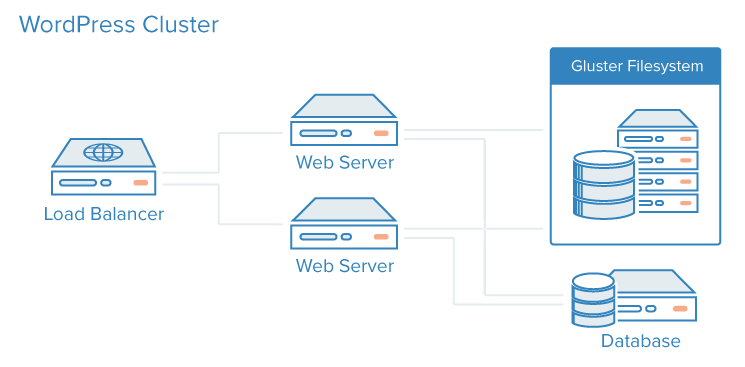
If you were to design a DR solution for this application architecture, you could use the following approaches:
- Load balancer DR: Load balancers can be hardware or software. Hardware load balancer high availability and DR are typically achieved through their own solutions. For software load balancers, installation on the base operating system is required. Local (same-city) DR can be achieved through software high-availability methods, while remote DR is typically implemented by pre-establishing peer nodes or using block-level or file-level DR software. This is a critical part of failover.
- Web Server DR: The WordPress runtime environment is essentially Apache + PHP. Since the file system for user-uploaded files is separated, this node is nearly stateless and can achieve high availability through horizontal scaling. Remote DR is relatively simple — either block-level or file-level traditional approaches can meet DR requirements.
- Shared file system DR: The diagram uses a GlusterFS file system. Since consistency in distributed systems is typically maintained internally, using block-level alone is difficult to ensure node consistency, so file-level DR is more appropriate here.
- Database DR: Relying solely on the storage layer cannot fundamentally achieve zero data loss for databases. The solution generally needs to be implemented at the database level. Of course, for cost reduction, database DR can be achieved simply through periodic database dumps. For higher reliability requirements, CDP (Continuous Data Protection) can also be used.
From the above case analysis, it is clear that DR in traditional infrastructure is storage-centric — whether through disk array storage mirroring or I/O data block and byte-level capture technology — combined with application-level techniques for networking, databases, and clustering to build high-availability and DR architectures. The main participants in the entire DR process are: hosts, storage, networking, and application software — relatively straightforward. Therefore, in traditional DR solutions, correctly solving storage DR is the key to solving the problem.
Hybrid Cloud Disaster Recovery
This is currently the most common hybrid cloud approach and the one primarily promoted by major DR vendors. Here, the cloud platform is essentially treated as a virtualization platform, with almost none of the cloud platform’s unique features utilized. During recovery, significant manual intervention is required to restore the business system to a usable state. This architecture does not represent cloud best practices, but it is indeed an accurate description of how many business systems look after being backed up or migrated to the cloud.
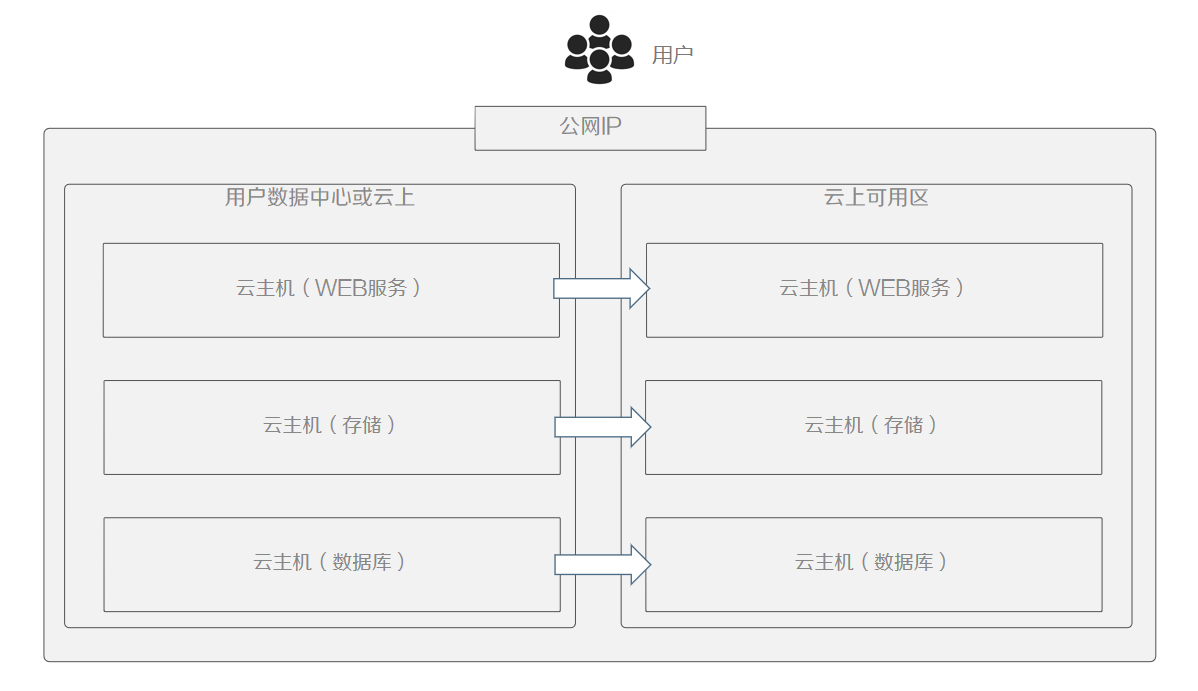
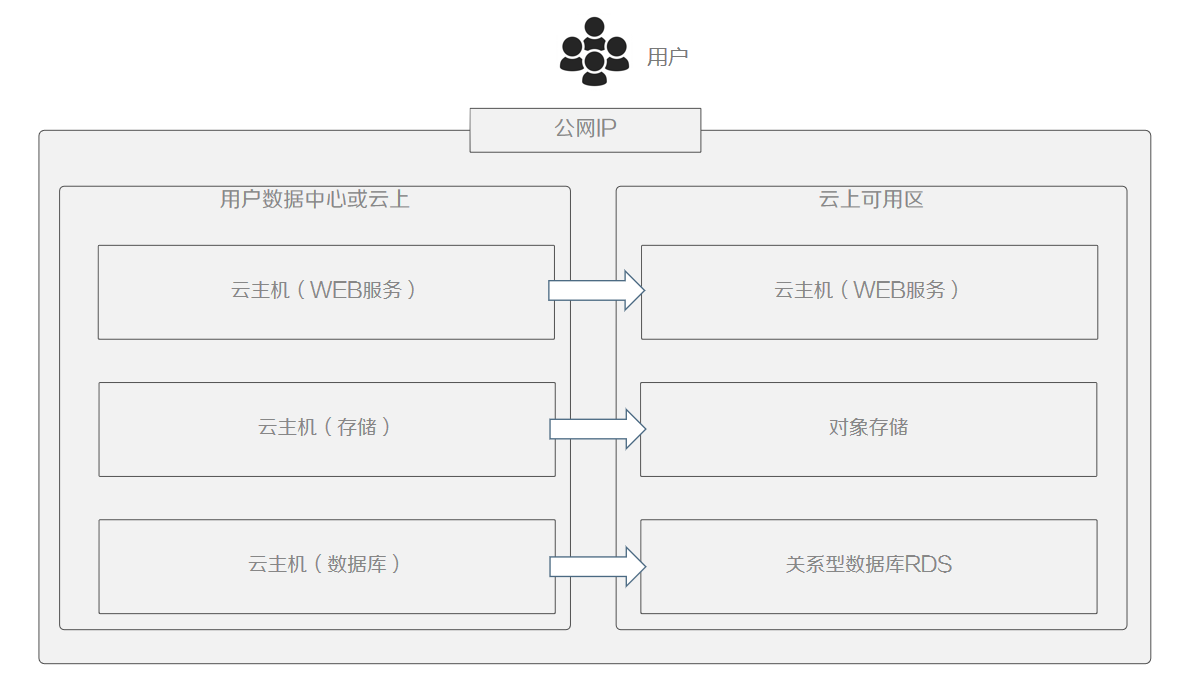
This architecture does solve the DR problem, but the cost is high. Let’s consider an alternative. We use object storage and a database service for optimization. The original storage service data is placed in object storage, and a data transfer service is used for real-time database replication. Cloud VMs still use the traditional block-level synchronization approach. Once a failure occurs, automated orchestration is needed to restore the backup in the shortest time possible according to our preset plan, completing the DR.
Same-City DR Architecture on the Cloud
The backup approach described above is essentially a migration using the Replatforming approach. Since migration has already been used for backup, the architecture can be further modified as follows to form a same-city DR architecture. Following cloud platform best practices, the architecture has been adjusted as follows:
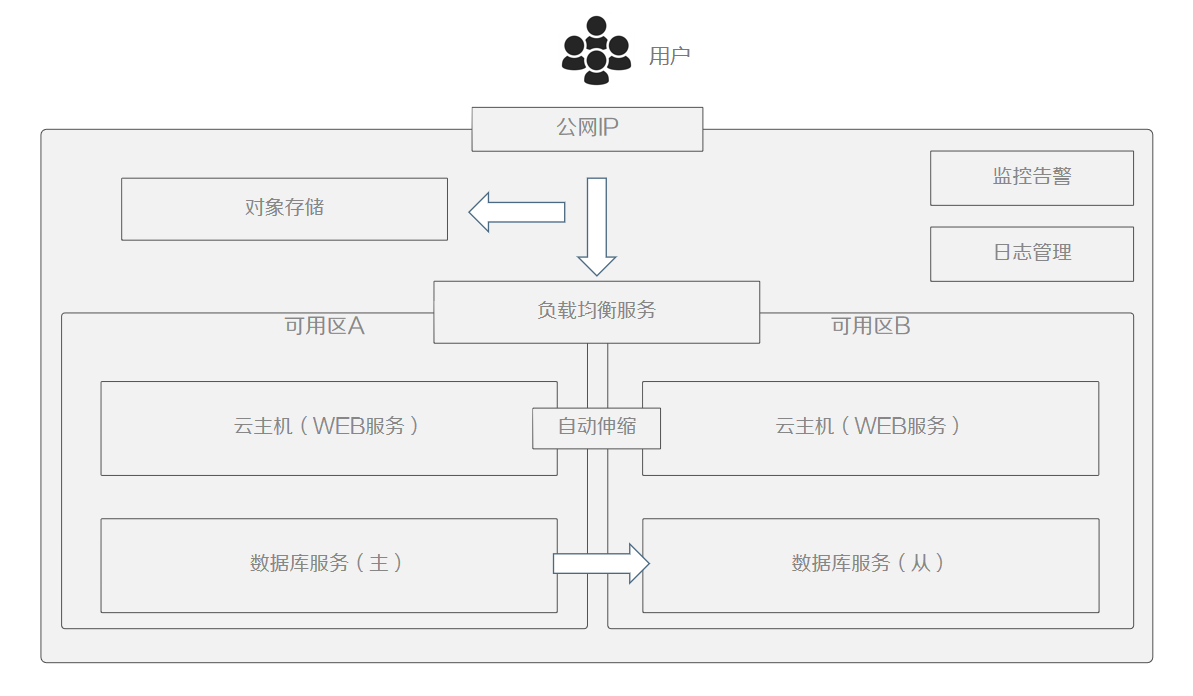
This architecture not only achieves application-level high availability but also supports certain levels of high concurrency. Users can achieve a dual-active setup within the same city with minimal modification costs. Let’s analyze how many cloud-native services are utilized on the cloud:
- DNS service
- VPC service
- Load balancing service
- Auto-scaling service
- Cloud VM service
- Object storage service
- Relational database RDS service
Except for cloud VMs, all other services natively support cross-availability-zone high availability. For cloud VMs, images can be created and managed by the auto-scaling service. Since cloud availability zones represent the concept of same-city DR, we have now achieved same-city business system DR.
The adjusted architecture meets business continuity requirements to a certain extent, but data security still lacks sufficient protection. In recent years, ransomware attacks have run rampant, causing enormous losses for many enterprises. Therefore, data backup must be implemented after moving to the cloud. Cloud-native services themselves provide backup solutions — such as periodic snapshots for cloud VMs — but these services tend to be scattered and difficult to manage uniformly. Additionally, recovery often requires restoring service by service. For large-scale business systems, this significantly increases recovery costs. Although cloud-native services solve their own backup challenges, reorganizing backups into applications requires automated orchestration capabilities.
Cross-Region DR Architecture on the Same Cloud
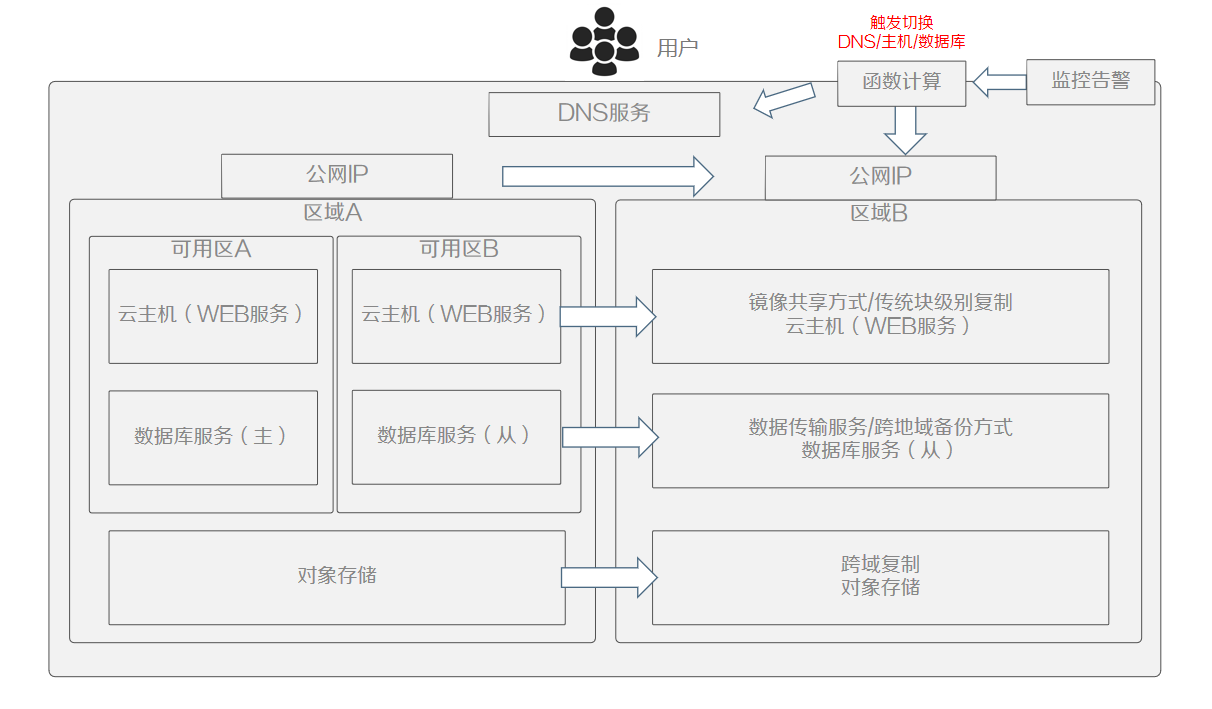
Most cloud-native services within an availability zone provide high-availability capabilities, but cross-region usually only provides backup capabilities. For example: cloud VMs can be converted to images and replicated to other regions; relational databases and object storage also have cross-region backup capabilities. Using these components’ own backup capabilities along with the cloud’s own resource orchestration capabilities, we can restore systems to a usable state in the DR zone. How do we trigger a cutover?
Here, based on the characteristics of the business system, we configure alerts on cloud-native monitoring and use the triggering capabilities of the alert platform to trigger function computing, completing cross-region business system cutover to achieve remote DR.
Cross-Cloud Disaster Recovery
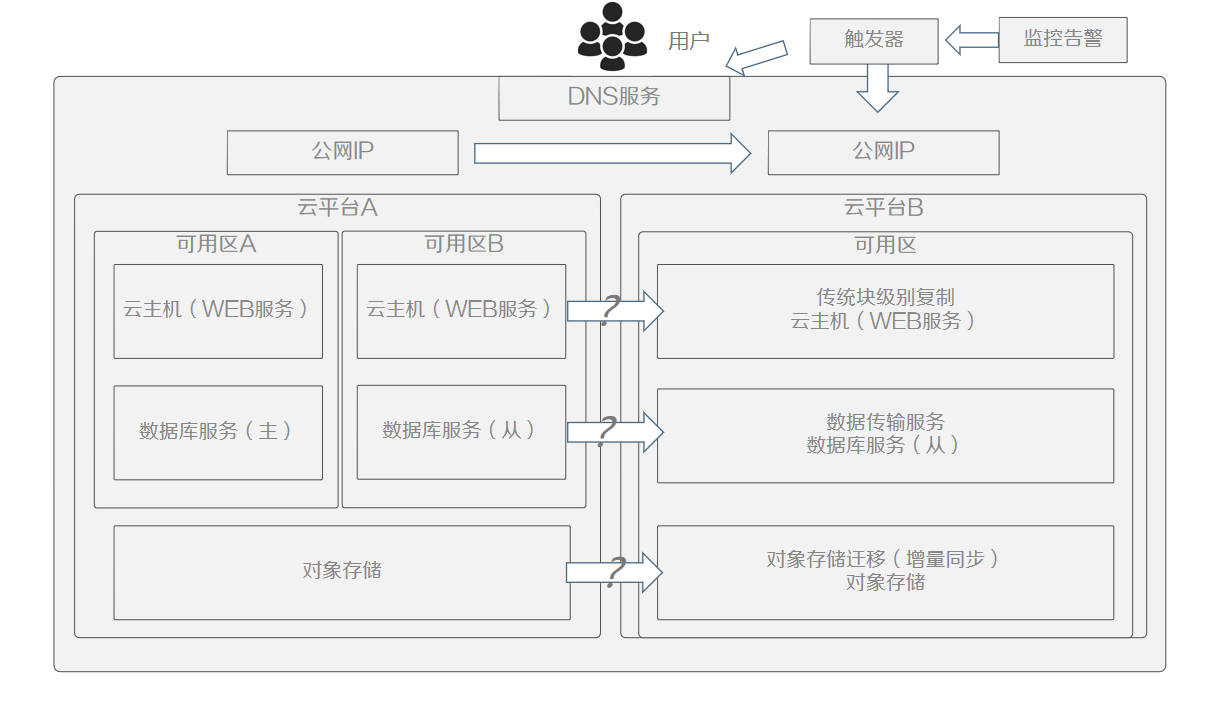
Cross-cloud DR differs from same-cloud DR in that services are at least consistent across different availability zones within the same cloud. In cross-cloud scenarios, methods used on the same cloud are essentially ineffective, and the target cloud platform’s capabilities or neutral third-party solutions are needed. Beyond data backup, service configuration matching between clouds must also be addressed to fully meet cross-cloud DR recovery requirements. Cost is another important consideration — take object storage as an example: it is typical “easy to get in, hard to get out.” Therefore, how to rationally design DR solutions by leveraging cloud-native resource characteristics is a significant test for cost management.
Summary
Cloud-native DR is still in its early stages. Currently, no complete platform can support DR requirements for all the scenarios described above — it is a topic worth continuous exploration. Cloud-native DR centers on backup and encompasses business scenarios of migration, recovery, and high availability to achieve free flow of workloads between clouds, ultimately meeting user business needs.
Therefore, a DR platform oriented toward cloud native must address three capabilities:
First, data-centric, enabling data to flow freely between multiple clouds. Data is the core value for users, so regardless of how the underlying infrastructure changes, data backup will always be a hard requirement for users. How to solve data backup for different cloud-native services is the essential foundation for data flow.
Second, leveraging cloud-native orchestration capabilities to achieve high automation and build business scenarios on top of data. Using automated orchestration capabilities to implement more data-layer-based applications helps users achieve more business innovation.
Third, flexibly leveraging the characteristics of cloud-native resources to reduce total cost of ownership. Addressing the problem of huge investment in traditional DR allows users to truly pay for costs on-demand — like water and electricity.